

Chapter 6: String Manipulation#
Introduction to Strings#
Strings are one of the most common and versatile data types in programming. This chapter will review introductory concepts and expand on the use of strings in Python, helping you master them for practical development applications.
For more technical details about strings in Python, you can consult PEP 498 - Literal String Interpolation, which introduces f-strings, one of the most efficient ways to format strings.
Official Documentation - Strings
See also the official documentation on strings for the complete list of available methods and operations.
What are strings?#
Strings are sequences of characters used to represent text in programming. In Python, they can contain letters, numbers, symbols, and spaces. Strings are delimited by quotes (single or double) and can be of any length, from a single letter to extensive texts.
String example:
"Hello, World!"
From the keyboard to the string
Every key on the keyboard corresponds to a character that can go into a string. Think of the keys as individual pieces and the string as a sequence of them in a specific order:
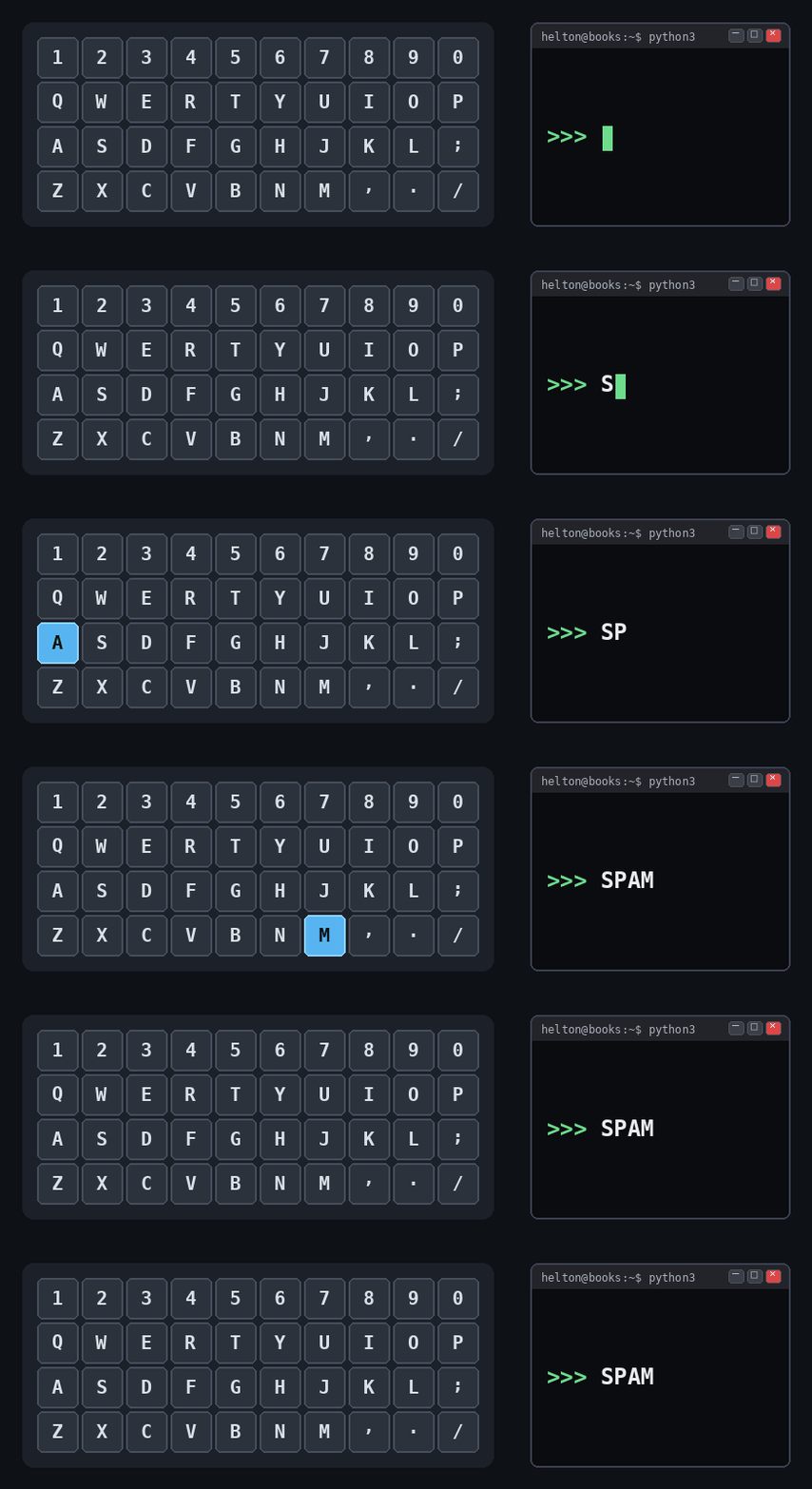
Curiosity - Why SPAM?
The word SPAM that appears in the animation is not random: it is the official placeholder in the Python documentation examples (in place of foo/bar). The language was named in honour of the British comedy group Monty Python’s Flying Circus, famous for a sketch about the canned ham of the same name.
To read text typed by the user at run time, use the input() function:
name = input("Enter your name: ")
print(f"Hello, {name}!")
The input() function waits for the user to type something, press Enter, and returns a string with everything that was typed. The returned value is always a string, even if the user types only numbers: you get "42" (string), not 42 (integer). To use it as a number, you have to convert it with int() or float().
ASCII codes: the number behind the character
At the lowest level, the computer stores each character as an integer, but for A to mean 65 on any machine a standard is needed. In the early days of computing, each manufacturer used its own encoding (IBM, for example, used EBCDIC), and files sent between different computers turned into unreadable text. ASCII (American Standard Code for Information Interchange), published in 1963, solved this: 128 codes (from 0 to 127) agreed upon by all manufacturers. To this day ASCII is the basis of practically every text encoding, including Unicode. The complete table, organised in columns of 16, is:
Dec Chr   Dec Chr   Dec Chr   Dec Chr   Dec Chr   Dec Chr   Dec Chr   Dec Chr
  0 NUL    16 DLE    32 SP     48 0      64 @      80 P      96 `     112 p
  1 SOH    17 DC1    33 !      49 1      65 A      81 Q      97 a     113 q
  2 STX    18 DC2    34 "      50 2      66 B      82 R      98 b     114 r
  3 ETX    19 DC3    35 #      51 3      67 C      83 S      99 c     115 s
  4 EOT    20 DC4    36 $      52 4      68 D      84 T     100 d     116 t
  5 ENQ    21 NAK    37 %      53 5      69 E      85 U     101 e     117 u
  6 ACK    22 SYN    38 &      54 6      70 F      86 V     102 f     118 v
  7 BEL    23 ETB    39 '      55 7      71 G      87 W     103 g     119 w
  8 BS     24 CAN    40 (      56 8      72 H      88 X     104 h     120 x
  9 HT     25 EM     41 )      57 9      73 I      89 Y     105 i     121 y
 10 LF     26 SUB    42 *      58 :      74 J      90 Z     106 j     122 z
 11 VT     27 ESC    43 +      59 ;      75 K      91 [     107 k     123 {
 12 FF     28 FS     44 ,      60 <      76 L      92 \     108 l     124 |
 13 CR     29 GS     45 -      61 =      77 M      93 ]     109 m     125 }
 14 SO     30 RS     46 .      62 >      78 N      94 ^     110 n     126 ~
 15 SI     31 US     47 /      63 ?      79 O      95 _     111 o     127 DEL
Notice the structure in blocks:
0-31 and 127: control characters (non-printable), used historically for terminal and printer commands. The most useful ones in Python strings have escape sequences:
\0(NUL, 0),\t(HT/tab, 9),\n(LF/new line, 10),\r(CR/carriage return, 13).32: the space (
SP).33-47, 58-64, 91-96, 123-126: punctuation and symbols.
48-57: digits
0to9.65-90: uppercase letters
AtoZ.97-122: lowercase letters
atoz.
In Python, the built-in functions ord() and chr() convert between character and code:
print(ord('A'))   # 65: code of the character 'A'
print(chr(65))    # 'A': character of code 65

# Consecutive characters have consecutive codes:
for code in range(65, 71):
    print(code, chr(code))
Code Output:
65
A
65 A
66 B
67 C
68 D
69 E
70 F
Notice the ordering: uppercase letters occupy codes 65 to 90 and lowercase ones 97 to 122. The constant difference of 32 between a letter and its uppercase/lowercase version is exactly what methods such as .upper() and .lower() exploit under the hood.
Note - ASCII, Unicode and Accents
ASCII covers only 128 characters, enough for basic English. For accents (á, ç), emojis and other alphabets, Python uses Unicode (encoded in UTF-8 by default), which covers more than 140 thousand characters. The ord() and chr() functions keep working: ord('á') returns 225 and ord('🐍') returns 128013.
Creating strings#
In Python, a string can be delimited by single quotes ('), double quotes (") or triple quotes (''' or """). All three forms produce the same str type, but each one has a natural use case.
Single or double quotes are interchangeable. The choice between them is usually a matter of convenience: you use one of the two to delimit the string and the other one inside it, without needing an escape.
phrase1 = 'He said: "Python is amazing!"'
phrase2 = "He said: 'Python is amazing!'"
print(phrase1)
print(phrase2)
Code Output:
He said: "Python is amazing!"
He said: 'Python is amazing!'
Triple quotes are for strings that span several lines, preserving the line breaks without needing \n:
message = """This is an example of a string
that occupies several lines. It is quite useful."""
print(message)
Code Output:
This is an example of a string
that occupies several lines. It is quite useful.
Tip - Consistency in the Use of Quotes
Although single and double quotes are equivalent, choose a standard style and keep it throughout the code, switching only when the content of the string requires it. PEP 8 does not impose a choice, but it recommends consistency within the same project.
String Indexing and Slicing#
Strings in Python can be treated as sequences of characters, and each character in the string has an associated numerical index. String indexing and slicing allow you to access and manipulate individual characters or substrings within a string.
Accessing individual characters in a string#
Each character in a string has a numerical index, starting from zero. You can access a specific character in a string using square brackets [] and providing the index of the desired character.
Example:
string = "Python"
first_character = string[0]
last_character = string[5]
print(first_character)
print(last_character)
Code Output:
P
n
String slicing#
String slicing allows you to extract a substring from a larger string. You can specify a range of indices to get a substring. The syntax for slicing is [start:end], where start is the index of the first character of the substring and end is the index of the character after the last desired character.
Example:
string = "Python is amazing!"
substring = string[10:17]
print(substring)
Code Output:
amazing
Example:
string = "Learn Python"
substring = string[0:5]
print(substring)
Code Output:
Learn
Negative indexing#
Python also allows the use of negative indices to access characters from the end of the string. The index -1 refers to the last character, -2 to the penultimate, and so on.
Example:
string = "Python"
last_character = string[-1]
penultimate_character = string[-2]
print(last_character)
print(penultimate_character)
Code Output:
n
o
Example:
string = "Negative indexing"
substring = string[-8:]
print(substring)
Code Output:
indexing
Example with intermediate slicing (positive and negative)
Consider a string representing a phone number:
phone = "(84) 91234-5678"
We want to extract the part “91234”, which is in the middle of the string.
Using positive indexing:
phone = "(84) 91234-5678"
middle_number = phone[5:10]
print(middle_number)
Using negative indexing:
phone = "(84) 91234-5678"
middle_number = phone[-10:-5]
print(middle_number)
Code Output:
91234
String Formatting#
String formatting is a common task in programming, especially when displaying information to users. With the most recent versions of Python, there are modern and efficient tools that offer flexibility and readability in text formatting. The two most used approaches today are f-strings and the str.format() method.
Using f-strings#
F-strings (or formatted strings) were introduced in Python 3.6 and are a practical and efficient way to format strings. They allow you to insert variables, expressions, or even function calls directly inside the string, with a clear and readable syntax. To use an f-string, just prefix the string with the letter f or F and include the expressions inside curly braces {}.
Basic example:
greeting = "Hello"
name = "Alana"
result = f"{greeting}, {name}!"
print(result)
Code Output:
Hello, Alana!
Example with expressions:
a = 5
b = 3
result = f"The result of {a} + {b} is {a + b}."
print(result)
Code Output:
The result of 5 + 3 is 8.
F-strings also allow you to specify advanced formatting, such as decimal precision, text alignment, and space padding.
Example with formatting:
value = 123.45678
print(f"The formatted value is {value:.2f}.")
Code Output:
The formatted value is 123.46.
Working with expressions#
price = 99.90
discount = 0.1
message = f"The discounted price is {price * (1 - discount):.2f}."
print(message)
Code Output:
The discounted price is 89.91.
Formatting with :.2f
The :.2f format in f-strings is used to format numbers directly inside the curly braces {}. It works like this:
:Starts the formatting..2Limits the number to two decimal places.fSpecifies that the number is a floating point (float).
Function calls#
Inside the curly braces {} you can call methods and functions directly, without needing to create intermediate variables. This makes the code more concise when the value needs to be transformed before appearing in the text.
text = "python"
message = f"The text in uppercase is {text.upper()}."
print(message)
Code Output:
The text in uppercase is PYTHON.
Any valid Python expression can appear inside the braces: {len(name)}, {list[0]}, {round(average, 2)}, and so on.
Alignment and width#
To generate tables, reports, or any output in columns, you can reserve a minimum width for the value and choose how it will be positioned inside that space. The syntax is {value:[alignment][width]}, where the alignment is one of these symbols:
<: Aligns to the left (default for strings).^: Centers.>: Aligns to the right (default for numbers).
name = "John"
age = 28
message = f"|{name:<10}|{age:^6}|{age:>5}|"
print(message)
Code Output:
|John | 28 | 28|
In the example, name occupies 10 characters aligned to the left and age appears twice: first centered in 6 characters, then aligned to the right in 5. If the value is larger than the defined width, it appears in full, without being cut.
Combining several features in a single print#
The true power of f-strings appears when you combine method call, expression, alignment, width, thousands separator, decimal places, percentage, and leading zeros in a single line. That is what turns a single print into a complete report line:
product = "spam"
code = 42
stock = 1287
price = 9.99
discount = 0.20

print(f"| {product.upper():^10} | #{code:05d} | {stock:>5,} un | $ {price * (1 - discount):>6.2f} (-{discount:.0%}) |")
Code Output:
| SPAM | #00042 | 1,287 un | $ 7.99 (-20%) |
Breaking down each piece inside the braces:
{product.upper():^10}→ calls the.upper()method and centers the result in 10 characters.{code:05d}→ formats the integer with 5 digits, filling with leading zeros.{stock:>5,}→ aligns to the right in 5 characters and adds a thousands separator.{price * (1 - discount):>6.2f}→ evaluates an expression (price already discounted), aligns to the right in 6 and shows 2 decimal places.{discount:.0%}→ converts the number to a percentage with no decimal places.
This is the pattern that supports tables, receipts, and reports straight in the terminal, without needing external libraries.
Formatting numbers in different styles#
You can use f-strings to display numbers in varied and readable ways. Each format solves a different problem; see three common scenarios:
Monetary values — thousands separator and two decimal places
revenue = 1250789.5
print(f"Annual revenue: $ {revenue:,.2f}")
Code Output:
Annual revenue: $ 1,250,789.50
Very large or very small values — scientific notation
earth_sun_distance_km = 149597871
electron_mass_kg = 9.10938e-31

print(f"Earth-Sun distance: {earth_sun_distance_km:.2e} km")
print(f"Electron mass:      {electron_mass_kg:.2e} kg")
Code Output:
Earth-Sun distance: 1.50e+08 km
Electron mass:      9.11e-31 kg
Codes and identifiers — leading zeros
order_code = 42
print(f"Order no. {order_code:06d}")
Code Output:
Order no. 000042
Explaining:
:,→ Adds a thousands separator (by default, a comma)..2f→ Shows two decimal places with fixed point..2e→ Formats in scientific notation with two decimal places.06d→ Converts to an integer with 6 digits, filling with leading zeros if necessary (use08d,010d, etc. for other sizes).
Note - Other Forms of Formatting (Legacy)
In older code you will still find the str.format() method ("Hello, {}".format(name)) and the % operator ("Hello, %s" % name). Being able to recognise them is useful for reading existing code, but in new code prefer f-strings, which are more readable and efficient.
String Operations#
Strings offer a wide range of operations that can be performed for text manipulation and analysis. In this section, we will explore some common string operations: concatenation, repetition, and comparison.
Concatenating strings#
String concatenation is the process of joining two or more strings into a single string. This can be done in several ways:
Using the + operator: The + operator is used to concatenate two or more strings.
string1 = "Hello,"
string2 = "Everyone!"
result = string1 + " " + string2
print(result)
Code Output:
Hello, Everyone!
Using the join() method: The join() method can be used to concatenate a list of strings with a specific delimiter.
words = ["Hello", "Everyone"]
result = " ".join(words) # Space delimiter in this case
print(result)
Code Output:
Hello Everyone
The separator can be any string. Swapping " " for ", " produces a sentence-style listing, useful for showing items to the user:
ingredients = ["egg", "bacon", "spam", "spam"]
result = ", ".join(ingredients) # Comma and space as separator
print(result)
Code Output:
egg, bacon, spam, spam
Other common separators are "\n" (one item per line), "/" (paths), " | " (columns) and "" (pure concatenation, with nothing between items).
Repeating strings#
Repeating strings is a simple process that can be performed using the * operator. This operator multiplies the string by the specified number of times.
Example:
string = "Hi! "
repeated = string * 3
print(repeated)
Code Output:
Hi! Hi! Hi!
A classic use of this operation is drawing progress bars, separators and visual indicators straight in the terminal, with no external libraries. Combining * with f-strings lets you build a full progress bar in a few lines:
progress = 0.7  # 70% done
total = 20      # bar width in characters

filled = int(progress * total)
bar = "█" * filled + "░" * (total - filled)
print(f"[{bar}] {progress:.0%}")
Code Output:
[██████████████░░░░░░] 70%
The same idea works for printing separator lines (print("=" * 50)), indentation (" " * level) or small decorations around headings.
And to actually see the bar filling up, drop the code into a loop, update the state at each step and combine three small print tricks:
import time

total = 20
for step in range(total + 1):
    bar = "█" * step + "░" * (total - step)
    print(f"\r[{bar}] {step / total:.0%}", end="", flush=True)
    time.sleep(0.1)
print()
Code Output (final state, after ~2 seconds of animation):
[████████████████████] 100%
The tricks involved:
\rmoves the cursor back to the start of the same line, so eachprintoverwrites the previous one instead of creating a new line.end=""disables the automatic\nfromprint— without it, every update would move down a line.flush=Trueforces the output to appear immediately, without waiting for the buffer.time.sleep(0.1)pauses for 100 ms between steps so the eye can follow.
Running this in the terminal, you see a single line where the bar fills up from 0% to 100%.
Comparing strings#
Comparing strings is a common operation and can be performed using comparison operators. Python compares strings lexicographically, that is, based on alphabetical order and the position of characters.
Equality (==) and inequality (!=):
string1 = "Python"
string2 = "python"
print(string1 == string2)  # False, case-sensitive
print(string1 != string2)  # True, case-sensitive
Code Output:
False
True
Lexicographical comparisons (<, >, <=, >=):
string1 = "Apple"
string2 = "Banana"
print(string1 < string2)  # True, "Apple" comes before "Banana"
print(string1 > string2)  # False, "Apple" comes before "Banana"
Code Output:
True
False
Tip - Case-Insensitive Comparisons
For comparisons that should ignore uppercase and lowercase, convert both sides with .lower() (or .upper()) before comparing. For international texts, prefer .casefold(), which correctly handles characters such as the German ß.
Example of a case-insensitive comparison:
string1 = "Python"
string2 = "python"
print(string1.lower() == string2.lower())  # True, ignores uppercase and lowercase
Code Output:
True
String Methods#
Strings in Python have several built-in methods that allow you to perform various text manipulation operations. Here are some of the most commonly used string methods, with code examples and the expected output:
Method |
Description |
Example |
Output |
|---|---|---|---|
|
Converts the string to uppercase. |
|
HELLO, WORLD! |
|
Converts the string to lowercase. |
|
hello, world! |
|
Converts the first letter of the string to uppercase and the others to lowercase. |
|
Hello, world! |
|
Removes whitespace (including tabs, line breaks, etc.) from the beginning and end of the string. |
|
Hello, World! |
|
Hello, World! |
||
|
Removes whitespace only from the beginning of the string. |
|
Hello, World! |
|
Removes whitespace only from the end of the string. |
|
Hello, World! |
|
Splits the string into a list of substrings, separating it by a specified delimiter. |
|
[‘Hello’, ‘World’] |
|
Joins the elements of a list into a single string, using a specified delimiter. |
|
Hello World |
|
Replaces all occurrences of a specific substring with another substring. |
|
I like oranges |
|
Formats the string by inserting values into the positions specified by curly braces {}. |
|
My name is Alberto and I am 25 years old |
Type Verification and Conversion#
Type verification and conversion are important tasks when dealing with strings that represent numbers. Below, we will explore the main methods to check if a string contains only numbers and how to perform conversions between strings and numeric types.
Verifying numbers in strings#
Python offers native methods to check if a string represents numbers in different contexts. Here are the main ones:
Method |
Description |
Example |
Output |
|---|---|---|---|
|
Returns |
|
|
|
Returns |
|
|
|
Returns |
|
|
Seeing isdecimal() in action
The fastest way to internalize what counts as a “decimal digit” for Python is to feed a varied list of strings through a loop and watch the verdict:
cases = ["123", "٠١٢٣", "²", "½", "12.3", "-5", "1e10", "abc", ""]

for s in cases:
    print(f"{s!r:>8} → {s.isdecimal()}")
Code Output:
   '123' → True
  '٠١٢٣' → True
     '²' → False
     '½' → False
  '12.3' → False
    '-5' → False
  '1e10' → False
   'abc' → False
      '' → False
Reading line by line:
"123"and"٠١٢٣"→ “pure” decimal digits (Latin and Arabic-Indic): True."²"and"½"→ look like numbers, but are not decimal: False. (isdigit()would accept"²", andisnumeric()would accept both.)"12.3","-5","1e10"→ represent valid numbers, but contain non-digit characters (.,-,e)."abc"→ obvious: no letter is a decimal digit.""→ important detail: the empty string returnsFalse. Soisdecimal()also guarantees that at least one character exists and all are digits.
Important notes:
isdigit(): Works only for positive integers.isdecimal(): Recognizes decimal digits from different languages (e.g., Arabic numbers).isnumeric(): Is the most comprehensive, recognizing fractions, Roman numerals, and special numeric characters.
Converting strings to numbers#
Converting strings to numbers can be done using the int() and float() functions. If the string contains invalid characters (such as letters), an error will be generated.
Examples:
age_str = "25"
age_int = int(age_str)
print(age_int)

price_str = "49.99"
price_float = float(price_str)
print(price_float)
Code Output:
25
49.99
Handling invalid inputs#
It is good practice to verify the validity of the string before conversion to avoid errors.
Example:
entry = "12.34"
if entry.replace(".", "").isdigit():
    number = float(entry)
    print(number)
else:
    print("Invalid input!")
Code Output:
12.34
Converting numbers to strings#
To display numbers as text, you can use the str() function or f-strings for greater control over the formatting.
Examples:
number = 42
number_str = str(number)
print(f"The number as a string is: {number_str}")  # Using an f-string

value = 3.14159
formatted_value = f"{value:.2f}"  # Formats with 2 decimal places
print(f"Formatted value: {formatted_value}")
Code Output:
The number as a string is: 42
Formatted value: 3.14
Conversion with advanced formatting You can customise the conversion of numbers to strings even further.
Example with a thousands separator:
large_number = 123456789
number_str = f"{large_number:,}"  # Uses ',' as the separator
print(f"Formatted value: {number_str}")
Code Output:
Formatted value: 123,456,789
Important:
Use the
isdigit(),isdecimal()orisnumeric()methods to validate strings before converting them.Use
int()andfloat()for numeric conversions, making sure the string is valid.Prefer f-strings for advanced conversions and formatting, as they are more modern and readable.
Useful Functions for Strings#
Python offers several built-in functions useful for string manipulation. These functions allow you to get information, verify content, or perform specific operations. Here are some of the most used ones:
Function |
Description |
Example |
Output (print) |
|---|---|---|---|
|
Returns the length (number of characters) of the string. |
|
|
|
Verifies if a substring is contained or not in the string. |
|
|
|
Returns the number of occurrences of a substring in the string. |
|
|
|
Returns the index of the first occurrence of a substring in the string, or |
|
|
|
Returns the index of the first occurrence of a substring in the string. Raises an error if not found. |
|
|
|
|
Regular Expressions#
Regular expressions (regex) are patterns used to search and manipulate text efficiently. In Python, the re module offers functionalities to work with regular expressions.
An idea before the theory#
Imagine you received a text and need to extract all the phone numbers from it:
text = "Get in touch by phone at 3211-1234, 99988-7766, or 4002-8922."
Without any special tool, you would have to go through the text character by character, check which ones are digits, count how many came together, remember to handle the hyphen… a long and error-prone task.
With regular expressions, we describe the shape of what we are looking for (“four or five digits, a hyphen, four digits”) and let the re module do the search:
import re

text = "Get in touch by phone at 3211-1234, 99988-7766, or 4002-8922."
phones = re.findall(r"\d{4,5}-\d{4}", text)
print(phones)
Output:
['3211-1234', '99988-7766', '4002-8922']
In a single line we solved the problem. The secret is in the pattern r"\d{4,5}-\d{4}", where each symbol has a meaning: \d is a digit, {4,5} means “four to five times”, and - is the hyphen itself. This is exactly the vocabulary of symbols that the table below organizes. Don’t worry about memorizing it all at once: each symbol will appear in use throughout the examples.
Table of Special Characters in Regular Expressions#
Character |
Description |
Pattern Example |
Example Result |
|---|---|---|---|
|
Any character (except newline) |
|
Matches “cat”, “hat”, “bat”, etc. |
|
Zero or more repetitions of the preceding element |
|
“ac”, “abc”, “abbbc”, etc. |
|
One or more repetitions of the preceding element |
|
“abc”, “abbc”, “abbbc”, etc. |
|
Zero or one repetition of the preceding element |
|
“color” or “colors” (the |
|
Start of the line |
|
“hello” only at the start of the line. |
|
End of the line |
|
“world” only at the end of the line. |
|
Start of the string |
|
“hello” only at the start of the string. |
|
End of the string |
|
“world” only at the end of the string. |
|
Set of allowed characters |
|
“ala”, “ela”, “ila”, etc. |
|
Set of forbidden characters |
|
“bla”, “cla”, “fla”, etc. |
|
A digit ( |
|
“3”, “7”, etc. |
|
One or more digits |
|
“3”, “75”, “1024”, etc. |
|
Alphanumeric character ( |
|
“a”, “Z”, “5”, “_” etc. |
|
Continuous alphanumeric sequence |
|
“text”, “abc123”, “_abc”, etc. |
|
A whitespace character (includes tab, newline) |
|
“ “, “\t”, “\n”. |
|
One or more spaces |
|
Sequences of spaces, tabs, newlines. |
|
A non-whitespace character |
|
“a”, “!”, “9”, etc. |
|
Sequence without spaces |
|
“text”, “abc123!”, etc. |
|
Word boundary |
|
Matches “cat” as an isolated word. |
|
Alternative between patterns |
|
“cat” or “dog”. |
|
Exactly n repetitions |
|
“aa”. |
|
Between n and m repetitions |
|
“a”, “aa”, “aaa”. |
|
Capture group |
|
Captures “12-3456”. |
Note - Line vs String
^ and $ mark the start and end of a line, while \A and \Z mark the start and end of the whole string. The difference only shows up in multi-line text (when the re.MULTILINE flag is used): in that case $ matches at the end of each line, but \Z matches only at the very end.
Knowing how to build the pattern is half the job; the other half is choosing what to do with it. The re module offers different functions depending on the question we want to answer. Going back to the phone-number text:
import re

text = "Get in touch by phone at 3211-1234, 99988-7766, or 4002-8922."
pattern = r"\d{4,5}-\d{4}"

print(re.search(pattern, text).group())  # only the first phone
print(re.findall(pattern, text))         # all the phones
print(re.sub(pattern, "(hidden)", text)) # replace each phone with other text
Output:
3211-1234
['3211-1234', '99988-7766', '4002-8922']
Get in touch by phone at (hidden), (hidden), or (hidden).
Notice that the same pattern serves three different tasks: finding the first occurrence, listing all of them, or replacing. The table below gathers the main functions of the re module and when to use each one.
Table of re Module Functions#
Function |
Description |
Example |
Result |
|---|---|---|---|
|
Finds the first occurrence of the pattern in any part of the string |
|
Match object for “cat”. |
|
Finds the pattern at the beginning of the string |
|
Match object for “cat”. |
|
Returns all occurrences of the pattern as a list |
|
|
|
Returns an iterator with all matches, each with access to the position |
|
Match objects for “3” and “5”. |
|
Replaces the found pattern |
|
|
|
Splits the string by the pattern |
|
|
|
Compiles a pattern for efficient use |
|
|
Detailed Explanation
re.search: Searches for the pattern in any part of the string, but returns only the first occurrence.re.match: Searches only at the beginning of the string.re.findall: Returns a list with all matches.re.finditer: Same asfindall, but returns MatchObjects, allowing start and end position of each match.re.sub: Replaces the pattern with another text.re.split: Splits the text where the pattern occurs.re.compile: Pre-compiles the pattern for efficient repetition.
About the use of r in regular expressions
The r prefix creates a raw string, preventing Python from treating \ as an escape.
This facilitates expressions like:
r"\bword\b"
r"\d+"
Without r, it would be necessary to escape all backslashes, decreasing readability.
Finding a single word and its position with re.search#
import re

text = "The quick brown fox jumped over the lazy dog."
pattern = r"\bquick\b"

match = re.search(pattern, text)

if match:
    print(f"Word found: {match.group()}")
    print(f"Start position: {match.start()}")
    print(f"End position: {match.end()}")
else:
    print("Word not found.")
Output:
Word found: quick
Start position: 4
End position: 9
What is .group()?#
After finding a match, the returned object (match) contains several pieces of information about it.
The .group() method returns exactly the text that was matched by the regular expression.
In the example above:
import re

text = "The quick brown fox jumped over the lazy dog."
pattern = r"\bquick\b"
match = re.search(pattern, text)

print(match.group())
returns:
quick
When to use .group()?
To retrieve the segment of text that matched the regex.
To access specific groups when your expression uses parentheses
().
Additional groups
If you have captures like:
(\d{2})/(\d{2})/(\d{4})
then:
group(0)→ the entire dategroup(1)→ daygroup(2)→ monthgroup(3)→ year
See it in practice, capturing the three groups of a date:
import re

text = "The first Monty Python episode aired on 05/10/1969."
pattern = r"(\d{2})/(\d{2})/(\d{4})"

m = re.search(pattern, text)

print(m.group())   # the entire date (group(0))
print(m.group(1))  # day
print(m.group(2))  # month
print(m.group(3))  # year
print(m.groups())  # all groups in a tuple
Output:
05/10/1969
05
10
1969
('05', '10', '1969')
Each pair of parentheses in the regex creates a group, numbered from left to right.
The .groups() method is a shortcut that returns all of them at once, in a tuple.
But when there are no groups in the regex (as in the “quick” example),
group() and group(0) are the same.
Finding all occurrences with re.finditer()#
import re

text = "The quick fox found another quick fox and then another quick one."
pattern = r"\bquick\b"

occurrences = re.finditer(pattern, text)

found = False
for match in occurrences:
    found = True
    print(f"Word found: {match.group()}")
    print(f"Start position: {match.start()}")
    print(f"End position: {match.end()}")
    print("-" * 30)

if not found:
    print("No occurrences found.")
Output:
Word found: quick
Start position: 4
End position: 9
------------------------------
Word found: quick
Start position: 28
End position: 33
------------------------------
Word found: quick
Start position: 55
End position: 60
------------------------------
Why use finditer?
Because it allows you to iterate through all matches and obtain exact positions, perfect for text analysis, tagging, and word highlighting.
Example: Searching for a phone number in a text#
import re

text = "Please call 123-456-7890 for more information."
pattern = r"\d{3}-\d{3}-\d{4}"

match = re.search(pattern, text)

if match:
    number = match.group()
    print(number)
else:
    print("Phone number not found.")
Code Output:
123-456-7890
Explanation of the regular expression:
\d{3}: Matches exactly three digits.-: Matches the hyphen character.\d{3}: Again, matches exactly three digits.-: Once more, matches the hyphen character.\d{4}: Matches the last four digits of the phone number.
Example: Checking if a string starts with a specific prefix#
import re

def starts_with_prefix(text, prefix):
    pattern = fr"^{prefix}"
    return bool(re.match(pattern, text))

if starts_with_prefix("https://www.example.com", "http"):
    print("The string starts with 'http'.")
else:
    print("The string does not start with 'http'.")
Code Output:
The string starts with 'http'.
Explanation of the regular expression and the fr"..." string:
^: Start of line, ensures we are matching the beginning of the string.http: The prefix we are looking for at the start of the string.fr"^{prefix}": Combines f-string (f) with raw string (r).The
fallows you to insert the{prefix}variable into the pattern.The
rensures the regular expression is treated as a literal, without having to escape backslashes.
In other words, fr"^{prefix}" allows you to dynamically build a correct and safe regular expression, without unnecessary escapes.
Example: Validating an email address#
import re

def validate_email(email):
    pattern = r"^\S+@\S+\.\S+$"
    return bool(re.match(pattern, email))

valid_email = "example@email.com"
invalid_email = "example email.com"

if validate_email(valid_email):
    print(f"{valid_email} is a valid email address.")
else:
    print(f"{valid_email} is not a valid email address.")

if not validate_email(invalid_email):
    print(f"{invalid_email} is not a valid email address.")
else:
    print(f"{invalid_email} is a valid email address.")
Code Output:
example@email.com is a valid email address.
example email.com is not a valid email address.
Warning - Real-World Email Validation
The pattern ^\S+@\S+\.\S+$ is didactic and helps grasp the idea, but it is fragile: it accepts clearly invalid addresses such as a@@b.c. Validating emails for real is surprisingly complex (the official specification is huge). In real projects, prefer dedicated libraries, such as email-validator.
Explanation of the regular expression:
^: Start of line.\S+: Matches one or more occurrences of non-whitespace characters.@: Matches the @ symbol.\S+: Once more, matches one or more occurrences of non-whitespace characters.\.: Matches the dot character.\S+: Again, matches one or more occurrences of non-whitespace characters.$: Indicates the end of the string.
Example: Extracting all occurrences of a specific word in a text#
import re

text = "I like apples, bananas, and oranges. Apples are my favorite."
pattern = r"\bapples?\b"  # accepts "apple" and "apples"

occurrences = re.findall(pattern, text, flags=re.IGNORECASE)
print(occurrences)
Code Output:
['apples', 'Apples']
Explanation of the regular expression:
\b: Indicates word boundary, ensuring the search doesn’t find parts within other words.apple: The root of the word we want to find.s?: The?makes the “s” optional — thus we capture both “apple” and “apples”.flags=re.IGNORECASE: Ignores the difference between uppercase and lowercase, allowing it to find “apples” and “Apples”.
Example: Extracting dates in a specific format#
import re

text = "The event dates are 2023-05-10, 2023-06-20, and 2023-07-15."
pattern = r"\b\d{4}-\d{2}-\d{2}\b"
dates = re.findall(pattern, text)
print(dates)
Code Output:
['2023-05-10', '2023-06-20', '2023-07-15']
Explanation of the regular expression:
\b: Word boundary.\d{4}: Matches exactly four digits (year).-: Matches the hyphen character.\d{2}: Matches exactly two digits (month).-: Once more, matches the hyphen character.\d{2}: Matches exactly two digits (day).\b: Word boundary.
Example: Replacing text with re.sub()#
import re

text = "I like dogs, cats, and dogs."
pattern = r"\bdogs\b"
replacement = "cats"
modified_text = re.sub(pattern, replacement, text)
print(modified_text)
Code Output:
I like cats, cats, and cats.
Explanation of the regular expression:
\b: Word boundary, ensures we are matching the entire word “dogs”.“dogs”: The word we are looking to replace.
Example: Removing non-alphanumeric characters from a string#
import re

text = "This text contains # characters $ special."
pattern = r"[^a-zA-Z0-9À-ÿ ]+"  # also keeps accented letters
# Note: for English, r"[^a-zA-Z0-9 ]+" would be enough, but we keep the logic.

clean_text = re.sub(pattern, "", text)
print(clean_text)
Code Output:
This text contains characters special
Explanation of the regular expression:
[^a-zA-Z0-9À-ÿ ]+:[...]defines a set of allowed or denied characters.^inside the brackets means negation, i.e., “any character that is NOT one of these”.a-zA-Z0-9À-ÿincludes:Lowercase and uppercase letters,
Digits,
Accented letters.
The space is also allowed.
+means “one or more occurrences” of those forbidden characters.This causes sequences like
##,$$$or!!!to be removed at once.
Thus, the pattern removes any symbol or special character, keeping only letters, numbers, and spaces.
Note - Leftover Spaces
Notice the output: where # and $ used to be, there are now double spaces. This happens because the pattern removes only the symbols, leaving the spaces that were next to them. To collapse multiple spaces into one, a second substitution is enough: re.sub(r"\s+", " ", text).
Web Example: Let’s search for a standard word on a website.#
import requests
import re

# Website URL
url = "https://heltonmaia.com/pythonbook_en/chapters/ch6/ch6.html"

# Makes the GET request to the website
response = requests.get(url)

# Gets the HTML content of the page
content = response.text

# Searches for the word "searching" in the content (with variations)
matches = re.findall(r'searching', content, re.IGNORECASE)

# Prints the result
print(f"The word 'searching' was found {len(matches)} times on the site.")
Quick explanation:
We import
requeststo make web requests andreto work with regular expressions.We define the URL of the site to be analyzed.
We make a GET request and get the complete HTML of the page.
We use
re.findall()to search for all occurrences of the word “searching”.The pattern
r'searching'finds the word even with attached punctuation (searching.,searching:).re.IGNORECASEallows finding both “searching” and “SEARCHING”.
We print how many times the word was found.
Code Output (example):
The word 'searching' was found X times on the site.
Regular expressions are a powerful tool for text manipulation and can be applied in various tasks, including searching, extracting, and transforming specific patterns. To further explore the possibilities, consult the official documentation on regular expressions in Python: Regular Expression (re).
Exercises#
A note before starting the exercises.
Some exercises, depending on the environment where they are solved, may require handling strings that contain double quotes at the beginning or end. For example, this can happen when dealing with data exported from files or APIs. In this case, the .strip() method can be used not only to remove whitespace but also to eliminate unwanted double quotes.
Examples:
Removing only double quotes
# String with double quotes at the beginning and end
text = '"Hello, World!"'

# Removing only double quotes
text_without_quotes = text.strip('"')

print(text_without_quotes)
Code Output:
Hello, World!
Removing only whitespace
# String with whitespace at the beginning and end
text = "   Hello, World!   "

# Removing only spaces
text_without_spaces = text.strip()

print(text_without_spaces)
Code Output:
Hello, World!
Strings in Python have several internal methods that allow you to perform various text manipulation operations. Among the most used are upper(), lower(), capitalize(), split(), join(), and replace(). Each of them offers useful features for transforming or manipulating string content. You can combine these methods to meet the specific needs of your code.
1. Basic String Manipulation
Develop a function called manipulate_string that accepts a string as input and performs the following operations:
Extracts the first character of the string.
Obtains the last character of the string.
Selects the first three characters of the string.
Captures the last three characters of the string.
Reverses the order of characters in the string.
Removes only lowercase vowels (a, e, i, o, u) from the string, keeping uppercase vowels and all other characters.
The function should compile the results of these operations into a list and return it.
Example use:
result = manipulate_string("Python")
print(result)
Expected output:
['P', 'n', 'Pyt', 'hon', 'nohtyP', 'Pythn']
Tests to be performed:
# Test 1
Input: "Hello"
Output: ['H', 'o', 'Hel', 'llo', 'olleH', 'Hll']

# Test 2
Input: "A"
Output: ['A', 'A', 'A', 'A', 'A', 'A']

# Test 3
Input: "Manipulating Strings"
Output: ['M', 's', 'Man', 'ngs', 'sgnirtS gnitapulinaM', 'Mnpltng Strngs']
2. Creating a Frame Pattern
Write a function called create_frame that receives two parameters: a string (text) and a character (decorative element). The function must create a decorative frame around the provided text, using the chosen decorative character.
The frame must follow these rules:
Have a top and bottom line composed of the repeated decorative character.
The text must be centered in the frame.
There must be a space between the text and the decorative character on the sides.
The total width of the frame must be the length of the text plus 4 characters (for the spaces and decorative characters on the sides).
Example function use:
text = "Hello, World!"
character = "*"
frame = create_frame(text, character)
print(frame)
Expected output:
*****************
* Hello, World! *
*****************
Your task is to implement the create_frame function that produces this result. Use string concatenation and repetition to create the frame. Remember that the function must work for texts of different lengths and different decorative characters.
Additional tests:
# Test 1
Input: Your Name,*
Output:
************
* Your Name *
************

# Test 2
Input: Python,#
Output:
##########
# Python #
##########

# Test 3
Input: _Strings_,=
Output:
=============
= _Strings_ =
=============
3. Keyword Detector in Texts
You have been hired to develop a program that analyzes texts and identifies the presence of specific keywords. The program must be able to count how many times each keyword appears in the text, ignoring uppercase and lowercase.
Create a function called search_keywords(text, keywords) that receives two parameters:
text: A string containing the text to be analyzed.keywords: A list of strings containing the keywords to be searched for.
Do:
Convert the text to lowercase to ensure the search is case-insensitive.
Iterate through the keyword list and count how many times each word appears in the text.
Return a dictionary where the keys are the keywords and the values are the number of occurrences of each word in the text.
To read the input, use the following format: entry = input().split(",")
Tests:
# Test 1
Input: Python is a powerful programming language. python is powerful and easy to learn. Many programmers love Python!, python, programming, language
Output: {'python': 3, 'programming': 1, 'language': 1}
# Test 2
Input: The black cat jumped over the wall. The white CAT meowed at the black cat., cat, black, white, dog
Output: {'cat': 3, 'black': 2, 'white': 1, 'dog': 0}
# Test 3
Input: The quick brown fox jumps over the lazy dog., fox, dog, cat, jumps
Output: {'fox': 1, 'dog': 1, 'cat': 0, 'jumps': 1}
Hint: Optionally, you can use regular expressions (re module) to solve the problem.
4. Password Validator
Create a program that validates the quality of a password entered by the user, based on the following criteria:
Minimum length: 8 characters;
Uppercase letters: At least one;
Lowercase letters: At least one;
Numbers: At least one.
Your program should ask the user to enter a password. Then, using string manipulation functions, the program should verify if the entered password meets all the security criteria listed above.
Implement a function called validate_password that receives the password as a parameter and returns a list containing a boolean for each of the established security conditions. The order of the booleans in the list should be:
list = [minimum_length, has_uppercase, has_lowercase, has_number]
For each criterion, the program should display a message stating whether it was met or not, based on the boolean values returned by the function.
At the end of the validation, the program should display a general message stating whether the password is considered strong or weak. A password is considered strong only if it meets all criteria.
Tests:
# Test 1
Input: Password123456
Output:
Minimum length of 8 characters: OK
At least one uppercase letter: OK
At least one lowercase letter: OK
At least one number: OK
Strong password!
# Test 2
Input: password
Output:
Minimum length of 8 characters: NO
At least one uppercase letter: NO
At least one lowercase letter: OK
At least one number: NO
Weak password!
# Test 3
Input: PASSWORD123
Output:
Minimum length of 8 characters: OK
At least one uppercase letter: OK
At least one lowercase letter: NO
At least one number: OK
Weak password!
# Test 4
Input: Password!
Output:
Minimum length of 8 characters: NO
At least one uppercase letter: OK
At least one lowercase letter: OK
At least one number: NO
Weak password!
5. Sensor Data Cleaning with Regular Expressions
You received a text file containing sensor data, but it contains some noise and extra spaces. Your task is to create a function that uses regular expressions to clean this data, making it more readable and organized.
Implement the function clean_sensor_data(data) that receives a string data and returns the cleaned version of that string.
Main requirements:
Removal of special characters: Eliminate all special characters, keeping only letters, numbers, spaces, and the symbols used in the measurements: dot (
.), colon (:), hyphen (-), degree (°), and percent (%).Single spaces: Ensure there is only one space between words and numbers. Remove unnecessary extra spaces.
The function should be able to handle the following types of sensor data: temperature (°C), humidity (%), and pressure (hPa).
Test your function with the following example cases:
# Test 1
Input: Temperature: 23.5°C& Humidity: 45% !@#$ Pressure: 1013.2hPa ^^^
Output: Temperature: 23.5°C Humidity: 45% Pressure: 1013.2hPa
# Test 2
Input: Temperature: -5.6°C !!! Humidity: 70%    @@@ Pressure: 999.5hPa ###
Output: Temperature: -5.6°C Humidity: 70% Pressure: 999.5hPa
# Test 3
Input: Temperature: 25.3°C !!! Humidity: 60%  @  # $ Pressure: 1000hPa   ^^
Output: Temperature: 25.3°C Humidity: 60% Pressure: 1000hPa
6. Results Report with f-strings
You have been hired to develop a program that generates a report with the results of an experiment. Each experiment has a name, a list of measured values, and an expected value for comparison. The report should display the experiment name, the average of the measured values with two decimal places, and the difference in relation to the expected value, also with two decimal places.
Create a function called generate_report(experiment_name, measured_values, expected_value) that receives:
experiment_name: A string with the name of the experiment.measured_values: A list of measured values (the count may vary).expected_value: A floating-point number.
Do:
Calculate the average of the measured values.
Determine the absolute difference between the average and the expected value.
Return a string formatted with f-strings with the results report.
Note: See that the data input is separated by commas.
Tests:
# Test 1
Input: Material Resistance, 12.4 13.2 11.8 12.9 12.0, 12.5
Output:
Experiment: Material Resistance
Average of measured values: 12.46
Difference from expected value: 0.04
# Test 2
Input: Impact Test, 102.5 98.7 100.8 101.0, 100.0
Output:
Experiment: Impact Test
Average of measured values: 100.75
Difference from expected value: 0.75
# Test 3
Input: Liquid Density, 0.97 0.99 1.02 0.98 0.99, 1.0
Output:
Experiment: Liquid Density
Average of measured values: 0.99
Difference from expected value: 0.01
Hint: Use f-strings to format numerical values with precision (two decimal places) and to create the output string.
7. Text Analyzer with String Functions
You have been hired to develop a program that analyzes phrases provided by the user. The program needs to identify important information, such as the presence of specific words, occurrence counts, and positions of certain terms.
Create a function called analyze_text(phrase, target_word) that receives:
phrase: A string representing the phrase to be analyzed.target_word: A string representing the word that will be searched for in the phrase.
Do:
Verify if the target word is present in the phrase.
Count how many times the target word appears in the phrase.
Identify the position of the first occurrence of the target word (if it exists).
Return a string formatted with the analysis results.
Note: The analysis should not be case-sensitive.
Tests:
# Test 1
Input: "Python is amazing. Python is powerful!","Python"
Output:
The word "Python" is present: Yes
Number of occurrences: 2
Position of the first occurrence: 0
# Test 2
Input: "Programming is fun and challenging.","python"
Output:
The word "python" is present: No
Number of occurrences: 0
Position of the first occurrence: -1
# Test 3
Input: "This text is just an example for testing.","testing"
Output:
The word "testing" is present: Yes
Number of occurrences: 1
Position of the first occurrence: 36
8. Prompt Generator for AI
Create a function that receives a title and a description, and formats a standardized prompt for AI models.
Function to be Created
def generate_prompt(title, description):
    """
    Generates a formatted prompt for AI models.

    Args:
        title (str): The prompt title.
        description (str): A brief description of the context or objective.

    Returns:
        str: The formatted prompt.
    """
The prompt must start with the title between “=== TITLE ===”.
Then, it should display the description preceded by the word “Description:”.
Use line breaks to organize the text, ensuring clear and readable formatting.
Note:
The title should be highlighted using uppercase letters.
The function must ensure the prompt is returned as a single formatted string.
Tests:
# Test 1
Input:
"Sentiment Classifier","Create a model to classify sentiments as positive, negative, or neutral."
Output:
=== TITLE ===
SENTIMENT CLASSIFIER

Description:
Create a model to classify sentiments as positive, negative, or neutral.
# Test 2
Input:
"Story Generator","Develop creative stories based on provided keywords."
Output:
=== TITLE ===
STORY GENERATOR

Description:
Develop creative stories based on provided keywords.
# Test 3
Input: "Code Assistant","Help users debug and optimize their code."
Output:
=== TITLE ===
CODE ASSISTANT

Description:
Help users debug and optimize their code.
9. Form Field Validator with Regular Expressions
Develop a program that verifies if the phone and CPF fields in a form have been filled out correctly, following standard formats.
Create a function called validate_fields(phone, cpf) that receives:
phone: A string representing the phone number in the format(XX) XXXXX-XXXXor(XX) XXXX-XXXX.cpf: A string representing the CPF in the formatXXX.XXX.XXX-XX.
Do:
Verify if the phone follows one of the specified valid formats.
Verify if the CPF follows the specified valid format.
Return a formatted string indicating whether each field is valid or invalid.
Tests:
# Test 1
Input: "(11) 98765-4321","123.456.789-09"
Output:
Valid phone: Yes
Valid CPF: Yes

# Test 2
Input: "(21) 8765-432","123.456.78-901"
Output:
Valid phone: No
Valid CPF: No

# Test 3
Input: "(84) 12345-6789","987.654.321-00"
Output:
Valid phone: Yes
Valid CPF: Yes

# Test 4
Input: "(83) 2345-6789","111.222.333-4A"
Output:
Valid phone: Yes
Valid CPF: No
10. Wiki Article Explorer
Create a function that uses the requests library to fetch the content of a Wikipedia article and perform string manipulations based on provided keywords.
Function to be Created
def explore_wiki(url, keyword):
    """
    Fetches the content of a Wikipedia article and performs manipulations based on a keyword.

    Args:
        url (str): Wikipedia article URL.
        keyword (str): Keyword for searches and analysis in the article content.

    Returns:
        dict: A dictionary containing the number of occurrences of the keyword and the article title.
    """
The function should make an HTTP request to the provided URL using
requests.get().Extract the article title (between
<title>tags).Count how many times the keyword appears in the content.
Organize the information into a dictionary with keys:
"title"and"occurrences".
Important Notes:
Status 200: The HTTP status code 200 indicates that the request was successful. In practice, this means:
The page was correctly found on the server
The content was loaded without errors
The page is ready to be processed
It is necessary to check
response.status_code == 200before processing the content to ensure the request was successful
Normalize the searches so they are not case-sensitive.
Note - The numbers may vary
Wikipedia articles are edited constantly, so the exact number of occurrences changes over time. The values in the tests below are only an approximate reference from when the exercise was written; what matters is that your function correctly counts the occurrences in the content it receives.
Tests:
# Test 1
Input: "https://en.wikipedia.org/wiki/Python_(programming_language)","language"
Output: {'title': 'Python (programming language) - Wikipedia', 'occurrences': 1325}
# Test 2
Input: "https://en.wikipedia.org/wiki/Artificial_intelligence","machine"
Output: {'title': 'Artificial intelligence - Wikipedia', 'occurrences': 331}
# Test 3
Input: "https://en.wikipedia.org/wiki/Quantum_mechanics","relativity"
Output: {'title': 'Quantum mechanics - Wikipedia', 'occurrences': 34}
# Test 4
Input: "https://en.wikipedia.org/wiki/Quantum_mechanics","relatividade"
Output: {'title': 'Quantum mechanics - Wikipedia', 'occurrences': 0}