

Chapter 2: Data Types and Conditional Structures#
Variables are essential for storing information during program execution. Understanding data types is fundamental for writing functional and readable programs, as each data type is designed to store a specific type of information, such as integers, real numbers, strings, and booleans. Whenever more details about the topics are needed, it’s recommended to access the official Python documentation.
Defining Variables#
A variable is an identifier that represents a value. Variable declaration is done using the assignment operator (=). For example, the following line creates a variable called name and assigns the value “Maria” to it:
name = "Maria"
To access the value stored in a variable, simply use its name. The following example shows how to print the value stored in the name variable:
name = "Maria"
print(name)
Code Output
Maria
Rules for Naming Variables#
Python has specific rules for creating variable names:
Rule |
Valid Example |
Invalid Example |
|---|---|---|
Must start with letter or |
|
|
Can contain letters, numbers and |
|
|
Cannot contain spaces |
|
|
Case-sensitive |
|
- |
Style convention: In Python, the convention for variable names is to use snake_case, that is, lowercase words separated by underscores (_).
# Good practices
user_age = 25
total_value = 100.50

# Avoid
UserAge = 25 # CamelCase style (used for classes)
Reserved Words#
Python has reserved words that cannot be used as variable names because they have special meanings in the language. Examples include: if, else, for, while, def, class, return, True, False, None, among others.
# This will cause a syntax error
# class = "Python" # 'class' is a reserved word
Reserved Words
To see the complete list of reserved words, consult the official Python documentation.
The following video demonstrates how to use the Python interpreter in the terminal to create a variable and display its value:
Formatting Data Output#
Let’s start with formatting, as this will help in understanding all the following examples. The print() function is used to display information on the screen, and can print strings, numbers, and other data types.
Displaying a Simple Message
print("Hello, world!")
Code Output
Hello, world!
Showing Information Concatenated with Commas
name = "Maria"
age = 30
print("Her name is", name, "and she is", age, "years old.")
Code Output
Her name is Maria and she is 30 years old.
The following video demonstrates creating variables and using the print() function with concatenation:
In this example, the name and age variables are concatenated with strings and separated by commas to create the final message. print() automatically inserts a space between elements.
Customizing the Separator (sep)
We can modify the separator using the sep argument, which defines what will be inserted between items:
print("Maria", "30 years", sep=" - ")
Code Output
Maria - 30 years
By default, the separator is a space (" "), but we can change it as needed.
Using f-strings
name = "Maria"
age = 30
print(f"Her name is {name} and she is {age} years old.")
Code Output
Her name is Maria and she is 30 years old.
F-strings allow you to directly incorporate variables into the string, making the code more readable and concise.
Displaying Information on Multiple Lines with \n
name = "Maria"
age = 30
print("Her name is", name, "\nand she is", age, "years old.")

# Using f-string to get the same output
print(f"Her name is {name}\nand she is {age} years old.")
Code Output
Her name is Maria
and she is 30 years old.
The line break (\n) is used to format the output on multiple lines.
Formatting Numbers with Decimal Places
value = 123.456789
print(f"The formatted value is: {value:.2f}")
Code Output
The formatted value is: 123.46
Inside the f-string, :.2f describes how the number should look: the f asks for floating-point notation and the .2, for two decimal places. The value stored in value stays the same; only what goes to the screen changes.
The number of places is your choice, and the formatting also pads with zeros when places are missing:
value = 123.456789
print(f"{value:.1f}")
print(f"{10:.2f}")
Code Output
123.5
10.00
The second line is why :.2f shows up so often with prices: 10 becomes 10.00, and a column of values lines up.
Rounding always goes to the nearest value. The last digit can surprise you when a number looks like it falls exactly halfway, because not every decimal has an exact binary representation. That is the subject of Floating-Point Precision, later in this chapter.
Reading Data with input()#
The input() function allows the program to receive data from the user during execution. It displays a message (optional) and waits until the user types something and presses Enter.
Basic Example
name = input("Enter your name: ")
print(f"Hello, {name}!")
Code Output
Enter your name: Maria
Hello, Maria!
Important: The input() function always returns a string (str), even if the user types a number.
age = input("Enter your age: ")
print(f"Data type: {type(age)}")
Code Output
Enter your age: 25
Data type: <class 'str'>
To perform mathematical operations with numeric values, it’s necessary to convert the data using int() or float():
age = int(input("Enter your age: "))
height = float(input("Enter your height: "))

print(f"Age: {age}, Height: {height}")
print(f"Types: {type(age)}, {type(height)}")
Code Output
Enter your age: 25
Enter your height: 1.75
Age: 25, Height: 1.75
Types: <class 'int'>, <class 'float'>
Note
Type conversion will be covered in depth in the “Type Conversion (Casting)” section later in this chapter.
Simple (Primitive) Data Types#
Simple types, also called primitives, are those that represent basic values used in most programs. They serve as the foundation for building more complex structures, allowing storage of numbers, text, logical values, among others. In Python, the main simple types include integers, floating-point numbers, booleans, and strings.
Integer Numbers#
The integer data type is used to represent whole numbers, both positive and negative, such as 1, 2, 3, -1, -2, -3, among others. These values are used to express quantities and indices in programming, playing an important role in various applications.
Examples of Integer Usage
# Declaration and initialization of an integer variable
x = 10
print(f"The value of x is: {x}, and its type is: {type(x)}")

# Assigning a new value to an integer variable
x = 20
print(f"The new value of x is: {x}, and its type remains: {type(x)}")

# Adding two integers
result = x + 10
print(f"The result of the sum is: {result}, and its type is: {type(result)}")
Code Output
The value of x is: 10, and its type is: <class 'int'>
The new value of x is: 20, and its type remains: <class 'int'>
The result of the sum is: 30, and its type is: <class 'int'>
In the example above, the variable x is initially declared and initialized with the value 10. Then, x receives a new value, 20, maintaining its int type. Finally, the operation x + 10 results in 30, also of type int, which is printed on the screen.
Unlimited Integer Size
Unlike other programming languages (such as C or Java), integers in Python do not have a fixed size limit. This means you can work with extremely large numbers without worrying about overflow:
# Very large number
large_number = 10 ** 100 # 10 to the power of 100 (googol)
print(f"Number with {len(str(large_number))} digits")
print(f"Type: {type(large_number)}")
Code Output
Number with 101 digits
Type: <class 'int'>
The following video demonstrates the use of large integers in Python:
Practical Applications
This feature makes Python especially useful for applications involving cryptography, computational mathematics, and calculations with very large numbers.
Floating-Point Numbers#
The floating-point data type, represented by the float type in Python, is used to express decimal values.
Usage Examples:
# Declaration and initialization of a float variable
y = 3.14
print(f"The value of y is: {y}, and its type is: {type(y)}")

# Assigning a new value to a float variable
y = 2.5
print(f"The new value of y is: {y}, and its type remains: {type(y)}")

# Subtracting two floats
result = y - 1.0
print(f"The result of the subtraction is: {result}, and its type is: {type(result)}")
Code Output
The value of y is: 3.14, and its type is: <class 'float'>
The new value of y is: 2.5, and its type remains: <class 'float'>
The result of the subtraction is: 1.5, and its type is: <class 'float'>
float values are essential for calculations involving decimal precision, such as mathematical, scientific, and financial operations.
Scientific Notation
Python allows representing very large or very small numbers using scientific notation with the letter e (or E):
# Scientific notation
speed_of_light = 3e8     # 3 × 10^8 = 300,000,000
electron_mass = 9.1e-31  # 9.1 × 10^-31

print(f"Speed of light: {speed_of_light} m/s")
print(f"Electron mass: {electron_mass} kg")
print(f"Types: {type(speed_of_light)}, {type(electron_mass)}")
Code Output
Speed of light: 300000000.0 m/s
Electron mass: 9.1e-31 kg
Types: <class 'float'>, <class 'float'>
Floating-Point Precision
It’s important to know that floating-point numbers have limited precision due to how they are stored in binary. This can cause unexpected results:
# Classic precision problem
result = 0.1 + 0.2
print(f"0.1 + 0.2 = {result}")
print(f"0.1 + 0.2 == 0.3? {result == 0.3}")
Code Output
0.1 + 0.2 = 0.30000000000000004
0.1 + 0.2 == 0.3? False
Important - Precision Limitation
This behavior is not a Python bug, but a characteristic of floating-point representation (IEEE 754 standard) common to virtually all programming languages. For financial calculations that require exact precision, consider using the decimal module.
Booleans#
Boolean types represent logical values, meaning they can be True or False. These values are commonly used to represent conditions, test results, and logical expressions.
Examples of Boolean Usage
# Declaring boolean variables
active = True
completed = False

print(f"Active: {active}, Type: {type(active)}")
print(f"Completed: {completed}, Type: {type(completed)}")

# Comparing two values
print(f"10 > 20: {10 > 20}")
print(f"5 == 5: {5 == 5}")
Code Output
Active: True, Type: <class 'bool'>
Completed: False, Type: <class 'bool'>
10 > 20: False
5 == 5: True
Conversion with bool()
The bool() function converts other data types to boolean:
print(bool(0), bool(''), bool([]))               # empty
print(bool(42), bool('text'), bool([1, 2, 3]))   # filled
Code Output
False False False
True True True
General Conversion Rule
In general, “empty” values like 0, "", [], {} are converted to False, while “filled” values are converted to True.
Strings#
The string data type, represented by str in Python, is used to store sequences of characters as text.
Usage Examples:
# Declaration and initialization of a string variable
z = "Hello, class!"
print(f"The value of z is: {z}, and its type is: {type(z)}")

# Assigning a new value
z = "123"
print(f"The new value of z is: {z}, and its type remains: {type(z)}")

# String concatenation
result = z + ", how are you?"
print(f"The result of concatenation is: {result}, and its type is: {type(result)}")
Code Output
The value of z is: Hello, class!, and its type is: <class 'str'>
The new value of z is: 123, and its type remains: <class 'str'>
The result of concatenation is: 123, how are you?, and its type is: <class 'str'>
Using Quotes in Strings
Python allows using both single (') and double (") quotes to define strings:
# String with single quotes
text1 = 'Text with single quotes.'
print(f"Example 1: {text1}")

# String with double quotes
text2 = "Text with double quotes."
print(f"Example 2: {text2}")

# String containing different quotes
text3 = "Contains 'single quotes' inside."
text4 = 'Contains "double quotes" inside.'
print(f"Example 3: {text3}")
print(f"Example 4: {text4}")
Code Output
Example 1: Text with single quotes.
Example 2: Text with double quotes.
Example 3: Contains 'single quotes' inside.
Example 4: Contains "double quotes" inside.
Multiline Strings
To create strings that span multiple lines, we use triple quotes (""" or '''):
message = """This is a text
that spans multiple lines.
Very useful for long texts."""

print(message)
Code Output
This is a text
that spans multiple lines.
Very useful for long texts.
Escape Characters
Escape characters allow inserting special characters in strings:
Sequence |
Description |
Example |
|---|---|---|
|
New line |
|
|
Tab |
|
|
Backslash |
|
|
Single quote |
|
|
Double quote |
|
# Examples of escape characters
print("First line\nSecond line")
print("Name:\tJohn")
print("Path: C:\\Users\\folder")
print("He said: \"Python is amazing!\"")
Code Output
First line
Second line
Name:	John
Path: C:\Users\folder
He said: "Python is amazing!"
Tip - Raw Strings
To avoid processing escape characters, use “raw” strings by adding r before the quotes: r"C:\Users\folder".
Using len to Calculate String Length
The len is a built-in function Built-in Functions in Python that returns the length (number of characters) of a sequence, such as a string. Let’s calculate the size of the string "Hello, class!" using len:
text = "Hello, class!"
size = len(text)
print("The string length is:", size)
Code Output
The string length is: 13
How Indices Work in a String
In Python, string indices start at 0 and go up to (string length - 1). This means the first character is at index 0, the second at index 1, and so on. We can print specific characters and parts of the string using these indices:
text = "Hello, class!"

# Printing characters using indices
print("First character:", text[0])
print("Second character:", text[1])

# Printing the last character using index -1
print("Last character:", text[-1])

# Printing part of the string using indices
print("Part of the string:", text[7:12])

# Reverses the string (step -1 traverses backwards)
print("Reversed string:", text[::-1])
Code Output
First character: H
Second character: e
Last character: !
Part of the string: class
Reversed string: !ssalc ,olleH
In the example above,
text[7:12]prints the part of the string from index7to index11(index12is not included).
String Manipulation Later in this material, we will conduct an in-depth study on string manipulation. We will explore a series of methods and operations that are essential for text processing. For example:
Using .upper() and .lower()
.upper(): This method is used to convert all characters in a string to uppercase. It’s useful when we want to standardize data input or highlight a message.
text = "Hello, World!"
print(text.upper())
Code Output
HELLO, WORLD!
.lower(): In contrast,.lower()transforms all characters in a string to lowercase. This is particularly useful for string comparisons, where capitalization can be ignored.
text = "Hello, World!"
print(text.lower())
Code Output
hello, world!
These methods are just the beginning of what we can do with string manipulation in Python. As we progress, we’ll discover more techniques and functions that allow us to manipulate and analyze strings in various situations.
In addition to the primitive types presented (
int,float,boolandstr), Python also provides thecomplextype, intended for representing complex numbers, although it is less commonly used in everyday applications. To learn more about this type (and other primitive types), see the section Numeric Types — int, float, complex in the official Python documentation.
Characteristics of Dynamic Typing#
As previously discussed, Python stands out as a dynamically typed programming language, which means that the type of a variable is determined during program execution, not during compilation. Unlike statically typed languages, such as C++ or Java, where a variable’s type must be explicitly declared before use, Python allows assigning values to variables without the need to declare the type beforehand.
It’s essential to highlight the flexibility provided by Dynamic Assignment, especially when combined with None:
# Dynamic value assignment
dynamic_variable = 42
print(dynamic_variable)

dynamic_variable = "Hello, world!"
print(dynamic_variable)

# Declaring variables as None
null_variable = None
print(null_variable)

# Assigning a value later
null_variable = 100
print(null_variable)
Code Output
42
Hello, world!
None
100
In the example above, the variable dynamic_variable is initially assigned the integer 42 and later the string “Hello, world!”. This illustrates the flexibility and dynamic typing in Python. Additionally, the variable null_variable is initialized with None, indicating the absence of a value, and later is assigned the integer value 100.
Checking Types with isinstance()
In some situations, it’s necessary to check a variable’s type at runtime. The isinstance() function allows doing this check safely:
value = 42

# Simple check
print(f"Is int? {isinstance(value, int)}")
print(f"Is str? {isinstance(value, str)}")

# Check with multiple types
print(f"Is int or float? {isinstance(value, (int, float))}")
Code Output
Is int? True
Is str? False
Is int or float? True
Good Practice
Prefer isinstance() instead of type(value) == int, as isinstance() also considers class inheritance.
Removing Variables with del
Another important feature to mention is the del statement, which allows removing an existing variable.
# Assigning a value to null_variable
null_variable = 100

# Removing a variable with the 'del' command
del null_variable
# Trying to print the variable after deleting it will result in an error
print(null_variable)
Code Output
Traceback (most recent call last):
 File "<filename>", line 5, in <module>
  print(null_variable)
NameError: name 'null_variable' is not defined
In the example above, the del command is used to remove the null_variable variable. Trying to print this variable after deleting it will result in a NameError, indicating that the variable is no longer defined. Using del is useful for freeing resources and managing the program structure more efficiently.
Type Conversion (Casting) and Numeric Bases#
Refers to converting one data type to another. This may be necessary when you want to operate on or compare values of different types. A common example is converting a string to a number, such as when using float(input()) to convert user input to a floating-point number.
Conversion Functions#
Python offers built-in functions to convert between basic types:
Function |
Description |
Example |
Result |
|---|---|---|---|
|
Converts to integer |
|
|
|
Converts to floating-point |
|
|
|
Converts to string |
|
|
|
Converts to boolean |
|
|
Conversion between int and float
# Float to int (truncates the decimal part, doesn't round)
float_number = 3.7
int_number = int(float_number)
print(f"int(3.7) = {int_number}")

float_number2 = 3.2
print(f"int(3.2) = {int(float_number2)}")

# Int to float
int_number = 5
float_number = float(int_number)
print(f"float(5) = {float_number}")
Code Output
int(3.7) = 3
int(3.2) = 3
float(5) = 5.0
Attention - Truncation vs Rounding
int() truncates the value (removes the decimal part), it doesn’t round. To round, use round().
Conversion to String
age = 25
height = 1.75
active = True

# Converting to string
print("Age: " + str(age))
print(f"Type of str(height): {type(str(height))}")
print(f"str(active) = '{str(active)}'")
Code Output
Age: 25
Type of str(height): <class 'str'>
str(active) = 'True'
Converting String to Integer
# Asks the user to enter an integer number
user_input = input("Enter an integer number: ")

# Converts the input to an integer number
integer_number = int(user_input)

# Prints the result
print("Integer number entered:", integer_number)
Code Output
Enter an integer number: 15
Integer number entered: 15
Converting String to Floating-Point
# Asks the user to enter a floating-point number
user_input = input("Enter a floating-point number: ")

# Converts the input to a floating-point number
float_number = float(user_input)

# Prints the result
print("Floating-point number entered:", float_number)
Code Output
Enter a floating-point number: 3.14
Floating-point number entered: 3.14
Conversion between Numeric Bases#
Python offers native support for conversion between different numeric bases. The representations include prefixes that indicate the base:
0bfor binary (base 2)0ofor octal (base 8)0xfor hexadecimal (base 16)
Decimal to Binary:
decimal_number = 10
binary_number = bin(decimal_number)  # Returns string with prefix 0b
print(binary_number)                 # 0b1010 (where 0b indicates binary format)
Code Output
0b1010
Binary to Decimal:
binary_number = 0b1010               # Prefix 0b allows writing binary literal
decimal_number = int(binary_number)  # Converts to decimal integer
print(decimal_number)
Code Output
10
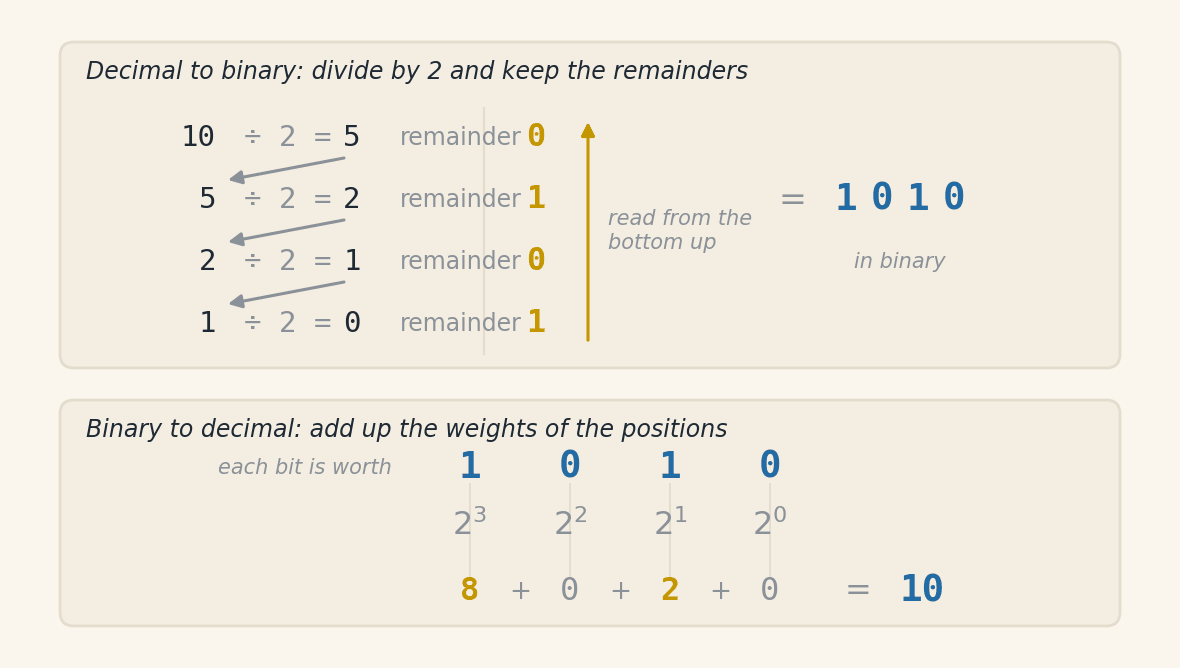
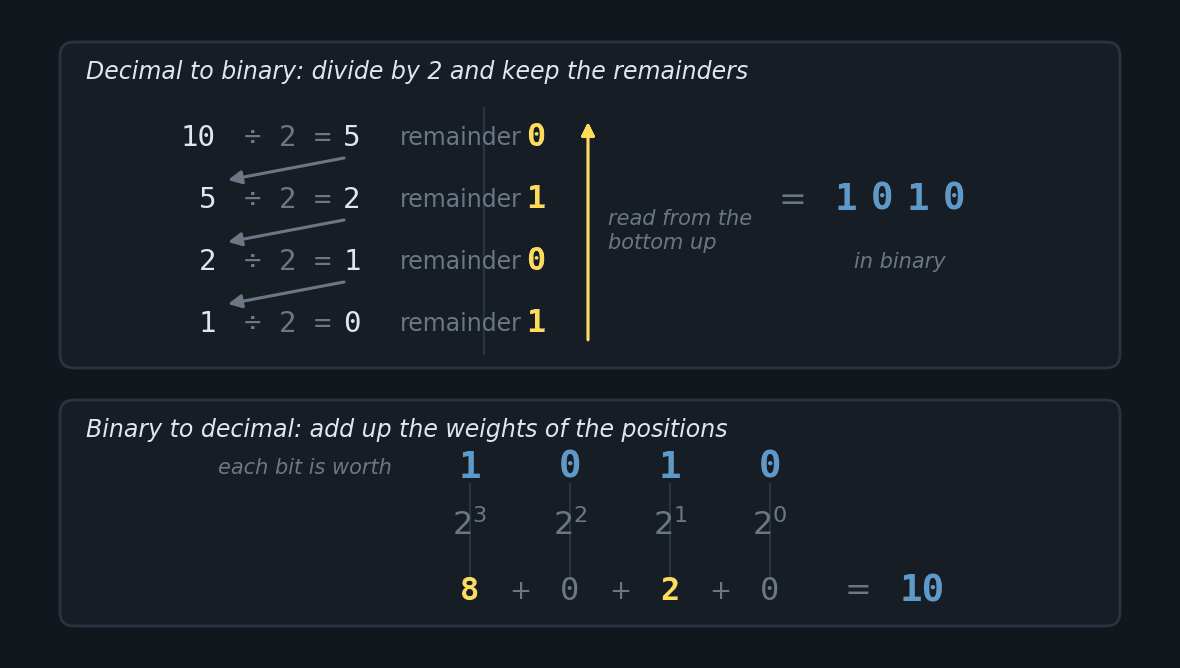
An illustration below to help understand the math involved.
Decimal to Hexadecimal:
decimal_number = 255
hexadecimal_number = hex(decimal_number)  # Returns string with prefix 0x
print(hexadecimal_number)                 # 0xff (where 0x indicates hexadecimal format)
Code Output
0xff
Hexadecimal to Decimal:
hexadecimal_number = 0xff                 # Prefix 0x allows writing hexadecimal literal
decimal_number = int(hexadecimal_number)  # Converts to decimal integer
print(decimal_number)
Code Output
255
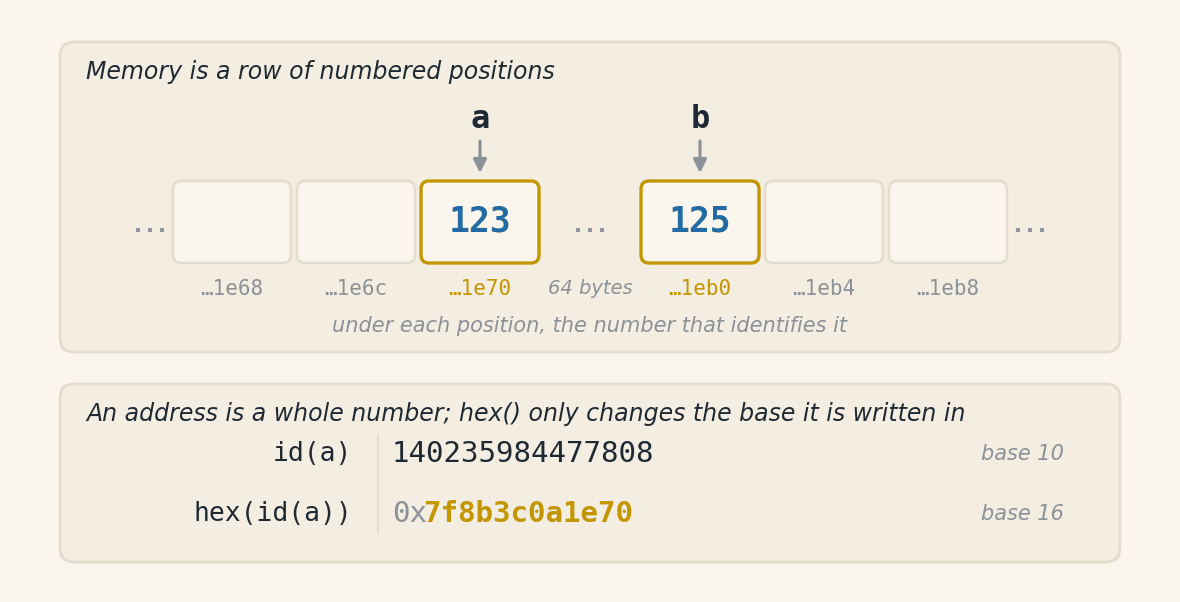
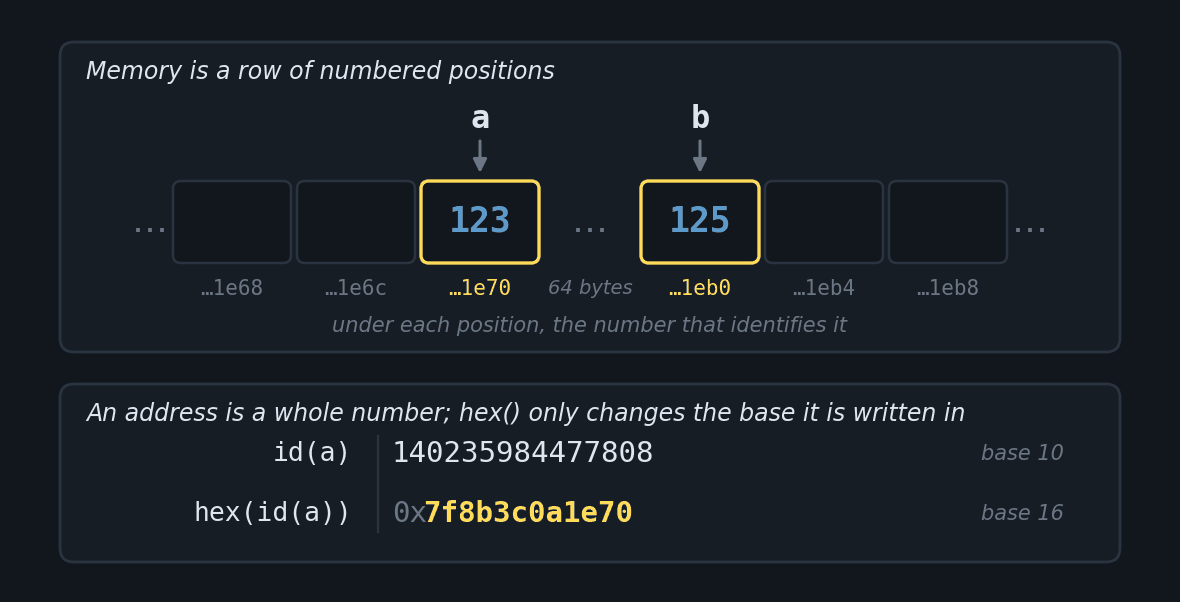
Visualizing Memory Addresses in Hexadecimal:
In Python, we can visualize the memory address where a variable is stored using the id() function combined with hex(). This is useful for understanding how Python manages objects in memory:
a = 123
b = 125

# Visualizing memory addresses in hexadecimal
print(f"Address of 'a': {hex(id(a))}")
print(f"Address of 'b': {hex(id(b))}")
Code Output
Address of 'a': 0x7f8b3c0a1e70
Address of 'b': 0x7f8b3c0a1eb0
Note on Memory Addresses
Memory addresses vary with each program execution and depend on the operating system and Python implementation.
Important notes:
The functions
bin(),oct()andhex()return strings with respective prefixesYou can use prefixes directly in code to represent literals in these bases
The
int()function can convert strings from these formats to decimal when used with the base parameter:
int(‘1010’, 2) # Binary → 10 int(‘0xff’, 16) # Hexadecimal → 255
### Where these conversions show up in everyday life

Conversions between bases appear in things you already use. The four below are explained entirely by what this section has shown.

**The colour of a website.** The blue of the Python logo is `#3776AB`. It is not an arbitrary code: it is three hexadecimal numbers stuck together, one for each colour the screen mixes. The `37` says how much red, the `76` how much green and the `AB` how much blue. Each one runs from `00` to `FF`, that is, from 0 to 255.

```python
print(int("37", 16), int("76", 16), int("AB", 16))
Code Output
55 118 171
The number of an emoji. Every character has a number, and Unicode tables write that number in hexadecimal, with the prefix U+. The snake emoji is U+1F40D.
print(int("1F40D", 16))
Code Output
128013
The permissions of a file on Linux. The chmod 755 command uses octal. Each digit is worth three bits, and each bit turns on one permission: read, write and execute. The 7 turns on all three, and the 5 turns on the first and the third.
print(bin(7), bin(5))
Code Output
0b111 0b101
The size of a file. A kilobyte is 1024 bytes, not 1000. The reason becomes visible in base 2: 1024 is 2 raised to 10, which in binary is a 1 followed by ten zeros.
print(2 ** 10)
print(bin(1024))
Code Output
1024
0b10000000000
The same conversions support subjects you will meet later on, such as network addresses, microcontroller registers and hash functions. In all of them what you have just seen holds: the number is the same, what changes is the base it is written in.
Composite Data Types (Collections)#
Python comes with four built-in collections: lists, tuples, dictionaries and sets. All of them hold several values, and what tells them apart is whether the order matters, whether the content can change, and whether access is by position or by key.
Lists#
Lists are mutable, ordered, and heterogeneous data structures that allow storing collections of items. They are represented by square brackets [] and items separated by commas.
Main Characteristics:
Mutable: Can be changed after creation
Ordered: Maintain insertion order
Heterogeneous: Accept different data types
Dynamic: Grow or shrink as needed
# Basic example
list = [1, "Python", 3.14, True]
Basic Operations with Lists#
Creating Lists
empty_list = []      # Literal syntax
empty_list = list()  # Using constructor
numbers = [1, 2, 3]  # List of integers
Accessing Elements
languages = ["Python", "Java", "C++"]

print(languages[0])  # First element
print(languages[-1]) # Last element
Code Output:
Python
C++
Slicing
Slicing allows extracting parts of a list using the syntax list[start:end:step]:
numbers = [0, 1, 2, 3, 4, 5, 6, 7, 8, 9]

# Elements from index 2 to 5 (doesn't include 5)
print(numbers[2:5])

# From beginning to index 4
print(numbers[:4])

# From index 6 to the end
print(numbers[6:])

# Elements every 2
print(numbers[::2])

# Reversed list
print(numbers[::-1])
Code Output:
[2, 3, 4]
[0, 1, 2, 3]
[6, 7, 8, 9]
[0, 2, 4, 6, 8]
[9, 8, 7, 6, 5, 4, 3, 2, 1, 0]
Syntax |
Description |
Example |
Result |
|---|---|---|---|
|
Elements from index |
|
|
|
From beginning to |
|
|
|
From |
|
|
|
All, skipping by |
|
|
|
Reversed list |
|
|
Modifying Lists
languages = ["Python", "Java", "C++"]
languages[1] = "JavaScript"
print(languages)
Code Output:
['Python', 'JavaScript', 'C++']
Modifying with Slicing
numbers = [0, 1, 2, 3, 4, 5]
numbers[1:4] = [10, 20, 30] # Replaces elements from index 1 to 3
print(numbers)
Code Output:
[0, 10, 20, 30, 4, 5]
Main List Methods#
Method |
Description |
Example |
Output |
|---|---|---|---|
|
Adds |
|
|
|
Adds items from another iterable |
|
|
|
Inserts |
|
|
|
Removes first occurrence of |
|
|
|
Removes and returns item at index |
|
Returns |
|
Removes all items |
|
|
|
Returns index of first occurrence |
|
|
|
Counts occurrences of |
|
|
|
Sorts the list (in-place) |
|
|
|
Reverses the order (in-place) |
|
|
|
Returns shallow copy |
|
|
List Combination#
Using + (creates new list)
list1 = [1, 2]
list2 = [3, 4]
combined = list1 + list2
print(combined)
Code Output:
[1, 2, 3, 4]
Using += (modifies the first list)
list1 = [1, 2]
list2 = [3, 4]
list1 += list2
print(list1)
Code Output:
[1, 2, 3, 4]
Using extend()
list1 = ['a', 'b']
list2 = ['c', 'd']
list1.extend(list2)
print(list1)
Code Output:
['a', 'b', 'c', 'd']
Integrated Practical Example#
# Creating shopping list
shopping = ["Apple", "Milk"]
shopping.append("Bread")
shopping.extend(["Eggs", "Cheese"])
shopping.insert(1, "Banana")

# Concatenating with another list
beverages = ["Juice", "Water"]
final_list = shopping + beverages

print("Complete shopping list:", final_list)
Code Output:
Complete shopping list: ['Apple', 'Banana', 'Milk', 'Bread', 'Eggs', 'Cheese', 'Juice', 'Water']
Best Practices#
Prefer
append()/extend()instead of+for large lists (better performance)Use
list.copy()orlist(list)to avoid unwanted modificationsUse
list.clear()to empty lists in a readable wayCheck element existence with
x in list(returnsTrueorFalse)
Tuples#
Tuples are fundamental data structures in Python, characterized by being immutable, ordered, and heterogeneous. Their syntax uses parentheses () with elements separated by commas – the comma, not the parentheses, being the defining element of the tuple.
Essential Characteristics:
Immutability: Once created, cannot be changed.
Order preservation: Maintains insertion sequence.
Type flexibility: Accepts different data types in the same structure.
Efficiency: Consumes fewer resources than lists for constant data.
# Basic demonstration
language = ("Python", 1991, "Guido van Rossum", True)
Fundamental Operations#
Creating Tuples
empty = ()                      # Empty tuple
empty = tuple()                 # Empty tuple
single = (42,)                  # Tuple with single element (comma required)
coordinates = (23.5, -46.6)     # Tuple of floats
record = ("ID123", "John", 28)  # Heterogeneous tuple

# Conversion from other iterables
from_list = tuple([1, 2, 3])
from_string = tuple("Python")
Code Output:
('P', 'y', 't', 'h', 'o', 'n')
Accessing Elements
data = ("Python", 3.11, "Open Source")

print(data[0])    # Access by positive index
print(data[-1])   # Access by negative index
Code Output:
Python
Open Source
Modification Attempt
tuple = (1, 2, 3)
try:
    tuple[1] = 99 # Modification attempt
except TypeError as e:
    print(f"Error: {e}")
Code Output:
Error: 'tuple' object does not support item assignment
See more details on how to use
tryexceptin Chapter 8.
Native Methods#
Method |
Description |
Example |
Result |
|---|---|---|---|
|
Counts occurrences of a value |
|
|
|
Position of first occurrence |
|
|
Tuple Combination#
Concatenation (+)
t1 = (1, 2)
t2 = (3, 4)
combined = t1 + t2
print(combined)
Code Output:
(1, 2, 3, 4)
Repetition (*)
greeting = ("Hello",) * 3
print(greeting)
Output:
('Hello', 'Hello', 'Hello')
Modern Unpacking
base_colors = ("red", "blue")
extra_colors = ("green", "yellow")
palette = (*base_colors, "purple", *extra_colors)
print(palette)
Output:
('red', 'blue', 'purple', 'green', 'yellow')
Note: The
*works on any type of sequence (lists, tuples, strings, etc.), “spreading” the elements in the new context.
Practical Applications#
Coordinate Systems
point_a = (-23.55, -46.63) # São Paulo
point_b = (-22.91, -43.17) # Rio de Janeiro
print(f"Route: {point_a} -> {point_b}")
Code Output:
Route: (-23.55, -46.63) -> (-22.91, -43.17)
Composite Keys in Dictionaries (we’ll study next)
inventory = {
    ("t-shirt", "M"): 42,
    ("pants", "40"): 15
}
print(inventory[("t-shirt", "M")])
Code Output:
42
Alternative Syntax
# Tuple without parentheses (packing)
values = 10, 20, 30
print(type(values))

# Unpacking
x, y, z = values
print(f"x={x}, y={y}, z={z}")
Code Output:
<class 'tuple'>
x=10, y=20, z=30
Practical example with function#
For when you’ve studied Chapter 5.
# Geolocation system
def calculate_distance(p1, p2):
    from math import sqrt
    return sqrt((p2[0]-p1[0])**2 + (p2[1]-p1[1])**2)

sp = (-23.55, -46.63)
rj = (-22.91, -43.17)

distance_km = calculate_distance(sp, rj) * 111
print(f"SP-RJ Distance: {distance_km:.1f} km")
Code Output:
SP-RJ Distance: 358.1 km
Best Practices#
Constant data: Use tuples for immutable information.
Composite keys: Ideal for dictionaries with multiple indices.
Multiple return: Efficient pattern for functions.
Data security: Protection against accidental modifications.
Performance: Prefer for large static collections.
Dictionaries#
Dictionaries are mutable data structures that store information as key-value pairs, offering fast data access through unique keys. They are represented by curly braces {} and each element consists of a key and its corresponding value, separated by colons.
Main characteristics:
Efficient access to values through unique keys
Do not allow duplicate keys
Can be modified after creation
Accept various data types as values
Optimized for basic operations in constant time
# Basic dictionary example
person = {
    "name": "Maria",
    "age": 28,
    "profession": "Engineer",
    "skills": ["Python", "CAD", "Management"]
}
Basic operations with dictionaries#
Creation:
empty = {}      # Literal syntax
empty = dict()  # Using constructor

registration = {
    "id": "user123",
    "active": False,
    "last_access": "2023-10-15"
}
Access and modification:
person = {
    "name": "Maria",
    "age": 28,
    "profession": "Engineer",
    "skills": ["Python", "CAD", "Management"]
}

# Direct access
print(person["name"])

# Safe access with get()
print(person.get("salary", "Not informed"))
# Returns default value if key doesn't exist

# Adding or updating values
person["salary"] = 7500.00  # Ideal for changing or creating a single key
person.update({"company": "Tech Solutions", "department": "IT"})
# Useful (and necessary) when we want to change or add several keys at once

print(person)
Code Output:
Maria
Not informed
{'name': 'Maria', 'age': 28, 'profession': 'Engineer', 'skills': ['Python', 'CAD', 'Management'], 'salary': 7500.0, 'company': 'Tech Solutions', 'department': 'IT'}
Removing items:
person = {
    "name": "Maria",
    "age": 28,
    "profession": "Engineer",
    "skills": ["Python", "CAD", "Management"],
    "salary": 7500.00,
    "company": "Tech Solutions",
    "department": "IT"
}

del person["skills"]     # Removes specified key
age = person.pop("age")  # Removes and returns the value
print(age)
last = person.popitem()  # Removes and returns the last item inserted
print(last)
print(person)
Code Output:
28
('department', 'IT')
{'name': 'Maria', 'profession': 'Engineer', 'salary': 7500.0, 'company': 'Tech Solutions'}
Useful methods#
Method |
Description |
Example |
Typical output |
|---|---|---|---|
keys() |
Returns all keys |
person.keys() |
dict_keys([‘name’, ‘profession’, …]) |
values() |
Returns all values |
person.values() |
dict_values([‘Maria’, ‘Engineer’, …]) |
items() |
Returns (key, value) pairs as tuples |
person.items() |
dict_items([(‘name’, ‘Maria’), …]) |
get(key, def) |
Returns value or default if key absent |
person.get(“age”, 30) |
30 |
update() |
Updates with pairs from another dictionary |
person.update({“age”: 29}) |
{‘name’: ‘Maria’, ‘age’: 29, …} |
clear() |
Removes all items |
person.clear() |
{} |
Practical examples#
Simple dictionary:
student = {
    "name": "John Silva",
    "id": "2023001",
    "course": "C&T"
}
print(student)
Code Output:
{'name': 'John Silva', 'id': '2023001', 'course': 'Computer Science'}
Access and modification:
student = {
    "name": "John Silva",
    "id": "2023001",
    "course": "C&T"
}

print(student["name"])
student["course"] = "Software Engineering"
print(student)
Code Output:
John Silva
{'name': 'John Silva', 'id': '2023001', 'course': 'Software Engineering'}
Key verification:
student = {
    "name": "John Silva",
    "id": "2023001",
    "course": "C&T"
}

has_id = "id" in student
print(has_id)
Code Output:
True
Dictionary with different types:
product = {
    "code": 123,
    "name": "Keyboard",
    "price": 99.90,
    "available": True
}
print(product)
Code Output:
{'code': 123, 'name': 'Keyboard', 'price': 99.9, 'available': True}
Dictionary with list as value:
contacts = {
    "John": ["john@email.com", "(83) 9999-1111"],
    "Maria": ["maria@email.com", "(84) 8888-2222"]
}
print(contacts["Maria"])
Code Output:
['maria@email.com', '(84) 8888-2222']
Best practices#
Use
key in dictionaryto check key existencePrefer
get()to avoid errors with non-existent keysTuples can be used as keys when necessary
Dictionaries maintain insertion order (Python 3.7+)
clear()is more efficient than creating new empty dictionary
Sets#
Sets are data structures that store unique elements, without duplicates. They are very useful for mathematical operations like union, intersection, difference and symmetric difference between collections.
Main characteristics
Store unique elements (don’t allow duplicates)
Don’t maintain specific element order
Don’t support indexing
Optimized for fast membership verification
Accept immutable data types as elements
# Basic set example
vowels = {'a', 'e', 'i', 'o', 'u'}
Basic operations#
Creation
empty = set()        # Empty set
numbers = {1, 2, 3}  # Set with elements
Addition and removal
numbers = {1, 2, 3}

numbers.add(4)
numbers.remove(2)
numbers.discard(5)

print(numbers)
Code Output:
{1, 3, 4}
Operations between sets#
Union
A = {1, 2, 3}
B = {3, 4, 5}
print(A | B) # Or A.union(B)
Code Output:
{1, 2, 3, 4, 5}
Intersection
A = {1, 2, 3}
B = {3, 4, 5}
print(A & B) # Or A.intersection(B)
Code Output:
{3}
Difference
A = {1, 2, 3}
B = {3, 4, 5}
print(A - B) # Elements that are only in the first set
Code Output:
{1, 2}
Symmetric difference
A = {1, 2, 3}
B = {3, 4, 5}
print(A ^ B) # Or A.symmetric_difference(B)
Code Output:
{1, 2, 4, 5}
Useful methods#
Method |
Description |
Example |
Output |
|---|---|---|---|
|
Adds an element |
|
|
|
Removes element (raises error if doesn’t exist) |
|
|
|
Removes element (doesn’t raise error) |
|
|
|
Returns union with another set |
|
|
|
Returns intersection with another set |
|
|
|
Returns difference between sets |
|
|
|
Returns symmetric difference |
|
|
|
Removes all elements |
|
|
Operators and equivalent methods#
Operator |
Method |
Description |
Example |
Output |
|---|---|---|---|---|
|
|
Union (elements in at least one) |
|
|
|
|
Intersection (elements in both) |
|
|
|
|
Difference (elements only in the first) |
|
|
|
|
Symmetric difference (in one OR the other) |
|
|
Quick Tip - Set Operators
| → all, & → common, - → only in first, ^ → only in one
Practical examples#
Checking membership
vowels = {'a', 'e', 'i', 'o', 'u'}
print('a' in vowels)
Code Output:
True
Removing duplicates from a list
list = [1, 2, 2, 3, 3, 3]
unique = set(list)
print(unique)
Code Output:
{1, 2, 3}
Working with sets of strings
colors = {'red', 'green', 'blue'}
colors.add('yellow')
print(colors)
Code Output:
{'red', 'green', 'blue', 'yellow'}
Best practices#
Use sets to eliminate list duplicates
Ideal for testing membership efficiently
Don’t use for data that needs order
Elements must be immutable (numbers, strings, tuples)
Prefer
discard()overremove()when not sure of existence
Decision Structures#
Decision structures control program execution flow, allowing code to make decisions based on specific conditions and execute different actions according to the result of those conditions.
if#
The if structure executes a code block only if a condition is evaluated as true (True). See the example:
age = 21

if age >= 18:
    print("You are of legal age.")
Code Output:
You are of legal age.
In the example above, the message “You are of legal age.” will be printed because the condition age >= 18 is true.
if-else#
The if-else structure allows code to execute one action when the condition is true and another when the condition is false. See the example:
age = 15

if age >= 18:
    print("You are of legal age.")
else:
    print("You are a minor.")
Code Output:
You are a minor.
If the condition age >= 18 is false, the code inside else will be executed, printing “You are a minor.”
if-elif-else#
The if-elif-else conditional structure is used when we need to check multiple conditions sequentially. The elif (abbreviation of “else if”) allows testing intermediate conditions between the initial if and the final else.
Basic Example#
age = 30

if age < 18:
    print("You are a minor.")
elif 18 <= age < 65: # Pythonic way
    print("You are an adult.")
else:
    print("You are a senior.")
Code Output:
You are an adult.
Syntax Comparison#
Form |
Example |
Note |
|---|---|---|
Traditional |
|
More explicit |
Pythonic |
|
More concise and idiomatic |
Both forms are valid, but the Pythonic version is preferable because:
It’s more readable
It resembles mathematical notation
It reduces variable repetition
match case#
Starting with Python 3.10, the match case structure was introduced, which allows comparing a value against multiple patterns in a clearer and more organized way.
It works similarly to switch from other languages, but with the advantage of supporting pattern matching, which makes the feature much more powerful.
Basic Example#
option = 2

match option:
    case 1:
        print("Option 1 selected")
    case 2:
        print("Option 2 selected")
    case 3 | 4:  # Pattern combination
        print("Option 3 or 4 selected")
    case _:
        print("Invalid option")
Code Output:
Option 2 selected
In this example:
The value in
optionis compared with eachcase.The
|operator allows combining multiple patterns.The
_(underscore) functions as a wildcard (equivalent toelse), capturing any value not previously handled.
Example with Data Structure#
match case also allows unpacking values directly within the comparison. Each case describes the expected shape of the data, and each position in the pattern does one of two things: it either holds a fixed value, which must match, or a name, which captures whatever is there.
point = (0, 5)

match point:
    case (0, y):
        print(f"Point on Y axis, coordinate {y}")
    case (x, 0):
        print(f"Point on X axis, coordinate {x}")
    case (x, y):
        print(f"Point at ({x}, {y})")
Code Output:
Point on Y axis, coordinate 5
In this example:
case (0, y)matches any tuple whose first element is0. The0compares; theycaptures, receiving the second element whatever it is. That is where the5in the output comes from.Order matters.
(0, 5)matches the firstcase, and the following ones are never tested. A point(0, 0)would also fall into the first one, printingPoint on Y axis, coordinate 0.case (x, y)at the end matches any two-element tuple and plays the wildcard role thatcase _plays in the previous example.
Attention - A name in case captures, it does not compare
A bare name inside a case never compares: it always creates a variable. Writing case ORIGIN: expecting to compare the value against a constant ORIGIN defined earlier compares nothing. The pattern matches any value and also overwrites ORIGIN. To compare against a stored value, use a dotted name, such as case Point.ORIGIN:, or a guard condition, such as case p if p == ORIGIN:.
Summary Table (complete):
Structure |
Description |
Use |
|---|---|---|
if |
Executes a block if the condition is true |
When there’s a single condition |
if-else |
Executes a block if the condition is true and another if false |
When there are two possibilities (true/false) |
if-elif-else |
Checks multiple conditions sequentially |
When there are more than two conditions to be handled |
match case |
Compares values against multiple patterns (with pattern matching support) |
When there are many alternatives or when dealing with data structures |
Exercises#
Write a program that asks the user for two values, one of type integer (
int) and another of type floating-point (float). After receiving these values as input, the program should assign them to two distinct variables and then print on screen the result of the following mathematical operations:
Sum of the two values.
Subtraction of the float value by the integer value.
Multiplication of the two values.
Division of the integer value by the float value.
Make sure to properly format the output of the results.
Write a program that asks the user to enter a word or phrase. Then, the program should print the length of the string, the first letter of the string, the last letter of the string, and the reversed string.
Write a program that compares two strings provided by the user, considering boolean values
"True"or"False". The program should ignore capitalization differences (uppercase and lowercase) and print on screen if the strings are equal or different.Create a program that calculates a person’s Body Mass Index (BMI). BMI is calculated by dividing a person’s weight by their height squared. BMI is a measure of the relationship between weight and height. The program should print the person’s BMI, classifying it according to the table below:
BMI | Classification

< 18.5   | Underweight
18.5 - 24.9 | Healthy
25.0 - 29.9 | Overweight
30.0 - 34.9 | Obesity grade I
35.0 - 39.9 | Obesity grade II
>= 40.0   | Obesity grade III
Create a program that asks the user to enter five different fruits. Before reading the data, create an empty list called
fruits. Then, store the fruits provided by the user in this list and, at the end, print the complete list on screen.Write a program that asks the user to enter two coordinates (x and y). Then, create a tuple called
coordinateswith these values and print the tuple content on screen.Create a dictionary called
contact. Ask the user to provide the data corresponding to the keys"name","phone"and"address". Then, print the complete content of the dictionary.Create, before reading the numbers, an empty set called
numbersusing theset()function. Then, store the values provided by the user in this set, using the.add()method. At the end, display the complete set in the output.Create a program that asks the user to enter three distinct integer numbers for each set. The sets
set_aandset_bshould be created using theset()function and filled with the numbers provided by the user, using the.add()method. Then, perform the following operations and print the results:
Union: combine the unique elements from both sets.
Intersection: find elements that are present in both sets.
Difference: identify elements that are in
set_a, but not inset_b.
Given two strings provided by the user, perform the following operations and print the results:
Transform to uppercase: convert the entire first string to uppercase letters.
Transform to lowercase: convert the entire second string to lowercase letters.
Concatenate the strings: combine the first and second string into a single string.
Print the result: display the concatenated string on screen.
You should create a program that checks if numbers in a list are even or odd. The list has size 5 and will be provided by the user. Each number in the list should be evaluated individually, without using loop structures. The program should display on screen if each number is even or odd.
Write a program to collect information about a student. Using a dictionary named “student”, ask the user for the following information:
Student’s name.
Student’s ID.
Three student grades.
Then, display on screen the registered data, including name, ID, and the average of the three grades. Use only the special methods of dictionaries to insert and access the data.