

Chapter 3: Operators and Expressions#

We have already seen how to store information in variables and work with different data types. Now it is time to learn how to manipulate that information through operators and expressions.
Operators are special symbols that perform operations on values, such as adding two numbers, comparing strings, or combining logical conditions. Expressions, in turn, are combinations of values and operators that produce a result.
Mastering operators and expressions is essential to:
Perform mathematical calculations of any complexity
Make decisions based on conditions
Validate user input
Manipulate strings, lists, and other collections
Write more concise and efficient code
In this chapter we will see the main operators in Python, organized into categories: arithmetic, relational, logical, ternary, membership, assignment, and bitwise. We will also learn how operators interact with each other through operator precedence.
Arithmetic Operators#
Arithmetic operators are the first ones we learn in any programming language because they work much like the math we already know. They let us perform mathematical operations on numbers, whether integers or decimals.
Arithmetic Operators Table#
Python provides seven basic arithmetic operators. Let’s get to know each one:
Operator |
Symbol |
Description |
Example |
Result |
|---|---|---|---|---|
Addition |
|
Adds two values |
|
|
Subtraction |
|
Subtracts the second value from the first |
|
|
Multiplication |
|
Multiplies two values |
|
|
Division |
|
Divides the first value by the second (always returns a decimal) |
|
|
Floor Division |
|
Divides and returns only the integer part |
|
|
Modulo |
|
Returns the remainder of the division |
|
|
Exponentiation |
|
Raises the first value to the power of the second |
|
|
Understanding Each Operator#
Let’s explore some of these operators in more detail:
Division (/) vs Floor Division (//)
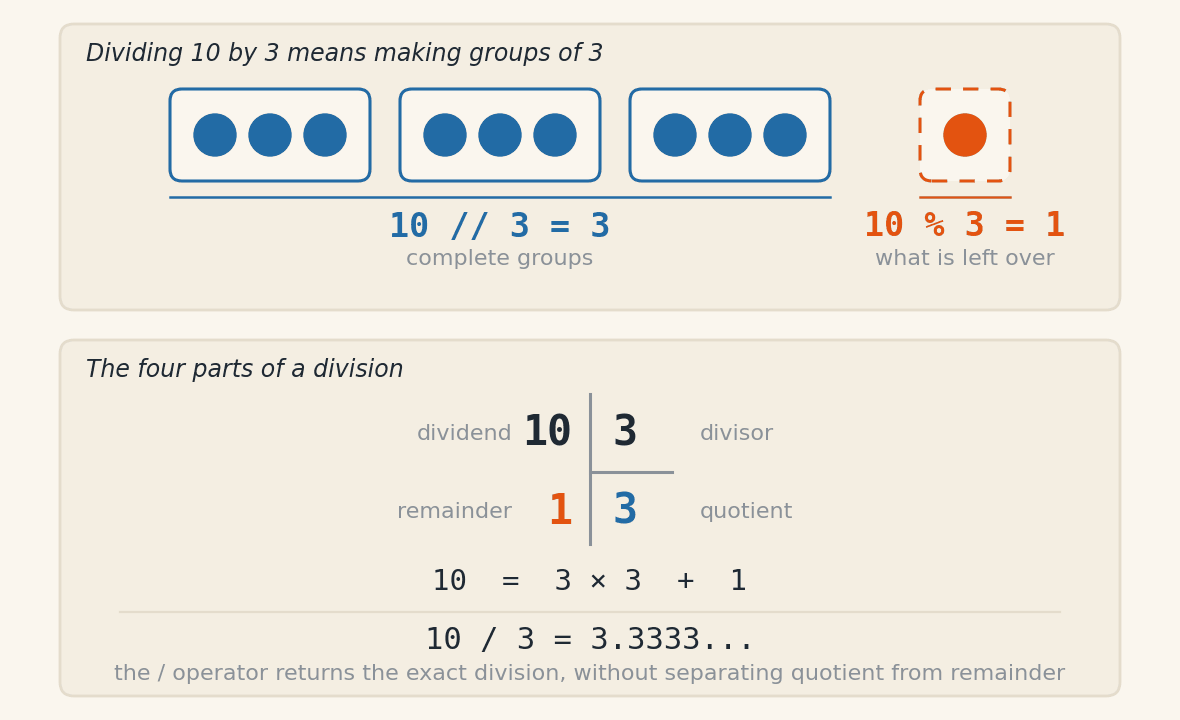
The difference between / and // matters:
The
/operator always returns a decimal number (float), even when the division is exactThe
//operator returns only the integer part, discarding the decimal part
print(10 / 2)
print(10 // 2)
print(10 / 3)
print(10 // 3)
Output:
5.0
5
3.3333333333333335
3
The figure below shows the three readings of the same division.
Modulo Operator (%)
The modulo operator is very useful in many situations:
Checking whether a number is even or odd
Determining whether a number is a multiple of another
Getting the last digit of a number
Cyclic operations (such as clocks)
# Check whether a number is even
number = 8
if number % 2 == 0:
    print(f"{number} is even")
else:
    print(f"{number} is odd")

# Get the last digit of a number
value = 12345
last_digit = value % 10
print(f"Last digit: {last_digit}")
Output:
8 is even
Last digit: 5
Exponentiation Operator (**)
The ** operator replaces functions like pow() and makes the code more readable:
# Compute the area of a circle: A = π * r²
radius = 5
PI = 3.14159
area = PI * radius ** 2
print(f"Circle area: {area:.2f}")
Output:
Circle area: 78.54
Practical Examples#
Let’s see examples that combine several operators in everyday situations:
Example 1: Shopping calculator with discount
original_price = 150.00
quantity = 3
discount_percent = 10

# Calculations
subtotal = original_price * quantity
discount = subtotal * (discount_percent / 100)
total = subtotal - discount

print(f"Subtotal: $ {subtotal:.2f}")
print(f"Discount ({discount_percent}%): $ {discount:.2f}")
print(f"Total to pay: $ {total:.2f}")
Output:
Subtotal: $ 450.00
Discount (10%): $ 45.00
Total to pay: $ 405.00
Example 2: Time conversion
# Convert total seconds into hours, minutes and seconds
total_seconds = 3725

hours = total_seconds // 3600                 # How many full hours
remainder_after_hours = total_seconds % 3600  # Remaining seconds
minutes = remainder_after_hours // 60         # How many full minutes
seconds = remainder_after_hours % 60          # Remaining seconds

print(f"{total_seconds} seconds is equivalent to:")
print(f"{hours} hour(s), {minutes} minute(s) and {seconds} second(s)")
Output:
3725 seconds is equivalent to:
1 hour(s), 2 minute(s) and 5 second(s)
Precedence of Arithmetic Operators#
Like in math, Python follows a specific order when evaluating expressions. That order is called operator precedence:
Priority |
Operators |
Note |
|---|---|---|
1st (highest) |
|
Exponentiation |
2nd |
|
Multiplication, divisions, and modulo |
3rd (lowest) |
|
Addition and subtraction |
Important rules:
Operators with the same precedence are evaluated left to right
Use parentheses
()to override the evaluation orderWhen in doubt, use parentheses to make the code clearer
Precedence examples:
# Without parentheses: multiplication before addition
result1 = 2 + 3 * 4
print(result1)

# With parentheses: we force addition first
result2 = (2 + 3) * 4
print(result2)

# Complex example
result3 = 2 ** 3 + 4 * 5 - 10 / 2
print(result3)
Output:
14
20
23.0
Unary Operators#
Unary operators act on a single value (unlike binary operators, which act on two values). In arithmetic, the most common unary operator is negation (-), which flips the sign of a number:
positive_number = 10
negative_number = -positive_number
print(negative_number)

# Unary operators have high precedence
result = -5 + 2 * 3
print(result)
Output:
-10
1
Practical example:
# Temperature with a variation
initial_temperature = 25
variation = -3  # Temperature dropped 3 degrees
final_temperature = initial_temperature + variation
print(f"Initial temperature: {initial_temperature}°C")
print(f"Variation: {variation}°C")
print(f"Final temperature: {final_temperature}°C")
Output:
Initial temperature: 25°C
Variation: -3°C
Final temperature: 22°C
Note: Python has other unary operators, such as bitwise inversion (
~), which we will see later in the bitwise operations section.
Relational Operators#
Now that we know how to do calculations with arithmetic operators, we need to learn how to compare values. That is where relational operators — also known as comparison operators — come in.
These operators are essential for writing programs that make decisions. For example: checking whether a student passed, whether a product is in stock, whether a password is correct, or whether a user is old enough to access certain content.
The result of a comparison is always a boolean value: True or False.
Relational Operators Table#
Operator |
Symbol |
Description |
Example |
Result |
|---|---|---|---|---|
Equality |
|
Checks whether two values are equal |
|
|
Inequality |
|
Checks whether two values are different |
|
|
Less than |
|
Checks whether the first is less than the second |
|
|
Greater than |
|
Checks whether the first is greater than the second |
|
|
Less than or equal |
|
Checks whether the first is less than or equal to the second |
|
|
Greater than or equal |
|
Checks whether the first is greater than or equal to the second |
|
|
Warning - Equality vs Assignment
Don’t confuse the equality operator == (two equal signs) with the assignment operator = (one equal sign). The first compares values, the second assigns values!
Basic Examples#
Let’s see how to use these operators in practice:
# Comparing numbers
grade = 7.5
average = 6.0

print(f"Grade equal to average? {grade == average}")
print(f"Grade different from average? {grade != average}")
print(f"Grade greater than average? {grade > average}")
print(f"Grade greater than or equal to 7? {grade >= 7}")
print(f"Grade less than 5? {grade < 5}")
Output:
Grade equal to average? False
Grade different from average? True
Grade greater than average? True
Grade greater than or equal to 7? True
Grade less than 5? False
String Comparison#
Comparisons don’t only work with numbers. We can also compare strings! The comparison follows lexicographic order (alphabetical order), based on the Unicode values of the characters.
name1 = "Anna"
name2 = "Bruno"
name3 = "Anna"

print(f"'{name1}' is equal to '{name3}'? {name1 == name3}")
print(f"'{name1}' is different from '{name2}'? {name1 != name2}")
print(f"'{name1}' comes before '{name2}'? {name1 < name2}")
Output:
'Anna' is equal to 'Anna'? True
'Anna' is different from 'Bruno'? True
'Anna' comes before 'Bruno'? True
Important points about string comparison:
Comparison is case-sensitive:
"Python" != "python"Uppercase letters come before lowercase ones in Unicode order
To ignore case, convert the strings:
text.lower()ortext.upper()
# Case-sensitive comparison
print("Python" == "python")

# Case-insensitive comparison
text1 = "Python"
text2 = "python"
print(text1.lower() == text2.lower())
Output:
False
True
Practical Examples#
Example 1: Student approval system
final_grade = float(input("Enter the student's final grade: "))
minimum_average = 7.0

if final_grade >= minimum_average:
    print(f"Student PASSED with grade {final_grade}")
else:
    print(f"Student FAILED with grade {final_grade}")
Sample run:
Enter the student's final grade: 8.5
Student PASSED with grade 8.5
Example 2: Age validation
age = int(input("Enter your age: "))
minimum_age = 18

if age >= minimum_age:
    print("Access granted.")
else:
    years_remaining = minimum_age - age
    print(f"Access denied. You must be at least {minimum_age} years old.")
    print(f"{years_remaining} year(s) remaining.")
Sample run:
Enter your age: 16
Access denied. You must be at least 18 years old.
2 year(s) remaining.
Example 3: Login validation
correct_user = "admin"
correct_password = "1234"

user = input("Username: ")
password = input("Password: ")

if user == correct_user and password == correct_password:
    print("Login successful!")
else:
    print("Incorrect username or password.")
Sample run:
Username: admin
Password: 1234
Login successful!
Combining Comparisons#
Relational operators are often used with conditional structures (if, elif, else) and can be combined with logical operators (and, or, not), which we will see in the next section.
Relational operators are the foundation for building intelligent programs that make decisions. They work together with conditional structures to control program flow based on different situations.
Logical Operators#
We saw that relational operators let us make simple comparisons. But what if we need to check multiple conditions at the same time? For example: “Is the user older than 18 AND does she have a driver’s license?” or “Was the payment made by card OR by PIX?”.
For those situations, we use logical operators. They let us combine several boolean conditions into a single expression, building more complex and powerful logic.
Logical Operators Table#
Operator |
Symbol |
Description |
Example |
Result |
Precedence |
|---|---|---|---|---|---|
Logical AND |
|
Returns |
|
|
Medium |
Logical OR |
|
Returns |
|
|
Low |
Negation |
|
Inverts the boolean value |
|
|
High |
Understanding Each Operator#
and Operator (Logical AND)
The and operator requires all conditions to be true:
age = 20
has_license = True

can_drive = (age >= 18) and has_license
print(can_drive)
Output:
True
Truth Table for and:
Condition A |
Condition B |
A and B |
|---|---|---|
|
|
|
|
|
|
|
|
|
|
|
|
or Operator (Logical OR)
The or operator needs at least one condition to be true:
has_card = False
has_cash = True

can_pay = has_card or has_cash
print(can_pay)
Output:
True
Truth Table for or:
Condition A |
Condition B |
A or B |
|---|---|---|
|
|
|
|
|
|
|
|
|
|
|
|
not Operator (Negation)
The not operator inverts the boolean value:
is_raining = False
go_running = not is_raining
print(go_running)
Output:
True
Truth Table for not:
Condition |
not Condition |
|---|---|
|
|
|
|
Precedence of Logical Operators#
When we combine multiple logical operators, they are evaluated in this order:
not(highest precedence)and(medium precedence)or(lowest precedence)
# Example without parentheses
result1 = True or True and False
print(result1)

# Example with parentheses (we change the order)
result2 = (True or True) and False
print(result2)
Output:
True
False
Tip - Code Clarity
Even when not required, use parentheses to make your expressions clearer and easier to read!
Practical Examples#
Example 1: Check whether a number is in a range
grade = float(input("Enter the grade (0-10): "))

# Check whether the grade is between 0 and 10
valid_grade = (grade >= 0) and (grade <= 10)

if valid_grade:
    print(f"Grade {grade} is valid!")
else:
    print(f"Grade {grade} is invalid! Enter a value between 0 and 10.")
Sample run:
Enter the grade (0-10): 8.5
Grade 8.5 is valid!
Example 2: Checking multiple payment methods
payment_method = input("Payment method (card/cash/pix): ").lower()

# Accepts any of the three methods
payment_accepted = (payment_method == "card") or \
                   (payment_method == "cash") or \
                   (payment_method == "pix")

if payment_accepted:
    print("Payment accepted!")
else:
    print("Payment method not accepted.")
Sample run:
Payment method (card/cash/pix): pix
Payment accepted!
Example 3: Access system with multiple validations
age = int(input("Enter your age: "))
has_authorization = input("Do you have parental authorization? (yes/no): ").lower() == "yes"

# Can enter if: age 18+ OR (under 18 BUT has authorization)
can_enter = (age >= 18) or (age < 18 and has_authorization)

if can_enter:
    print("Access granted!")
else:
    print("Access denied. People under 18 need authorization.")
Sample run:
Enter your age: 16
Do you have parental authorization? (yes/no): yes
Access granted!
Example 4: Strong-password validation
password = input("Enter your password: ")

# Criteria for a strong password
has_min_chars = len(password) >= 8
has_digit = any(char.isdigit() for char in password)
has_letter = any(char.isalpha() for char in password)

# Password is strong if it meets ALL criteria
strong_password = has_min_chars and has_digit and has_letter

if strong_password:
    print("Strong password! Registration successful.")
else:
    print("Weak password! Use at least 8 characters, including letters and numbers.")
Sample run:
Enter your password: python123
Strong password! Registration successful.
Example 5: Using not to invert a condition
age = int(input("Enter your age: "))

# Check whether NOT of legal age
if not (age >= 18):
    print("You are a minor.")
else:
    print("You are an adult.")
Sample run:
Enter your age: 16
You are a minor.
Simplifying Logical Expressions#
Sometimes we can simplify our logical expressions. For example:
x = 5
# More verbose form
if (x > 0) == True:
    print("Positive")

# Simplified form (better)
if x > 0:
    print("Positive")

# Another example
age = 20
# More verbose form
if not (age < 18):
    print("Adult")

# Simplified form (better)
if age >= 18:
    print("Adult")
Putting It All Together#
Logical operators are extremely powerful when combined with relational operators:
# Store discount system
purchase_value = float(input("Purchase value: $ "))
is_vip_customer = input("Is a VIP customer? (yes/no): ").lower() == "yes"
first_purchase = input("Is this the first purchase? (yes/no): ").lower() == "yes"

# 20% discount for VIP OR first purchase above $ 100
has_discount = is_vip_customer or (first_purchase and purchase_value > 100)

if has_discount:
    final_value = purchase_value * 0.8  # 20% discount
    print(f"You got a 20% discount!")
    print(f"Final value: $ {final_value:.2f}")
else:
    print(f"Final value: $ {purchase_value:.2f}")
Logical operators are essential for building programs that make complex decisions based on multiple conditions. Mastering them lets you write more sophisticated code and solve real-world problems!
Ternary Operator (Conditional Expression)#
When you need to choose between two values depending on a condition, Python offers the ternary operator, also called a conditional expression. It lets you write in a single line what we would normally do with if/else across multiple lines.
Syntax#
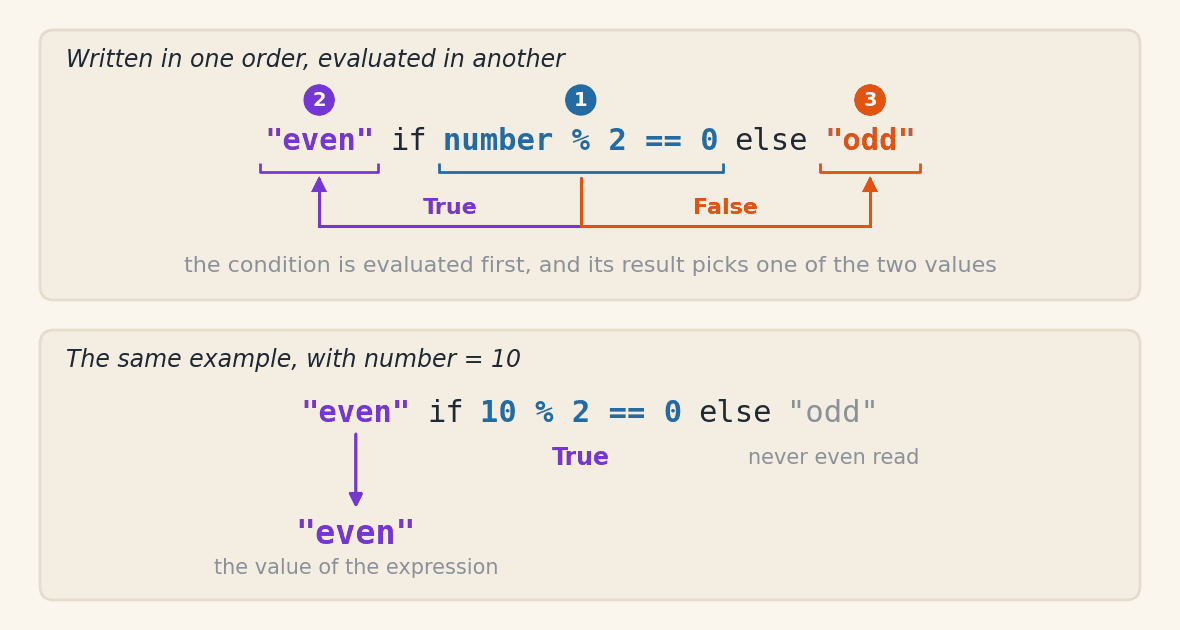
value_if_true if condition else value_if_false
The reading is direct: “use value_if_true if the condition is true, otherwise use value_if_false”.
Basic Example#
Suppose we want to classify a number as “even” or “odd”:
number = 10
classification = "even" if number % 2 == 0 else "odd"
print(f"{number} is {classification}")
Output:
10 is even
The equivalent block if/else version would be longer:
number = 10
if number % 2 == 0:
    classification = "even"
else:
    classification = "odd"
print(f"{number} is {classification}")
Both forms produce the same result — the ternary just condenses the logic into a single expression that produces a value.
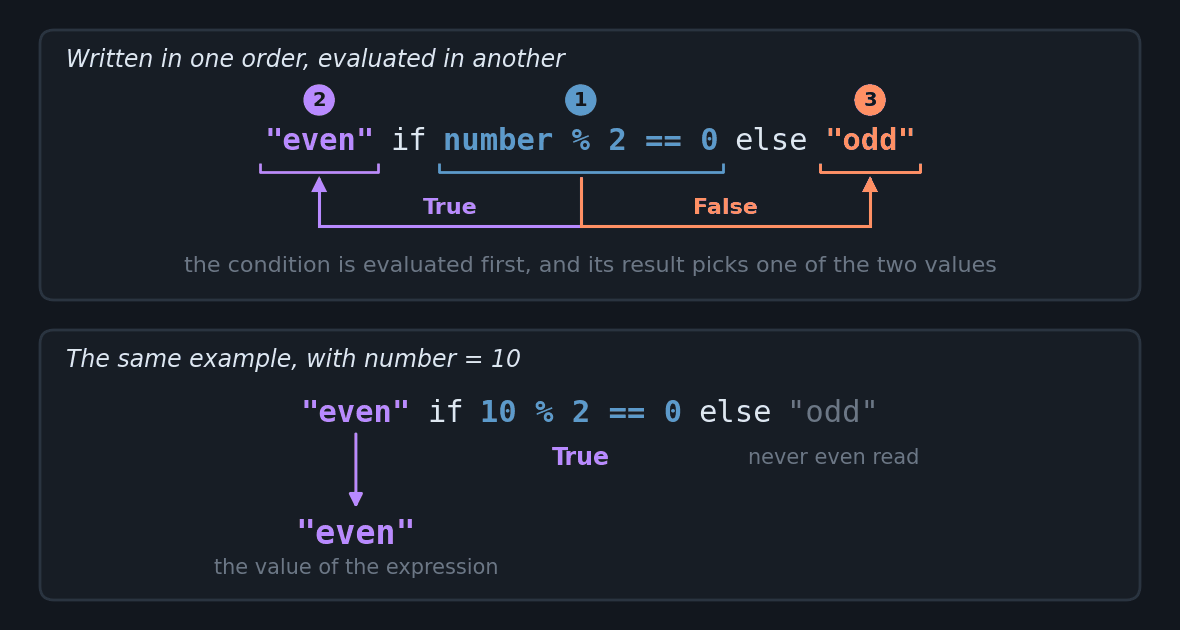
The figure below shows the three operands and the order Python evaluates them in.
Why Is It Called “Ternary”?#
Most operators we have seen so far are binary (they act on two values: 2 + 3, x and y). We have also seen unary operators (acting on a single value: -x, not x). The ternary operator acts on three operands: the value returned when the condition is true, the condition itself, and the value returned when the condition is false.
More Examples#
Example 1: Discount based on a minimum amount
purchase_amount = 250
discount = 0.10 if purchase_amount > 200 else 0.05
print(f"Discount: {discount * 100:.0f}%")
Output:
Discount: 10%
Example 2: Pass/fail message
grade = 7.5
result = "Approved" if grade >= 6 else "Failed"
print(result)
Output:
Approved
Example 3: Absolute value without abs()
x = -8
modulus = x if x >= 0 else -x
print(modulus)
Output:
8
Nesting (Use With Care)#
Ternaries can be chained, but readability drops fast. When you need more than two options, prefer block if/elif/else (which we will see in the next chapter):
grade = 8.5
concept = "A" if grade >= 9 else "B" if grade >= 7 else "C" if grade >= 5 else "D"
print(concept)
Output:
B
How to read the chain. The else of a ternary accepts any expression, and a ternary is an expression. So what comes after the first else is another whole ternary, and so on. Writing the parentheses Python assumes makes it visible:
"A" if grade >= 9 else ("B" if grade >= 7 else ("C" if grade >= 5 else "D"))
Evaluation follows the same rule as the basic example, one level at a time: it tests grade >= 9; since that is false, the value of the expression becomes the ternary inside the first parentheses, which tests grade >= 7. Since 8.5 >= 7 is true, the result is "B" and the remaining levels are never even read.
The same decision as a block. Each else followed by a new ternary becomes an elif, and the last else stays as the final else:
grade = 8.5
if grade >= 9:
    concept = "A"
elif grade >= 7:
    concept = "B"
elif grade >= 5:
    concept = "C"
else:
    concept = "D"
print(concept)
Output:
B
Both forms produce the same result for any grade. The difference is that the block version puts each condition at the start of a line, in the order they are tested, while the chained one forces you to read to the end to find out how many levels there are.
Tip - When to use the ternary
Use it when the choice between two values fits comfortably on one line and makes the code more direct.
Avoid it when the condition or the values are long — block
if/elsereads better.Remember that the ternary is an expression (it produces a value that can be assigned or passed to a function), while block
if/elseis a statement (it executes code). This difference becomes important in the next chapter, when we combine ternaries with list comprehensions.
Membership Operators#
So far, we have learned how to do calculations, comparisons, and combine conditions. But we often need to check whether an element belongs or does not belong to a collection of data. For example: checking whether a letter is in a word, whether a name is in a list of approved candidates, or whether a product is available in stock.
For these situations, Python provides the membership operators: in and not in.
Membership Operators Table#
Operator |
Symbol |
Description |
Example |
Result |
|---|---|---|---|---|
Member of |
|
Checks if a value is present in the sequence |
|
|
Not member of |
|
Checks if a value is not present in the sequence |
|
|
Visual demonstration of the in and not in operators
Supported Sequence Types#
Membership operators work with several types of collections:
Strings: check whether a letter or word is contained
Lists: check whether an element exists in the list
Tuples: check membership in tuples
Sets: check membership (very efficient)
Dictionaries: check whether a key exists (not values!)
Basic Examples#
Checking in strings:
phrase = "Python is amazing"

print('P' in phrase)
print('Java' in phrase)
print('python' in phrase)
print('Python' in phrase)

# Ignoring upper/lowercase
print('python' in phrase.lower())
Output:
True
False
False
True
True
Checking in lists:
fruits = ['apple', 'banana', 'orange', 'grape']

print('banana' in fruits)
print('watermelon' in fruits)
print('watermelon' not in fruits)
Output:
True
False
True
Checking in dictionaries:
stock = {'rice': 50, 'beans': 30, 'pasta': 40}

# Checks the KEYS (not the values)
print('rice' in stock)
print('sugar' in stock)
print(50 in stock)
Output:
True
False
False
Practical Examples#
Example 1: Vowel validation
letter = input("Enter a letter: ").lower()
vowels = 'aeiou'

if letter in vowels:
    print(f"'{letter}' is a vowel.")
else:
    print(f"'{letter}' is a consonant.")
Sample run:
Enter a letter: A
'a' is a vowel.
Example 2: Menu of options
valid_options = ['1', '2', '3', '4', 'exit']
option = input("Choose an option (1-4 or 'exit'): ")

if option in valid_options:
    print(f"You chose: {option}")
else:
    print("Invalid option! Please try again.")
Sample run:
Choose an option (1-4 or 'exit'): 2
You chose: 2
Example 3: Permissions list (blacklist/whitelist)
blocked_users = ['spam_user', 'bot123', 'fake_account']
user = input("Enter your username: ").lower()

if user in blocked_users:
    print("Access denied! User is blocked.")
else:
    print("Welcome!")
Sample run:
Enter your username: bot123
Access denied! User is blocked.
Example 4: Checking multiple keywords
text = input("Enter a sentence: ").lower()
forbidden_words = ['spam', 'scam', 'fraud']

# Check whether any forbidden word is in the text
contains_spam = any(word in text for word in forbidden_words)

if contains_spam:
    print("Message blocked! It contains forbidden terms.")
else:
    print("Message sent successfully!")
Sample run:
Enter a sentence: Special offer with no scam
Message blocked! It contains forbidden terms.
Example 5: Department-based access control
# Access levels by department
admin_departments = ['IT', 'HR', 'Board']
department = input("Enter your department: ")

if department in admin_departments:
    print(f"ADMINISTRATOR access granted for {department}")
else:
    print(f"USER access granted for {department}")
Sample run:
Enter your department: IT
ADMINISTRATOR access granted for IT
Difference Between in for Strings and Lists#
It is important to understand how in behaves differently in strings and lists:
# In strings: checks for a substring
print('ana' in 'banana')

# In lists: checks for the full element
print('ana' in ['ba', 'na', 'na'])
print('na' in ['ba', 'na', 'na'])
Output:
True
False
True
Combining With Other Operators#
Membership operators work well combined with logical operators:
# Movie rating system
age = int(input("Enter your age: "))
movie = input("Enter the movie name: ")

adult_movies = ['Movie A', 'Movie B', 'Movie C']

# Can watch if: NOT an adult movie OR age 18+
can_watch = (movie not in adult_movies) or (age >= 18)

if can_watch:
    print(f"You can watch '{movie}'")
else:
    print(f"You cannot watch '{movie}' - rated 18+")
Sample run:
Enter your age: 16
Enter the movie name: Kids Movie
You can watch 'Kids Movie'
Important Notes#
Case-Sensitive:
The check distinguishes upper from lowercase:
print('Python' in 'python')
print('Python'.lower() in 'python')
Output:
False
True
In Dictionaries:
The in operator checks only the keys, not the values:
data = {'name': 'John', 'age': 25}
print('name' in data)
print('John' in data)
print('John' in data.values())
Output:
True
False
True
Strings and Substrings:
In strings, in finds substrings, not just individual characters:
print('thon' in 'Python')
Output:
True
Membership operators are extremely useful for validations, filters, and membership checks, making code cleaner and more readable!
Assignment Operators#
We have already seen the simple assignment operator (=) when declaring variables. But Python offers combined assignment operators that make our code more concise and efficient. These operators perform an operation and assign the result to the variable in a single step.
Assignment Operators Table#
Operator |
Description |
Example |
Equivalent |
Result |
|---|---|---|---|---|
|
Simple assignment |
|
- |
|
|
Add and assign |
|
|
|
|
Subtract and assign |
|
|
|
|
Multiply and assign |
|
|
|
|
Divide and assign |
|
|
|
|
Integer divide and assign |
|
|
|
|
Modulo and assign |
|
|
|
|
Exponentiate and assign |
|
|
|
Why Use Combined Assignment Operators?#
Combined operators make code:
Shorter: less typing
More readable: clearer intent
More efficient: in some cases, can be optimized by the interpreter
# Traditional form
counter = 0
counter = counter + 1
print(counter)

# Combined operator form (better)
counter = 0
counter += 1
print(counter)
Output:
1
1
Basic Examples#
Increment and Decrement:
# Increment
points = 10
points += 5
print(f"Points: {points}")

# Decrement
lives = 3
lives -= 1
print(f"Lives remaining: {lives}")
Output:
Points: 15
Lives remaining: 2
Math Operations:
# Multiplication
price = 50.0
price *= 2
print(f"Price: $ {price}")

# Division
amount = 100
amount /= 4
print(f"Amount: {amount}")

# Exponentiation
base = 2
base **= 3
print(f"Result: {base}")
Output:
Price: $ 100.0
Amount: 25.0
Result: 8
Practical Examples#
Example 1: Game scoring system
points = 0
print(f"Initial points: {points}")

# Player answers an easy question correctly
points += 10
print(f"Easy question right! Points: {points}")

# Player answers a hard question correctly
points += 50
print(f"Hard question right! Points: {points}")

# Player uses a hint (loses half of the points)
points //= 2
print(f"Used hint! Points: {points}")
Output:
Initial points: 0
Easy question right! Points: 10
Hard question right! Points: 60
Used hint! Points: 30
Example 2: Compound interest calculation
initial_capital = float(input("Initial capital: $ "))
interest_rate = float(input("Interest rate (% per month): "))
months = int(input("Number of months: "))

capital = initial_capital * (1 + interest_rate / 100) ** months

print(f"Final capital: $ {capital:.2f}")
print(f"Profit: $ {capital - initial_capital:.2f}")
Sample run:
Initial capital: $ 1000
Interest rate (% per month): 5
Number of months: 3
Final capital: $ 1157.63
Profit: $ 157.63
The ** exponent applies all three months of interest at once. To follow the value month by month, instead of only the total, you need repetition, which we will see in the next chapter.
Example 3: Character counter
This example uses for to walk through the text one character at a time. Do not worry about the repetition syntax now: it is the subject of the for Loop Structure in the next chapter.
text = input("Enter some text: ")

vowels = 0
consonants = 0
spaces = 0

for char in text.lower():
    if char in 'aeiou':
        vowels += 1
    elif char.isalpha():
        consonants += 1
    elif char == ' ':
        spaces += 1

print(f"Vowels: {vowels}")
print(f"Consonants: {consonants}")
print(f"Spaces: {spaces}")
Sample run:
Enter some text: Python is amazing
Vowels: 6
Consonants: 9
Spaces: 2
Example 4: Progressive discount calculator
original_price = float(input("Product price: $ "))
quantity = int(input("Quantity: "))

# Progressive discount by quantity
discount_percent = 0

if quantity >= 10:
    discount_percent += 10
if quantity >= 20:
    discount_percent += 5
if quantity >= 50:
    discount_percent += 10

total_price = original_price * quantity
total_price *= (1 - discount_percent / 100)

print(f"\nOriginal price: $ {original_price * quantity:.2f}")
print(f"Discount: {discount_percent}%")
print(f"Final price: $ {total_price:.2f}")
Sample run:
Product price: $ 50
Quantity: 25

Original price: $ 1250.00
Discount: 15%
Final price: $ 1062.50
Assignment Operators with Strings#
The += and *= operators also work with strings:
# Concatenation with +=
message = "Hello"
message += ", world!"
print(message)

# Repetition with *=
separator = "-"
separator *= 30
print(separator)

# Building text gradually
report = "Report:\n"
report += "- Item 1\n"
report += "- Item 2\n"
report += "- Item 3\n"
print(report)
Output:
Hello, world!
------------------------------
Report:
- Item 1
- Item 2
- Item 3
Assignment Operators with Lists#
With lists, combined operators can append elements or concatenate lists:
# Append elements with +=
numbers = [1, 2, 3]
numbers += [4, 5]
print(numbers)

# Repeat list with *=
sequence = [0]
sequence *= 5
print(sequence)
Output:
[1, 2, 3, 4, 5]
[0, 0, 0, 0, 0]
Important Notes#
Precedence:
Assignment operators have low precedence and are evaluated from right to left:
x = y = 10
print(f"x = {x}, y = {y}")
Output:
x = 10, y = 10
Python does not have ++ or --:
Important - Increment Operators
Unlike C or Java, Python does not have unary increment/decrement operators (++ and --). Use += and -= instead!
# Wrong in Python
# counter++  # Error!
# counter--  # Error!

# Correct in Python
counter = 0
counter += 1
print(counter)
counter -= 1
print(counter)
Output:
1
0
In-place modification:
Combined operators modify the original variable:
list_a = [1, 2, 3]
list_b = list_a
list_a += [4, 5]

print(list_a)
print(list_b)
Output:
[1, 2, 3, 4, 5]
[1, 2, 3, 4, 5]
Both lists changed because the two names point to the same object: list_b = list_a copies nothing, it only gives a second name to the same list. When you want an independent copy, clone the list with .copy() or with the list() constructor:
list_a = [1, 2, 3]
list_b = list_a.copy()  # creates a new object in memory, with the same values
list_a += [4, 5]

print(list_a)
print(list_b)
Output:
[1, 2, 3, 4, 5]
[1, 2, 3]
Only the middle line changed, and now list_b stays untouched.
When to Use Combined Assignment Operators#
Use combined operators when:
You are updating a variable based on its previous value
The code becomes clearer and more concise
You are doing repetitive operations (loops, counters, accumulators)
# Good use: accumulator, adding to the previous value
total = 0
total += 10
total += 25
total += 7
print(f"Total: {total}")

# Good use: counter, subtracting on each attempt used
attempts = 3
attempts -= 1
print(f"Attempts left: {attempts}")
attempts -= 1
print(f"Attempts left: {attempts}")
Sample output (with the correct password):
Enter the password (3 attempts): 1234
Access granted!
Combined assignment operators are powerful tools that make code more elegant and expressive, especially in loops and repetitive operations!
Bitwise Operations#
So far we have worked with operators that handle numbers in a “natural” way — adding, subtracting, comparing. But there is an even more fundamental level: bitwise operations. These operations work directly on the binary representation of numbers (0s and 1s).
Although they may look advanced, bitwise operations matter in areas such as:
Cryptography: scrambling and protecting data
Data compression: reducing file size
Hardware communication: controlling electronic devices
Performance optimization: very fast operations in low-level systems
Image manipulation: pixel processing
Binary Representation#
Before getting into the operators, let’s recall how numbers are represented in binary:
# Convert decimal to binary
number = 5
binary = bin(number)
print(f"{number} in binary: {binary}")

# Convert binary to decimal
binary_string = "1101"
decimal = int(binary_string, 2)
print(f"{binary_string} in decimal: {decimal}")
Output:
5 in binary: 0b101
1101 in decimal: 13
Note: The
0bprefix indicates that the number is in binary format.
Other operators: Python also offers the bitwise inversion operator (
~), but it is rarely used in basic programming and will not be covered in this chapter.
Bit Shift Operators#
Shift operators move the bits of a number to the left or right. These operations are equivalent to multiplying or dividing by powers of 2.
Left Shift (<<)#
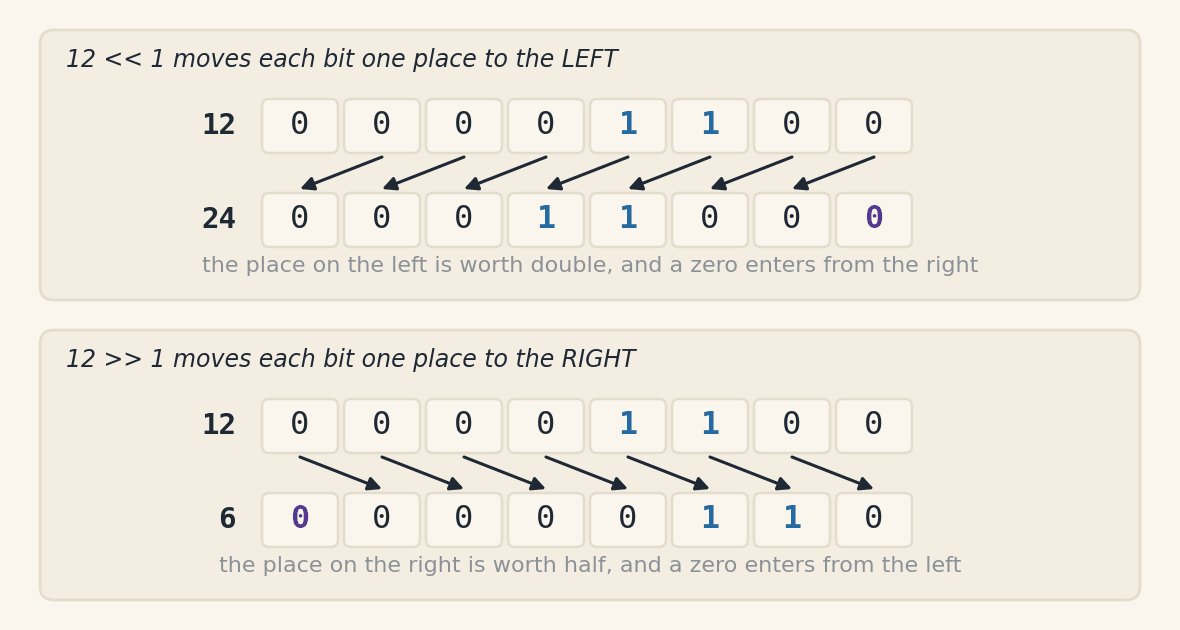
Moves the bits to the left, filling with zeros on the right. Each shifted position multiplies the number by 2.
number = 5

# Shift 1 position to the left
result1 = number << 1
print(f"{number} << 1 = {result1}")

# Shift 2 positions to the left
result2 = number << 2
print(f"{number} << 2 = {result2}")

# Shift 3 positions to the left
result3 = number << 3
print(f"{number} << 3 = {result3}")
Output:
5 << 1 = 10
5 << 2 = 20
5 << 3 = 40
Formula: n << k is equivalent to n * (2 ** k)
Right Shift (>>)#
Moves the bits to the right, discarding the bits that “fall off”. Each shifted position divides the number by 2 (integer division).
number = 20

# Shift 1 position to the right
result1 = number >> 1
print(f"{number} >> 1 = {result1}")

# Shift 2 positions to the right
result2 = number >> 2
print(f"{number} >> 2 = {result2}")

# Shift 3 positions to the right
result3 = number >> 3
print(f"{number} >> 3 = {result3}")
Output:
20 >> 1 = 10
20 >> 2 = 5
20 >> 3 = 2
Formula: n >> k is equivalent to n // (2 ** k)
Visualizing Shifts#
Let’s see visually what happens to the bits:
The figure below shows both directions on the same number. They are the same digits, one place forward or back, and the value changes because each cell is worth twice the one to its right.
number = 12

print(f"Original number: {number:4d} -> {bin(number)}")
print(f"Shifted << 1:    {number << 1:4d} -> {bin(number << 1)}")
print(f"Shifted << 2:    {number << 2:4d} -> {bin(number << 2)}")
print()
print(f"Original number: {number:4d} -> {bin(number)}")
print(f"Shifted >> 1:    {number >> 1:4d} -> {bin(number >> 1)}")
print(f"Shifted >> 2:    {number >> 2:4d} -> {bin(number >> 2)}")
Output:
Original number:   12 -> 0b1100
Shifted << 1:      24 -> 0b11000
Shifted << 2:      48 -> 0b110000

Original number:   12 -> 0b1100
Shifted >> 1:       6 -> 0b110
Shifted >> 2:       3 -> 0b11
The two animations below repeat the shift step by step, with the numbers the examples above used. The cell marked in holds the zero that is about to enter, and the cell marked out receives the digit that leaves the byte.
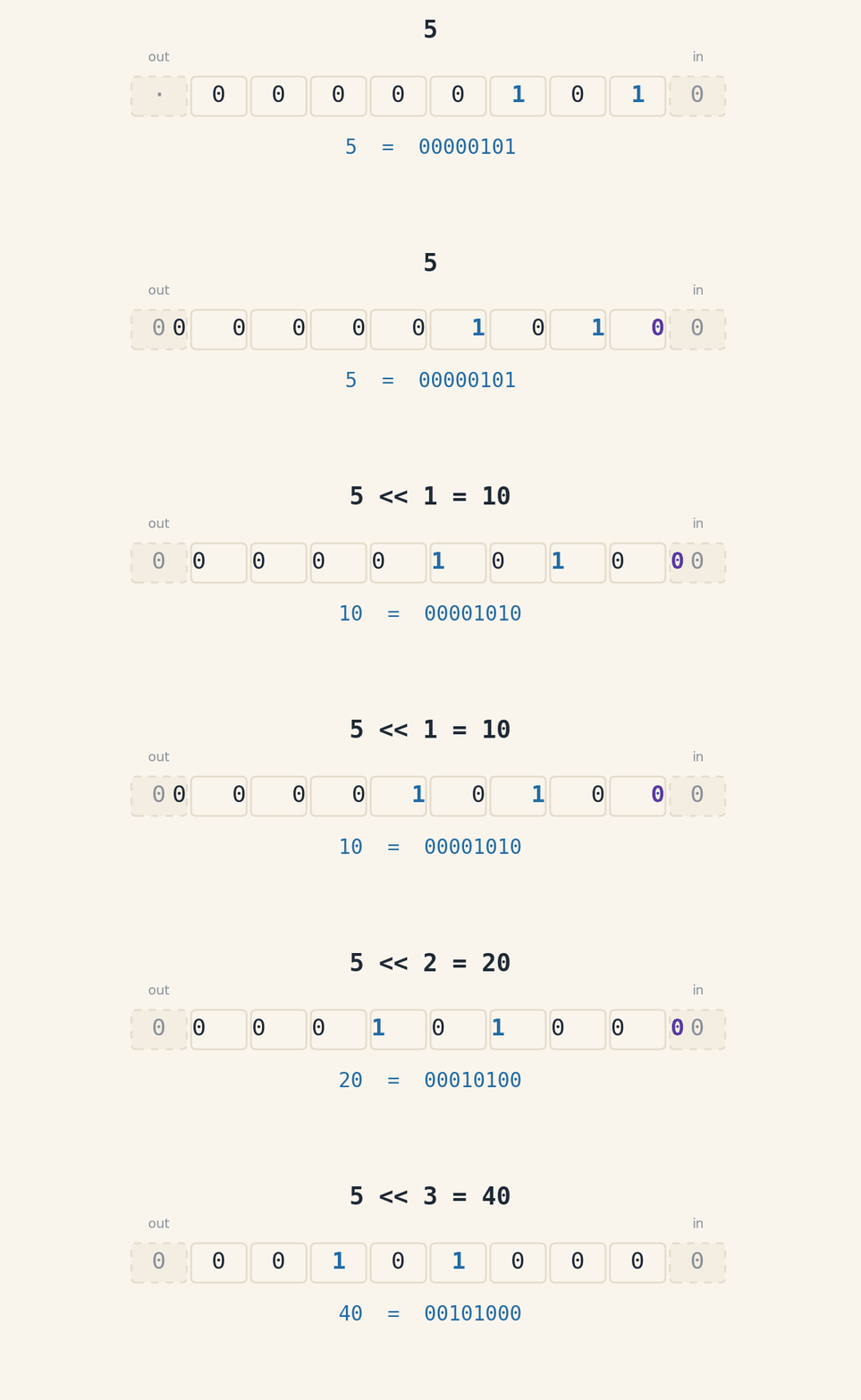

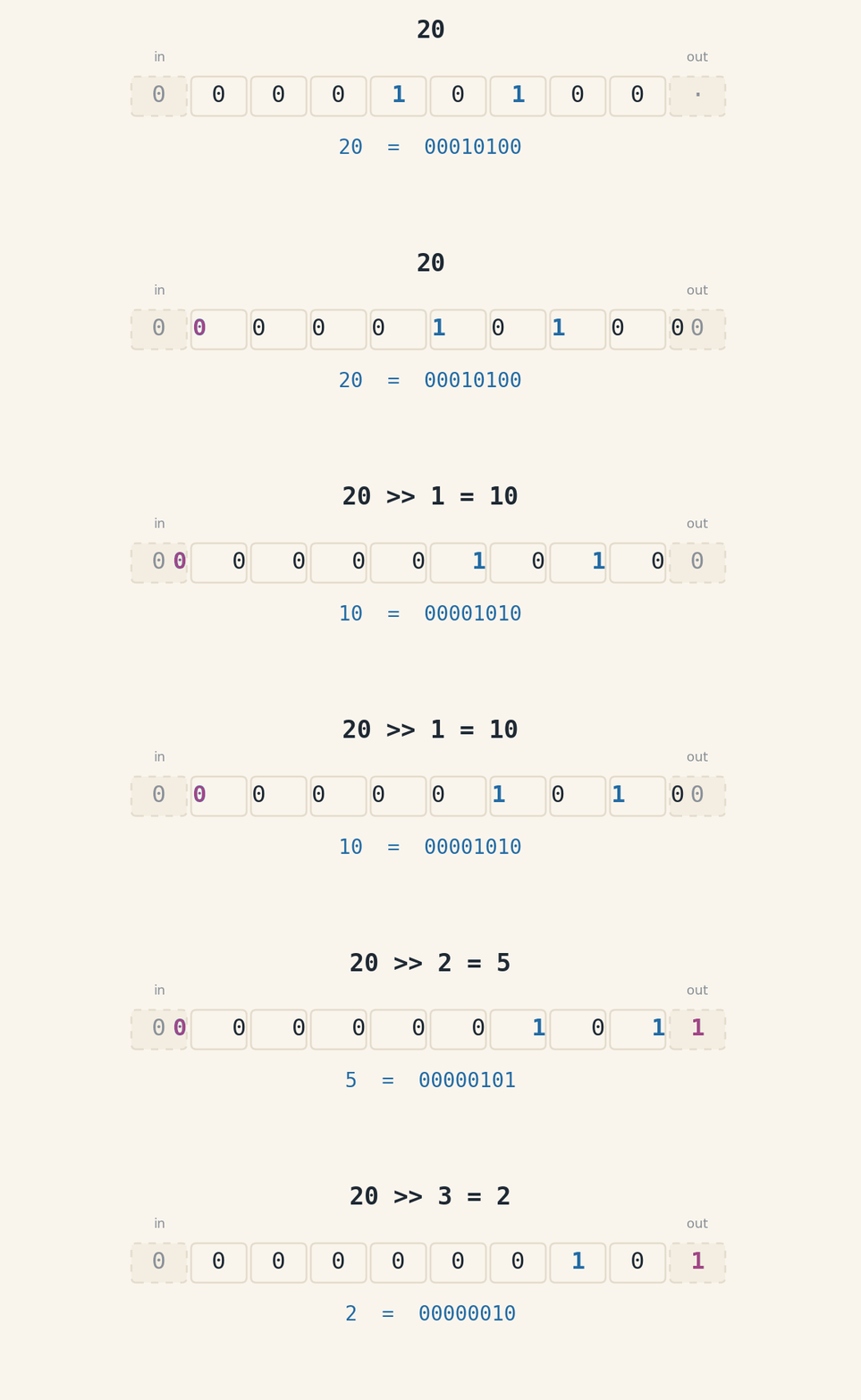

Look at the last frame of the second animation. The digit that leaves is a 1, and it does not come back: 2 << 3 gives 16, not 20. That is what integer division means here, and it is the difference between >> and ordinary division.
Practical Examples#
Example 1: Fast multiplication and division by powers of 2
# Multiply by 2, 4, 8...
value = 7
print(f"{value} * 2 = {value << 1}")
print(f"{value} * 4 = {value << 2}")
print(f"{value} * 8 = {value << 3}")

print()

# Divide by 2, 4, 8...
value = 100
print(f"{value} / 2 = {value >> 1}")
print(f"{value} / 4 = {value >> 2}")
print(f"{value} / 8 = {value >> 3}")
Output:
7 * 2 = 14
7 * 4 = 28
7 * 8 = 56

100 / 2 = 50
100 / 4 = 25
100 / 8 = 12
Example 2: Check whether a number is a power of 2
# A number is a power of 2 if, in binary, it has a single bit set to 1.
# The trick: n & (n - 1) clears the rightmost bit 1.
number = 16
print(f"{number} in binary:      {bin(number)[2:]}")
print(f"{number - 1} in binary:      {bin(number - 1)[2:]}")
print(f"{number} & {number - 1} = {number & (number - 1)}")
print(f"Is it a power of 2? {number > 0 and (number & (number - 1)) == 0}")

number = 15
print(f"\n{number} & {number - 1} = {number & (number - 1)}")
print(f"Is it a power of 2? {number > 0 and (number & (number - 1)) == 0}")
Output:
16 in binary:      10000
15 in binary:      1111
16 & 15 = 0
Is it a power of 2? True

15 & 14 = 14
Is it a power of 2? False
Example 3: Convert between binary and decimal
print("Decimal -> Binary conversions:")
print(f"Decimal: {5:3d} | Binary: {bin(5)[2:]:>8s}")
print(f"Decimal: {28:3d} | Binary: {bin(28)[2:]:>8s}")
print(f"Decimal: {100:3d} | Binary: {bin(100)[2:]:>8s}")

print("\nBinary -> Decimal conversions:")
print(f"Binary: {'1010':>8s} | Decimal: {int('1010', 2)}")
print(f"Binary: {'11001':>8s} | Decimal: {int('11001', 2)}")
Output:
Decimal -> Binary conversions:
Decimal:   5 | Binary:      101
Decimal:  28 | Binary:    11100
Decimal: 100 | Binary:  1100100

Binary -> Decimal conversions:
Binary:     1010 | Decimal: 10
Binary:    11001 | Decimal: 25
Other Bitwise Operators#
While we did not detail them in this introductory chapter, Python offers other bit-manipulation operators:
&(AND): returns 1 only if both bits are 1|(OR): returns 1 if at least one bit is 1^(XOR): returns 1 if the bits are different~(NOT): inverts every bit
These operators are extremely useful in low-level programming and we will see more of them in advanced chapters.
When to Use Bitwise Operations?#
Most of the time you will use the regular arithmetic operators. Use bitwise operations when:
You need extreme performance in specific calculations
You work with low-level communication protocols
You manipulate flags and bit masks
You implement cryptography or compression algorithms
You work with image processing
For beginners, understanding the concept matters more than mastering every detail. As you advance in programming, these operations will become more relevant!
Operator Precedence (Summary)#
Throughout this chapter, we have seen many kinds of operators. When we combine several of them in a single expression, Python needs to decide which operation to run first. That order is determined by operator precedence.
Understanding precedence is crucial to:
Write correct expressions
Read and understand other people’s code
Avoid subtle bugs in complex calculations
Full Precedence Table#
The table below lists the operators in precedence order, from highest (evaluated first) to lowest (evaluated last):
Priority |
Operator(s) |
Type |
Example |
Description |
|---|---|---|---|---|
1st (Highest) |
|
Parentheses |
|
Group expressions and force evaluation |
2nd |
|
Exponentiation |
|
Power |
3rd |
|
Unary |
|
Negation, bit inversion, positive sign |
4th |
|
Multiplicative |
|
Multiplication, division, integer division, modulo |
5th |
|
Additive |
|
Addition and subtraction |
6th |
|
Bit shift |
|
Left/right shift |
7th |
|
Bitwise AND |
|
Bitwise AND |
8th |
|
Bitwise XOR |
|
Bitwise exclusive OR |
9th |
|
Bitwise OR |
|
Bitwise OR |
10th |
|
Relational |
|
Comparisons |
11th |
|
Membership |
|
Membership checks |
12th |
|
Logical NOT |
|
Logical inversion |
13th |
|
Logical AND |
|
Logical AND |
14th |
|
Logical OR |
|
Logical OR |
15th (Lowest) |
|
Assignment |
|
Value assignment |
Important Rules#
Parentheses are your friends
Rule of Thumb - Operator Precedence
When in doubt about evaluation order, use parentheses! They make code more readable and ensure the desired order.
# Without parentheses - can be confusing
result = 10 + 5 * 2 - 3
print(result)

# With parentheses - clear intent
result = 10 + (5 * 2) - 3
print(result)

# Changing the order
result = (10 + 5) * (2 - 3)
print(result)
Output:
17
17
-15
Same precedence: left to right
When operators share the same precedence, they are evaluated left to right:
result = 10 - 5 - 2
print(result)

result = 100 / 10 / 2
print(result)
Output:
3
5.0
Exception: Exponentiation (**) is evaluated right to left:
result = 2 ** 3 ** 2
print(result)
Output:
512
Assignment has the lowest precedence
Assignment operators are always evaluated last:
x = 5 + 3 * 2
print(x)
Output:
11
Step-by-Step Practical Examples#
Example 1: Expression with multiple operators
result = 2 + 3 * 4 ** 2 - 10 / 2
print(result)
Evaluation order:
4 ** 2= 16 (exponentiation - highest)3 * 16= 48 (multiplication)10 / 2= 5.0 (division)2 + 48= 50 (addition - left to right)50 - 5.0= 45.0 (subtraction)
Output:
45.0
Example 2: Combining logical and relational operators
age = 25
has_license = True
result = age >= 18 and has_license or not has_license
print(result)
Evaluation order:
age >= 18= True (relational)not has_license= False (logical NOT)True and True= True (and - left to right)True or False= True (or)
Output:
True
Example 3: Bitwise and arithmetic operations
result = 5 + 3 << 2
print(result)
Evaluation order:
5 + 3= 8 (addition has higher precedence than shift)8 << 2= 32 (left shift)
Output:
32
But if we want to shift 3 first:
result = 5 + (3 << 2)
print(result)
Output:
17
Complete Example: Complex Expression#
Let’s evaluate an expression that combines many kinds of operators:
a = 10
b = 5
c = 2

result = a + b * c ** 2 >= 30 and not b < c or a // b == 2
print(result)
Step by step:
c ** 2= 4 (exponentiation - highest)b * 4= 20 anda // b= 2 (multiplication and integer division)a + 20= 30 (addition)30 >= 30= True,b < c= False,2 == 2= True (relational)not False= True (logical NOT)True and True= True (and)True or True= True (or)
Output:
True
Tips for Writing Clear Code#
Use parentheses generously
# Less clear
x = 10
y = 5
z = 0
if x > 5 and y < 10 or z == 0:
    print("Condition is true")

# Clearer
if (x > 5 and y < 10) or (z == 0):
    print("Condition is true")
Output:
Condition is true
Condition is true
Use intermediate variables
# Less clear
a = 10
b = 5
c = 3
d = 20
e = 100
f = 50
g = 60
h = True

if a + b * c > d and e / f < g or h:
    print("Result: True")

# Clearer
weighted_sum = a + b * c
ratio = e / f
if (weighted_sum > d and ratio < g) or h:
    print("Result: True")
Output:
Result: True
Result: True
Rule of Thumb - Operator Precedence
Operator precedence is a powerful tool, but don’t abuse it! Clear code beats “clever” code. When in doubt:
Use parentheses
Break complex expressions apart
Add explanatory comments
With practice, you will internalize these precedences naturally and write code that is both efficient and readable!
Exercises#
Before starting the exercises, it’s important to note that for tests with multiple inputs on the same line, it’s useful to use the .split() method. This method divides the string received by input() into substrings, using whitespace as delimiters. It returns a list containing the resulting substrings.
For example, for an input: 1 1 6 6 4 4
input_data = input().split()
print(input_data)
When executing the above code with the input 1 1 6 6 4 4, the output will be:
['1', '1', '6', '6', '4', '4']
Given the mathematical expression: \(a = 4 * (2 + 3) - 7\). Create a variable called
aand assign to it the result of this expression. Then, create a variable calledband assign to it the value ofamultiplied by 2. Finally, print the values ofaandb.
# Test 1
Input: No input
Output:
The value of 'a' is: 13
The value of 'b' is: 26
Write a program that asks the user for a positive integer between 100 and 1000. Then, the program should calculate the remainder of dividing this number by 5, store the result in a variable called remainder, and print this value.
Make sure the program handles invalid inputs appropriately. If the user enters a negative number or a number outside the specified range, display the following error message: “Please enter a positive integer between 100 and 1000.”
# Test 1
Input: 172
Output: The remainder of dividing 172 by 5 is 2.

# Test 2
Input: -10
Output: Please enter a positive integer between 100 and 1000.

# Test 3
Input: 2000
Output: Please enter a positive integer between 100 and 1000.

# Test 4
Input: 500
Output: The remainder of dividing 500 by 5 is 0.
Write a program that converts a temperature from Celsius to Fahrenheit. Use the formula: \(F = \frac{9}{5} * C + 32\).
Ask the user to enter the temperature in Celsius.
Then, convert the entered temperature to Fahrenheit using the provided formula.
Finally, display the conversion result to the user, formatted with 2 decimal places.
# Test 1
Input: 20.5
Output: The temperature in Fahrenheit is: 68.90

# Test 2
Input: 0.75
Output: The temperature in Fahrenheit is: 33.35
Write a program that receives an integer between 10 and 20 as input. The program should convert this number to its binary representation, removing the
'0b'prefix from the conversion. Then, each bit of this binary representation will be saved in a list, where each position of the list will contain one of the bits. Finally, the program should print the result.
# Test 1
Input: 10
Output: ['1', '0', '1', '0']

# Test 2
Input: 16
Output: ['1', '0', '0', '0', '0']

# Test 3
Input: 34
Output: The entered number is not within the allowed range.
Using tuples, you should receive the coordinates of a rectangle in the Cartesian plane, where
(x_min, y_min)represents the lower left corner and(x_max, y_max)represents the upper right corner. Additionally, you have a point represented by a pair of coordinates(x, y).
Your task is to write a program that determines if the point is inside, touching the edge, or outside the rectangle. The program should print a message to standard output indicating the verification result.
See the didactic ASCII drawing example for Test 1:
The
+represents the rectangle’s corners.The
.represents the point.The rectangle’s coordinates are
(x_min, y_min) = (1,1)and(x_max, y_max) = (6,6).The point’s coordinates are
(x, y) = (4,4).
7 |
6 |   +--------------+ (6,6)
5 |   |              |
4 |   |       .(4,4) |
3 |   |              |
2 |   |              |
1 |   +--------------+
0 | (1,1)
  -+--+--+--+--+--+--+--+
   0  1  2  3  4  5  6  7
# Test 1
Input: 1 1 6 6 4 4
Output: The point is inside the rectangle.

# Test 2
Input: 1 1 6 6 6 6
Output: The point is touching the edge of the rectangle.

# Test 3
Input: 1 1 6 6 0 1
Output: The point is outside the rectangle.

# Test 4
Input: 1 1 6 6 1 7
Output: The point is outside the rectangle.

# Test 5
Input: 1 1 6 6 6 1
Output: The point is touching the edge of the rectangle.

# Test 6
Input: 1 1 6 6 4 6
Output: The point is touching the edge of the rectangle.
Develop an authentication system that uses a dictionary called
users_passwordsto store the names and passwords of two users. The program should ask the user to enter their username and password. Then, the system should verify if the entered credentials match those stored in the dictionary. If the credentials are correct, the program should display a message “Login successful! Welcome, user.”. Otherwise, it should inform the user “Access denied. Invalid credentials.”.
Note: Only three users will be stored.
# Test 1
Input: user1 pass123 user2 abc456 user3 123456 user1 pass123
Output: >> Login successful! Welcome, user1.

# Test 2
Input: user1 pass143 user2 abc452 user3 654321 user2 123abc
Output: >> Access denied. Invalid credentials.
You are a biologist working in a natural park and are in charge of monitoring three species of migratory birds. Each species has a set of preferred islands for nesting during migration season. The species’ preferences are as follows:
Species 1: Prefers islands with IDs from 1 to 10.
Species 2: Prefers islands with IDs from 6 to 17.
Some islands are shared between species, which can lead to resource competition. Your job is to identify which islands are shared to implement conservation measures. Therefore, given a user input corresponding to one of the island IDs, check if this specific island is a competition area or if it’s exclusive to one of the species.
# Test 1
Input: 2
Output: Island 2 is exclusive to Species 1.
Therefore, it is not shared with other species.

# Test 2
Input: 6
Output: Island 6 is shared between species: 1 2.

# Test 3
Input: 10
Output: Island 10 is shared between species: 1 2.

# Test 4
Input: 17
Output:
Island 17 is exclusive to Species 2.
Therefore, it is not shared with other species.
Helping Hacker Neo Unravel the Truth About Reality.
The Matrix Story: Neo, a talented hacker, lives a double life. In the world he knows, he is an ordinary programmer. But what if there existed a hidden reality, a truth he never imagined?
After being contacted by Morpheus, Neo faces a critical choice: take the red pill and unravel the truth, or take the blue pill and continue living his life as always.
Program Phases:
Phase 1: The Choice ● ●
Neo must choose between the red pill and the blue pill. The choice is made through user input:
If the user types “Red”, Neo advances to phase 2.
If the user types “Blue”, Neo continues living his normal life and the program ends.
Phase 2: Unraveling Reality
Neo needs to question the reality he lives in. He must answer three questions:
Is the reality you know real? (Yes or No)
Is there a hidden reality? (Yes or No)
Do you want to unravel the truth? (Yes or No)
Phase 3: Exploring the Truth
If Neo answers “Yes” to all questions in phase 2, he will have access to information about the truth, and the program ends with a success message.
If Neo answers “No” to any of the questions in phase 2, he continues living his normal life, and the program ends with a message that the choice is his.
Test Examples:
# Test 1
Input: Red Yes No Yes
Output: The choice is yours, Neo continues living his normal life.

# Test 2
Input: Blue
Output: Neo continues living his normal life.

# Test 3
Input: Red No Yes Yes
Output: The choice is yours, Neo continues living his normal life.

# Test 4
Input: Red Yes Yes Yes
Output: Neo will have access to information about the truth.
You are a professional photographer. During a job, you come across a crystal clear lake surrounded by immense mountains. Your goal is to capture an epic aerial photo of the lake, using a drone. To ensure the best perspective, you need to determine the ideal flight height for the drone. For this, you’ll need to know the horizontal distance between you and the lake shore, as well as the vertical height you want to reach with the drone.
The hypotenuse, which represents the diagonal distance traveled by the drone, can be calculated using the Pythagorean Theorem:
\( Hypotenuse = \sqrt(AdjacentLeg^2 + OppositeLeg^2) \)
Your program will receive as input, in meters, the length of the adjacent leg and the opposite leg, and will calculate the corresponding hypotenuse.
Test Examples:
# Test 1
Input: 50 30
Output: 58.31 meters

# Test 2
Input: 40 20
Output: 44.72 meters

# Test 3
Input: 70 50
Output: 86.02 meters
A craftsman is working on two pieces: a metal cone and a wooden parallelepiped. To help him in his project, you need to develop a program that receives the dimension information in cm of these objects and calculates their volumes and masses.
Receive as input the following information for the cone: Height and Radius.
Then, receive the information for the parallelepiped: Height, Width, and Length.
Considering the appropriate mathematical formulas to calculate the volume of each object:
Cone Volume: \(V_{\text{cone}} = \frac{1}{3} \pi r^2 h\)
Parallelepiped Volume: \( V_{\text{parallelepiped}} = l \times w \times h \)
Calculate the mass of each object, considering that the metal density is 8 g/cm³ and the wood density is 0.5 g/cm³. Which of the two objects, cone or parallelepiped, is heavier? Consider that they have the same weight if the mass difference is less than 5g.
Test Examples:
# Test 1
Input: 10 5 19 8 6
Output: The cone is heavier at 2094.4g.

# Test 2
Input: 4 2 10 8 8
Output: The parallelepiped is heavier at 320.0g.

# Test 3
Input: 10 2.44 10 10 10
Output: The parallelepiped and cone have the same weight.

# Test 4
Input: 20 4.886 20 20 20
Output: The parallelepiped and cone have the same weight.