

Chapter 4: Control Flow and Random Numbers#
Nested Decision Structures#
Conditional structures allow the programmer to control the program’s flow, executing different blocks of code according to specific conditions. Let’s review the most used structures:
if: Evaluates a condition and executes a block of code if the condition is true.elif: Evaluates a condition and executes a block of code if the condition is true, but only if the previous condition is false.else: Executes a block of code if all previous conditions are false.
Comparison Chains:
Python allows comparison chains, which are a concise way to express multiple comparisons. For example, if a < b < c: is equivalent to if a < b and b < c:.
Nesting Conditional Structures:
The real power of conditional structures lies in the ability to nest them, creating complex logic to handle different scenarios.
Example: Age and Gender Verification
age = 25
gender = "Female"

if age >= 18:
    print("You are of legal age.")
    if gender == "Female":
        print("And also female.")
else:
    print("You are a minor.")
Code Output:
You are of legal age.
And also female.
In this example, we check the person’s age and gender. If the person is of legal age, we check the gender and print an additional message if it’s female.
Example: Grade Classification with Comparison Chains
grade = 75

if 90 <= grade < 100:
    print("Congratulations! You got an A.")
elif 80 <= grade < 90:
    print("Great! Your grade is B.")
elif 70 <= grade < 80:
    print("Good job! Your grade is C.")
else:
    print("Unfortunately, you did not reach the minimum grade. Your grade is D.")
Code Output:
Good job! Your grade is C.
In this example, the student’s grade is compared in intervals using comparison chains. The code checks which grade range the grade belongs to and prints a corresponding message. Since the grade is 75, the condition 70 <= grade < 80 is satisfied, and the program prints that the student got a C.
for Loop Structure#
The for loop is widely used in Python to iterate over data collections such as lists, tuples, dictionaries, and even strings.
But before exploring the for structure, it’s important to understand two fundamental concepts: the range() function and the in operator.
The range() Function#
The range() function is used to generate numeric sequences. It can be configured to define the start, end, and step between numbers in the sequence, using the following syntax:
range(start, end, step), where:start: The first number in the sequence (inclusive). The default value is 0.end: The last number in the sequence (exclusive).step: The difference between consecutive numbers. The default value is 1.
For example:
# Generates a list with numbers from 0 to 4
numbers_list = list(range(5))
print(numbers_list)
Code Output:
[0, 1, 2, 3, 4]
In this example, the range(5) function generates a sequence of numbers from 0 to 4, and we use list() to transform this sequence into a visible list.
Another example with an increment of 2:
# Generates a list with even numbers from 0 to 10
evens = list(range(0, 11, 2))
print(evens)
Code Output:
[0, 2, 4, 6, 8, 10]
Here, range(0, 11, 2) generates a sequence of even numbers from 0 to 10 with increments of 2.
The in Operator#
The in operator is used to check if a value is present in a sequence, and in the context of the for loop, it indicates that the loop should iterate over each element of that sequence.
For example:
if 3 in [1, 2, 3, 4, 5]:
    print("3 is present in the list")
Code Output:
3 is present in the list
Here, the in operator checks if the number 3 is inside the list. It returns True if the value is present and False otherwise.
The for Loop#
Now that we understand range() and the in operator, we can introduce the for loop. It allows iterating over each element of a sequence (list, string, tuple, etc.) and executing a block of code for each element:
for variable in sequence:
    # Block of code to be repeated
The variable takes on, in each iteration, the value of an element from the sequence, and the code block is executed for each of these values.
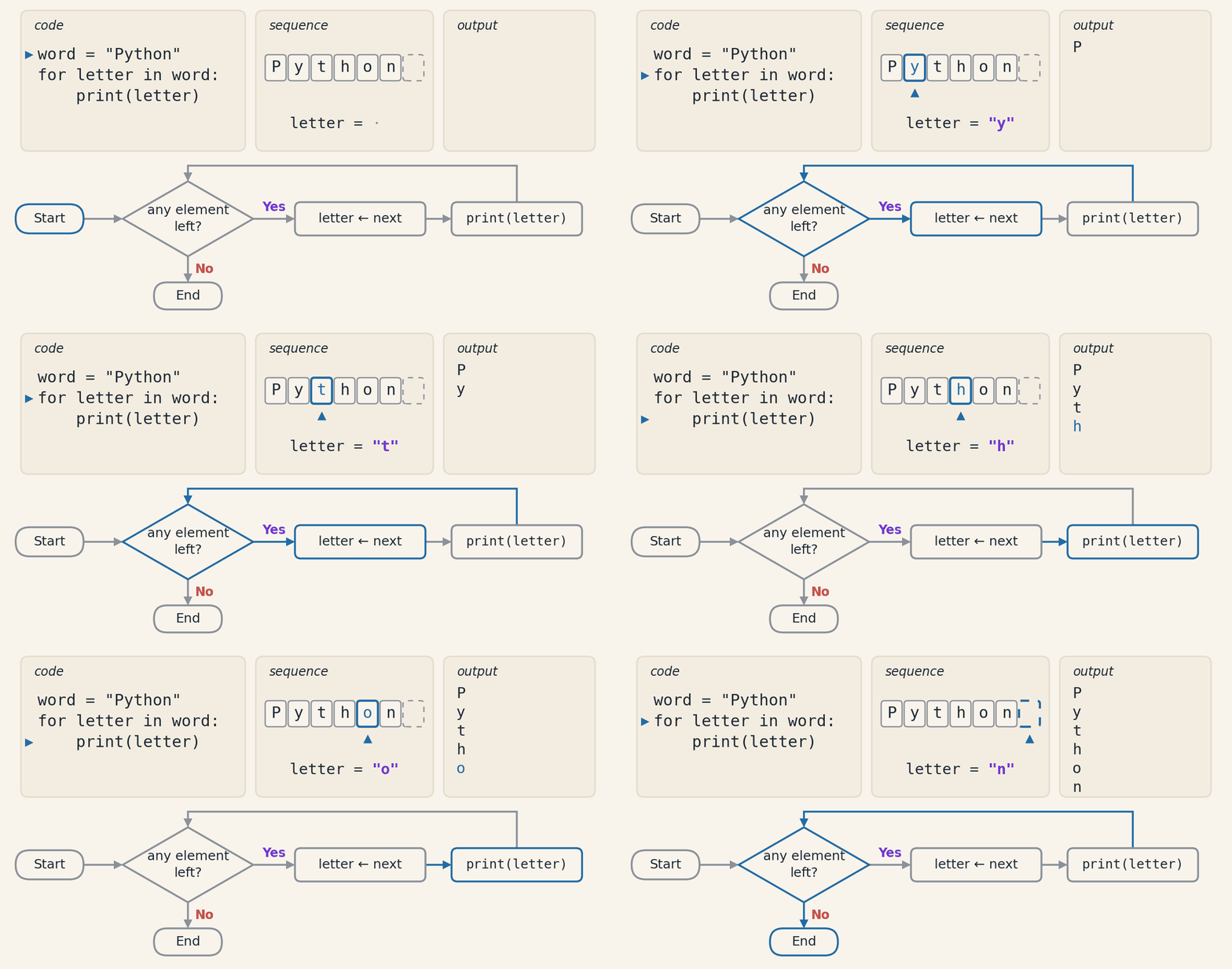
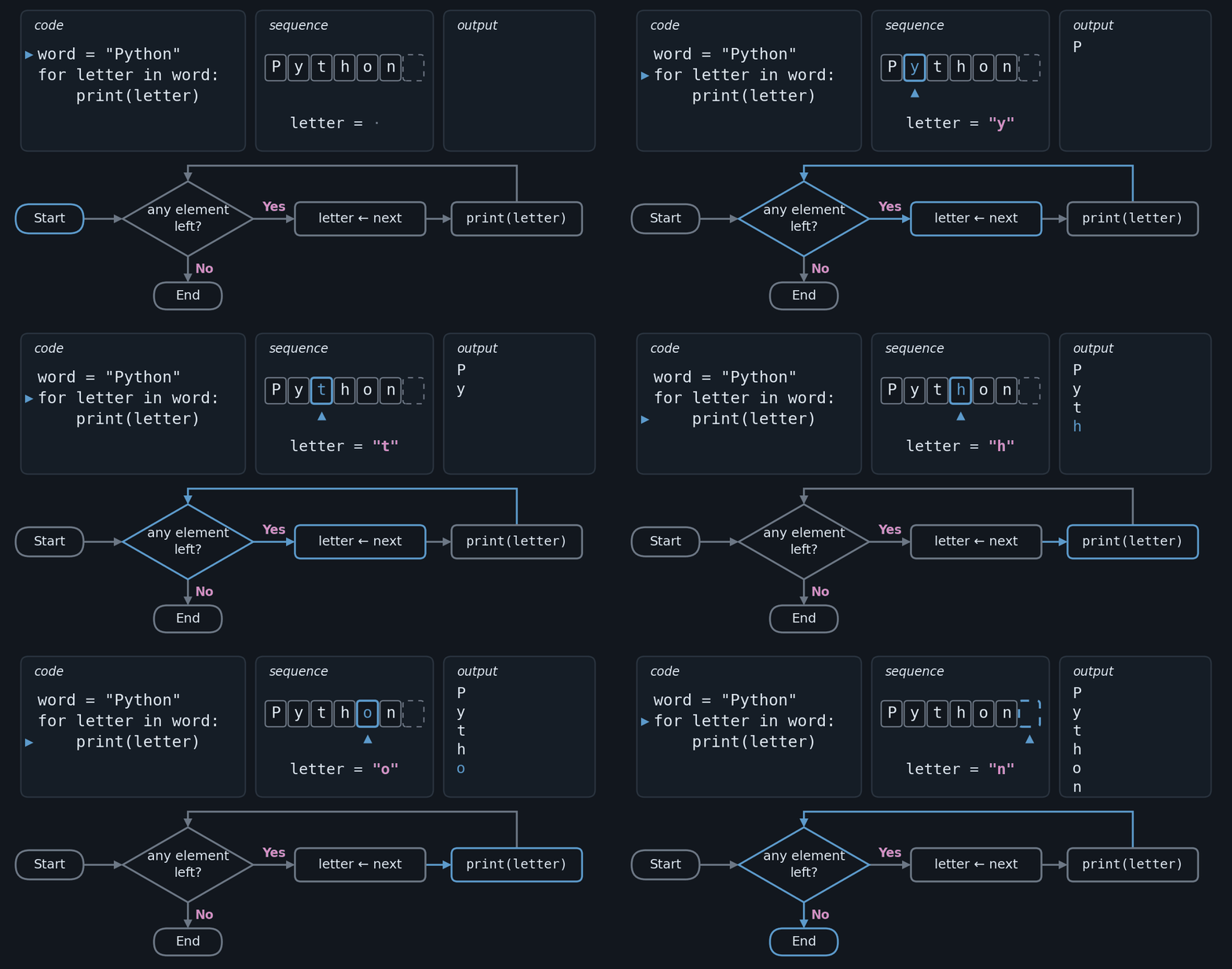
The animation below runs, step by step, the "Python" string example that appears later in this section. On each pass, the for checks whether there is still an element in the sequence. If there is, the variable receives the next one and the block runs. When the elements run out, the loop ends, and the variable keeps the last value.
Practical Example: Iterating Over a Numeric Sequence#
Based on what we’ve learned about range(), we can now use a for loop to iterate over the number sequence:
for i in range(5):
    print(i)
Code Output:
0
1
2
3
4
Here, the for loop iterates over the sequence generated by range(5), printing the numbers from 0 to 4.
Iterating Over a String#
We can use the for loop to iterate over the characters of a string:
word = "Python"
for letter in word:
    print(letter)
Code Output:
P
y
t
h
o
n
In this case, the for loop goes through each letter of the string "Python" and prints them individually.
Iterating Over a List of Numbers#
We can also use the for loop to go through a list of numbers and perform calculations:
numbers = [10, 20, 30, 40, 50]
for num in numbers:
    print(f"The double of {num} is {2 * num}.")
Code Output:
The double of 10 is 20.
The double of 20 is 40.
The double of 30 is 60.
The double of 40 is 80.
The double of 50 is 100.
In this example, we iterate over each number in the numbers list and print its double.
Executing a Specific Number of Times#
If we want to execute a block of code a fixed number of times, we can use for with range():
for _ in range(3):
    print("Hello, world!")
Code Output:
Hello, world!
Hello, world!
Hello, world!
The use of _ as a variable (also called a placeholder) indicates that we are not interested in the variable’s value during the iteration, only in the number of times the loop will be executed.
Iterating Over a Dictionary#
We can use the for loop to go through the keys and values of a dictionary:
student_grades = {"John": 8.5, "Mary": 9.0, "Peter": 7.8}
for name, grade in student_grades.items():
    print(f"{name} got a grade of {grade}.")
Code Output:
John got a grade of 8.5.
Mary got a grade of 9.0.
Peter got a grade of 7.8.
Here, the .items() method allows iterating through both the keys and values of the dictionary, printing the student’s name and their respective grade.
Understanding the Nested for#
In some cases, it may be necessary to use nested loops, that is, a for loop inside another. A practical example would be iterating over a matrix (or table) of numbers:
matrix = [
    [1, 2, 3], # First row
    [4, 5, 6], # Second row
    [7, 8, 9]  # Third row
]

for row in matrix:
    for number in row:
        print(number, end=' ') # Keeps the numbers on the same line together
    print() # Jumps to the next line
Code Output:
1 2 3
4 5 6
7 8 9
Here, we use an outer loop to go through each row of the matrix, and an inner loop to go through each number within the row. The combination of loops allows navigating more complex structures like this one.
Another Example of Nested for#
Let’s use a nested for to generate all possible combinations between two groups of elements. Imagine that you have two lists, one for colors and another for sizes, and you want to combine each color with each size.
colors = ["red", "blue", "green"]
sizes = ["S", "M", "L"]

for color in colors:
    for size in sizes:
        print(f"{color} - {size}")
Code Output:
red - S
red - M
red - L
blue - S
blue - M
blue - L
green - S
green - M
green - L
In this example, the outer loop iterates over each color and the inner loop iterates over each size, generating all possible combinations of color and size. This is a classic example of how the nested for can be useful for solving problems involving multiple datasets.
while Loop Structure#
The while loop is used to repeat a block of code as long as a specified condition is true, giving precise control over the execution flow.
The structure of the while loop has two parts. Its basic syntax is:
while condition:
    # Block of code to be repeated
Condition: A boolean expression that determines whether the loop should continue or stop.
Block of Code: The instructions that will be executed while the condition is true.
Example of a simple counter that counts to 5 using the while loop:
counter = 1
while counter <= 5:
    print(counter)
    counter += 1
Code Output:
1
2
3
4
5
Explaining the code:
counteris initialized with 1.The condition
counter <= 5is evaluated. If it isTrue, the block of code is executed.print(counter)prints the current value ofcounter.counter += 1incrementscounterby 1.The loop repeats while the condition is
True, untilcounteris greater than 5.
The animation below runs this code step by step. On each pass, the condition is evaluated again with the current value of counter. It is the increment at the end of the block that changes this value: when counter reaches 6, the condition gives False and the loop ends.
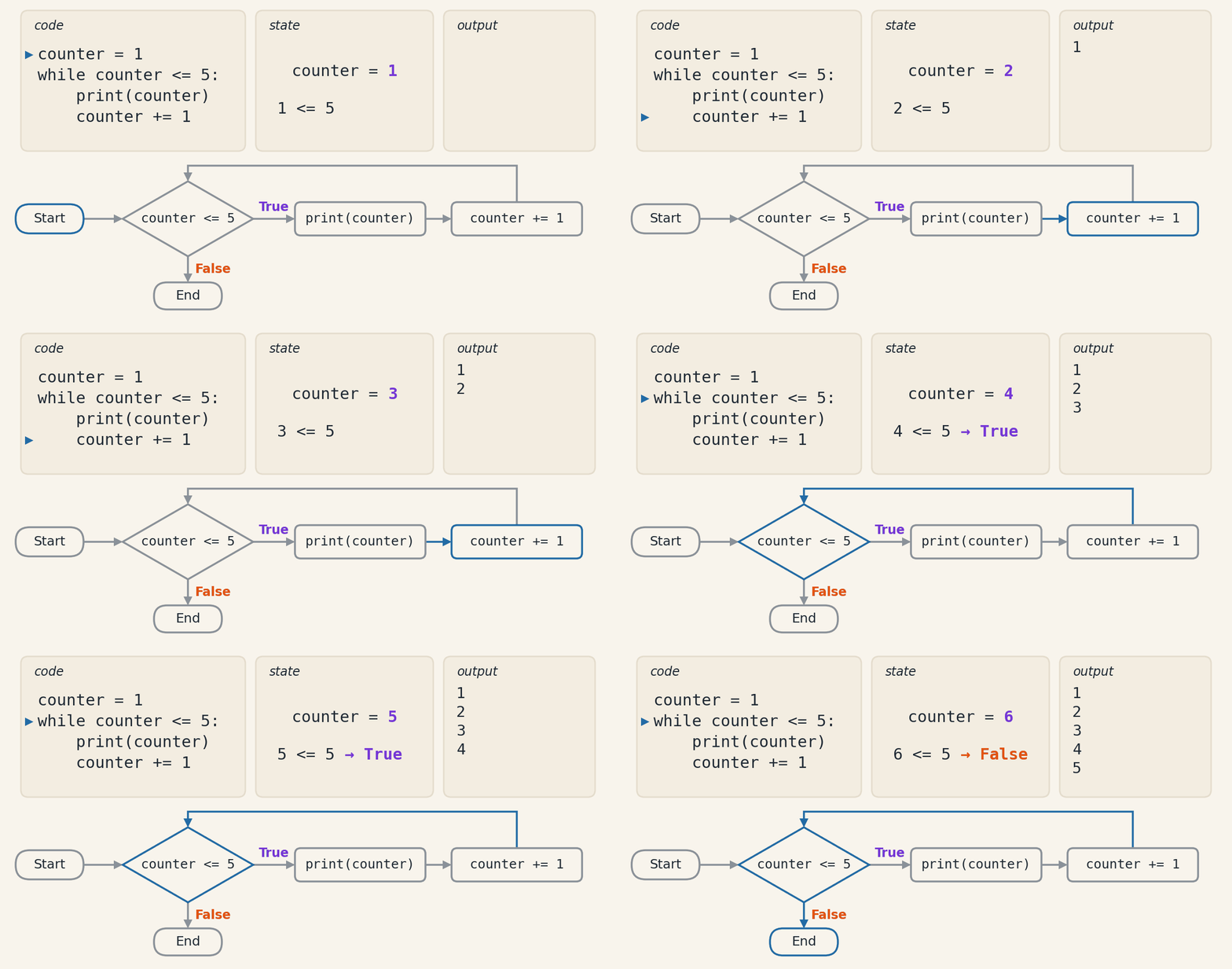
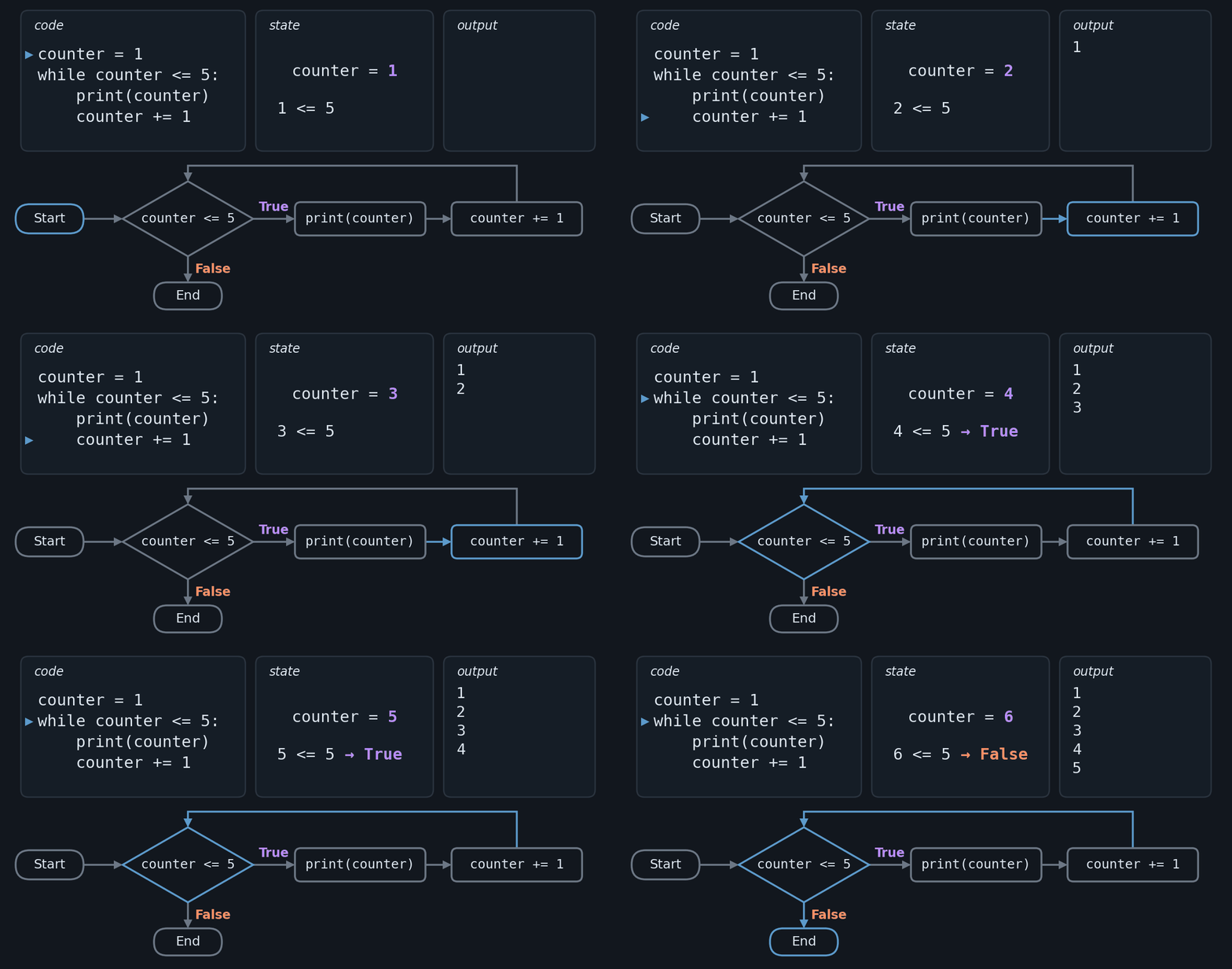
Printing the Even Numbers from 1 to 10:
number = 1
while number <= 10:
    if number % 2 == 0:
        print(number)
    number += 1
Code Output:
2
4
6
8
10
The loop iterates from 1 to 10.
The condition
number % 2 == 0checks whethernumberis even.If it is even,
print(number)prints the number.number += 1incrementsnumberby 1.
Using while not#
With while not, the loop continues while the condition, for example of the variable flag, is False.
flag = False
while not flag:
    answer = input("Do you want to exit? (yes/no): ")
    if answer.lower() == 'yes':
        flag = True
print("You have left the loop.")
Explaining the code:
flagis initialized asFalse.The
while notloop continues whileflagisFalse.The user is asked to answer whether they want to exit.
If the user types “yes”,
flagbecomesTrue.When
flagisTrue, the loop ends and prints “You have left the loop.”
While inside another while: Example of nesting while loops.
x = 0
while x < 3:
    y = 0
    while y < 2:
        print(f"Value of x: {x}, Value of y: {y}")
        y += 1
    x += 1
Code Output:
Value of x: 0, Value of y: 0
Value of x: 0, Value of y: 1
Value of x: 1, Value of y: 0
Value of x: 1, Value of y: 1
Value of x: 2, Value of y: 0
Value of x: 2, Value of y: 1
Here, x varies from 0 to 2 and y from 0 to 1. To make the example more interesting, we can add a condition to highlight when x and y are equal:
x = 0
while x < 3:
    y = 0
    while y < 2:
        if x == y:
            print(f"X and Y are equal and their value is: {x}!")
        else:
            print(f"Value of x: {x}, Value of y: {y}")
        y += 1
    x += 1
Code Output:
X and Y are equal and their value is: 0!
Value of x: 0, Value of y: 1
Value of x: 1, Value of y: 0
X and Y are equal and their value is: 1!
Value of x: 2, Value of y: 0
Value of x: 2, Value of y: 1
For inside a while#
It is also possible to nest different structures, such as a for loop inside a while loop.
x = 0
while x < 3:
    for i in range(3):
        print(f"Value of x: {x}, Value of i: {i}")
    x += 1
Code Output:
Value of x: 0, Value of i: 0
Value of x: 0, Value of i: 1
Value of x: 0, Value of i: 2
Value of x: 1, Value of i: 0
Value of x: 1, Value of i: 1
Value of x: 1, Value of i: 2
Value of x: 2, Value of i: 0
Value of x: 2, Value of i: 1
Value of x: 2, Value of i: 2
In the last example, x is incremented after each cycle of the for loop, until it reaches the value 3 and the while loop is interrupted.
List Comprehensions#
One of Python’s most powerful features is the ability to simplify complex operations into a few lines of code, and list comprehensions are a perfect example of this.
List comprehensions provide a concise way to create lists. Common applications include making new lists where each element is the result of some operations applied to each member of another sequence or iterable, or to create a subsequence of those elements that satisfy a certain condition.
Basic Syntax#
The basic syntax of a list comprehension is:
[expression for item in iterable if condition]
expression: The operation that will be performed on each item, such as a mathematical operation or a function call.
item: Represents each element of the sequence or collection being traversed.
iterable: A sequence (list, tuple, etc.) or collection (set, dictionary, etc.) over which you want to iterate.
condition (optional): A filter that includes only the elements where the condition is true.
Example: Squaring Numbers#
Suppose you want to square each number in a list. Here’s how this can be done using a list comprehension:
numbers = [1, 2, 3, 4, 5]
squares = [x ** 2 for x in numbers]
print(squares)
Code Output:
[1, 4, 9, 16, 25]
Example: Filtering and Squaring Only Even Numbers#
Now, suppose you want to square only the even numbers in a list. To do this, you can add an if condition in the list comprehension. See the example:
numbers = [1, 2, 3, 4, 5, 6, 7, 8, 9, 10]
even_squares = [x ** 2 for x in numbers if x % 2 == 0]
print(even_squares)
Code Output:
[4, 16, 36, 64, 100]
In this example, the resulting list contains only the squares of the even numbers, because the if x % 2 == 0 filters the elements of the original list, ensuring that only the even ones are squared.
The animation below runs this comprehension one element at a time. The numbers 1, 2 and 3 mark the order in which the parts act: the for delivers the next x, the if tests it, and only then is the expression x ** 2 calculated, even though it is written first. The odd numbers do not pass the filter and are discarded before the expression is calculated, so the resulting list ends up with 5 of the 10 elements.
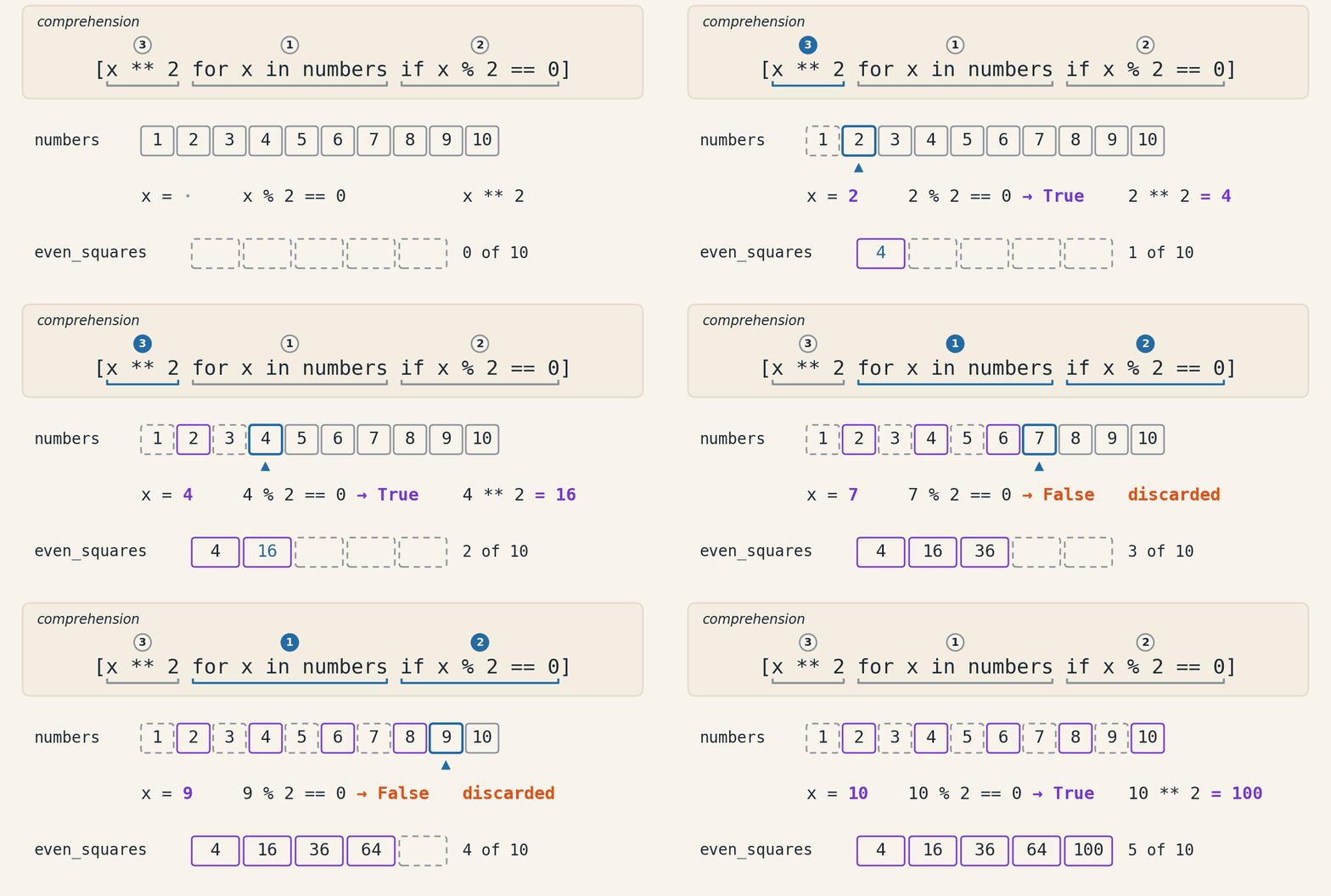
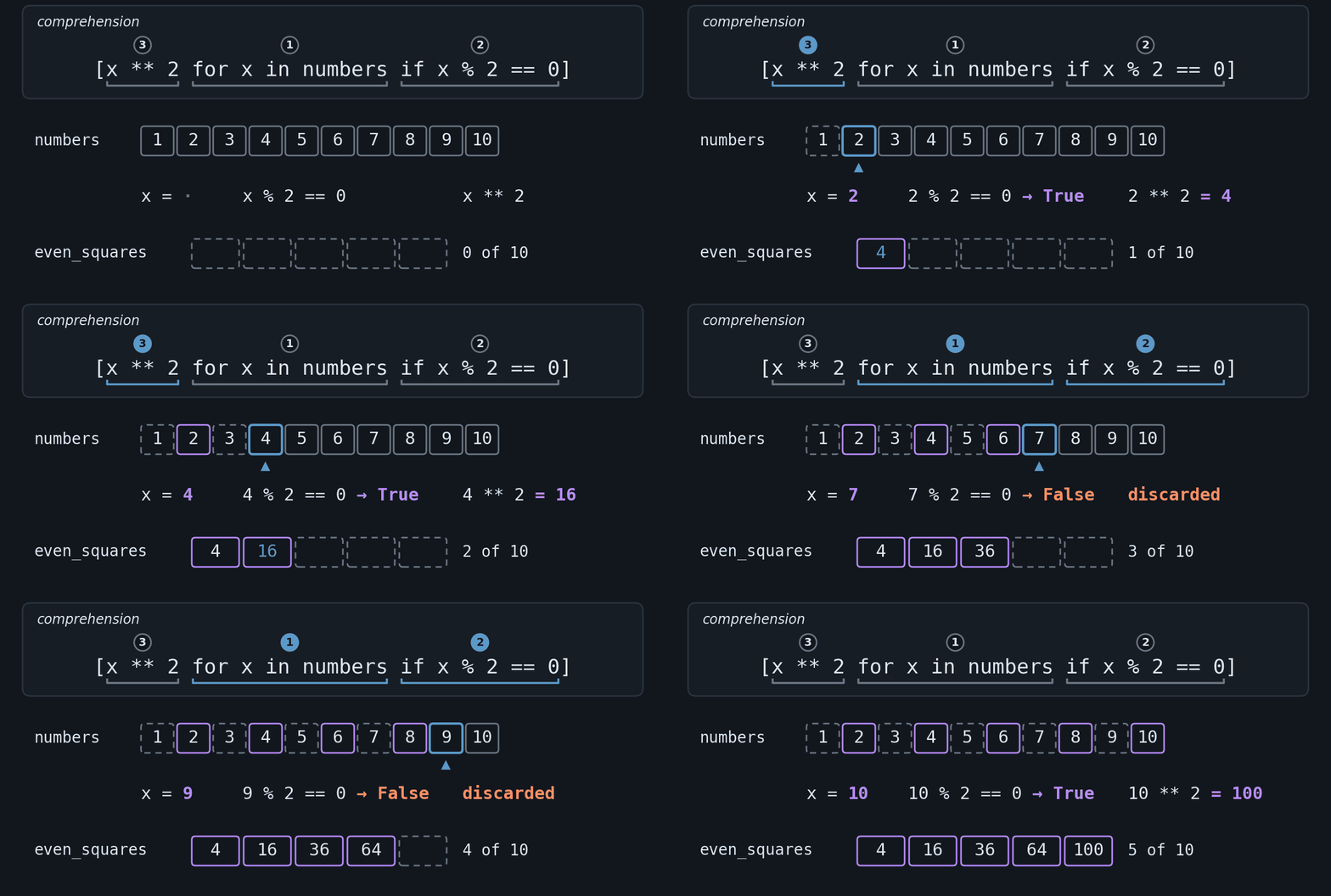
Example: Transforming Even and Odd Numbers with if/else (Ternary Expression)#
What if, instead of filtering the numbers, you wanted to transform all of them differently — for example, square the even ones and leave the odd ones as they are? In that case, we use the ternary expression (seen in Chapter 3) inside the comprehension, with the if/else before the for:
numbers = [1, 2, 3, 4, 5, 6, 7, 8, 9, 10]
result = [x ** 2 if x % 2 == 0 else x for x in numbers]
print(result)
Code Output:
[1, 4, 3, 16, 5, 36, 7, 64, 9, 100]
Here, even numbers become squares and odd numbers stay as they are. Note that, unlike the previous example (with if at the end), no element is discarded: the resulting list has the same size as the original.
Tip - if at the end vs. if/else at the beginning
ifat the end works as a filter: only elements that pass the condition are included, so the resulting list may have fewer elements. Example:[x**2 for x in numbers if x % 2 == 0].if/elseat the beginning is a ternary expression: every element is included, but the produced value depends on the condition, so the list keeps the same size. Example:[x**2 if x % 2 == 0 else x for x in numbers].
Swapping one form for the other is a common mistake. Remember: a filter sits next to the for, a ternary sits next to the expression.
List Comprehension vs. Conventional Structure#
To see how much list comprehensions can simplify the code, compare filtering even numbers and squaring them with and without using list comprehensions.
Without List Comprehension (Conventional Way)
numbers = [1, 2, 3, 4, 5, 6, 7, 8, 9, 10]
even_squares = []

for x in numbers:
    if x % 2 == 0:
        even_squares.append(x ** 2)

print(even_squares)
In this case, the code requires several lines to define the resulting list, iterate over the original list, apply the condition, and add the results.
With List Comprehension
numbers = [1, 2, 3, 4, 5, 6, 7, 8, 9, 10]
even_squares = [x ** 2 for x in numbers if x % 2 == 0]
print(even_squares)
Here, the list comprehension condenses the logic into a single line, keeping the code more direct and readable.
By using list comprehensions, you can significantly reduce the number of lines of code, making it easier to read and maintain. This makes the code more “Pythonic” and is especially useful for operations that involve filtering and mapping data, as in the example above, where the code was reduced from five lines to just one.
Flow Control with break, continue, and pass#
Python offers several ways to control the execution flow of a program. Among them, break, continue, and pass stand out, allowing you to end loop execution, skip iterations, or even leave code blocks purposely empty.
Each one answers a different question: what if I want to leave the loop before it finishes (break)? skip this iteration and carry on (continue)? mark a block as not yet implemented (pass)?
Exiting the Current Loop with break#
The break command is used to interrupt only the current loop, allowing the rest of the code to continue running after the loop.
Example of using break in a for loop#
fruits = ["apple", "grape", "strawberry", "banana", "pineapple"]
for fruit in fruits:
    if fruit == "banana":
        print("Found a banana! Exiting the loop.")
        break
    print(f"I am processing the fruit {fruit}.")
print("I am out of the Loop.")
Output:
I am processing the fruit apple.
I am processing the fruit grape.
I am processing the fruit strawberry.
Found a banana! Exiting the loop.
I am out of the Loop.
Here, break only terminates the for loop. The program continues normally after the loop.
Example of using break in a while loop#
while True:
    option = input("Enter an option (a/b/c/exit): ")
    if option == "exit":
        print("Exiting the program.")
        break
    elif option == "a":
        print("Executing action related to option 'a'")
    elif option == "b":
        print("Executing action related to option 'b'")
    else:
        print("Invalid option. Try again.")
In this case, the while loop repeats indefinitely until the user types “exit”. At that moment, break interrupts the loop and the program continues its execution normally.
Attention: in nested loops, break interrupts only the innermost loop — the outer one continues normally. To leave an entire nested structure, it is common to extract the section into a function and use return, or to keep a flag and check it in the outer loop.
Skipping to the Next Iteration with continue#
The continue command is used when you want to skip the rest of the code inside the current loop and return immediately to the beginning of the next iteration.
Example of using continue in a for loop#
fruits = ["apple", "grape", "strawberry", "banana", "pineapple"]
for fruit in fruits:
    if fruit == "banana":
        print("Ignoring the banana.")
        continue
    print(f"I am processing the fruit {fruit}.")
print("I am out of the Loop.")
Output:
I am processing the fruit apple.
I am processing the fruit grape.
I am processing the fruit strawberry.
Ignoring the banana.
I am processing the fruit pineapple.
I am out of the Loop.
When the loop encounters “banana”, continue causes the rest of the code inside the loop to be skipped and the next iteration begins.
Creating Empty Blocks with pass#
The pass command is used as a placeholder in code blocks that have not yet been implemented.
It does nothing — it serves only to keep the structure syntactically valid.
Example of using pass#
fruits = ["apple", "grape", "strawberry", "banana", "pineapple"]

for fruit in fruits:
    if fruit == "banana":
        pass # In the future, I will add something here
    else:
        print(f"I am processing the fruit {fruit}.")
Output:
I am processing the fruit apple.
I am processing the fruit grape.
I am processing the fruit strawberry.
I am processing the fruit pineapple.
In this example, pass is used as a marker to indicate that, in the case of “banana”, nothing should happen (for now).
It is useful during development, when you are still planning the code’s logic.
Another common use of pass is to leave empty classes and functions while planning the skeleton of the program — you define the names now and implement the body later, without Python complaining about an empty block:
def calculate_tax(amount):
    pass # implement later

class Cart:
    pass # class skeleton
This pattern appears frequently when sketching the structure of a program before going down into the details of each part.
Bonus: the else block in loops#
Python has a little-known detail: both for and while accept an else block, which runs only if the loop finishes without break. It is a useful shortcut in search patterns, where you want to answer “found it” or “not found” without needing an auxiliary flag:
fruits = ["apple", "grape", "strawberry", "pineapple"]
target = "banana"

for fruit in fruits:
    if fruit == target:
        print(f"Found {target}!")
        break
else:
    print(f"{target} is not in the list.")
Output:
banana is not in the list.
If the break is triggered (the search finds the fruit), the else is skipped. This is a case where the intuitive reading of else (“otherwise”) gets in the way — try to remember it as “ran all the way through, without interruption”.
Summary of Differences#
Command |
Action |
Effect Scope |
Note |
|---|---|---|---|
|
Interrupts only the current loop |
Local (loop) |
Continues the code after the loop |
|
Skips to the next iteration of the loop |
Local (loop) |
Ignores the rest of the current iteration |
|
Does nothing (placeholder) |
Local |
Keeps syntax valid without executing an action |
Random Numbers#
The random module in Python makes it easy to generate random numbers, providing a simple and straightforward interface.
This module implements pseudorandom number generators, which produce sequences of numbers that approximate true randomness for various statistical distributions.
Fun fact: truly random numbers can be generated from physical phenomena — such as atmospheric noise — on services like random.org.
Modules in Python#
Modules in Python are files containing definitions and instructions that can be reused in other programs.
To use them, you must import them with the import statement, followed by the module’s name.
For example, to import the random module (responsible for generating random numbers):
import random
Once imported, its functions and classes can be accessed using dot notation, such as random.random(), random.randint(), and random.choice().
Common Methods of the random Module#
In the table, the left column shows only the name of the method. In code, it always comes after random., as in the example on each row.
Method |
What it does |
|---|---|
|
Draws a |
|
Draws an integer from |
|
Draws one element of |
|
Draws |
|
Draws |
|
Shuffles the list itself and returns |
Usage Examples#
To see each method in use, picture a teacher who runs the class draws with Python. The class has five students, and each example below handles a different draw, one method at a time.
A roll-call number, with randint. randint(1, 5) draws an integer from 1 to 5, both ends included:
import random

number = random.randint(1, 5)
print(f"Roll-call number: {number}")
Code output (example):
Roll-call number: 3
A name from the list, with choice. Instead of the number, choice draws an element of the list directly:
import random

class_list = ['Ada', 'Alan', 'Grace', 'Guido', 'Linus']
student = random.choice(class_list)
print(f"Who answers: {student}")
Code output (example):
Who answers: Guido
Several draws that may repeat, with choices. The teacher has four questions and draws who answers each one. The same student may come up more than once, like a die rolled four times:
import random

class_list = ['Ada', 'Alan', 'Grace', 'Guido', 'Linus']
answering = random.choices(class_list, k=4)
print(f"Who answers the 4 questions: {answering}")
Code output (example):
Who answers the 4 questions: ['Grace', 'Guido', 'Guido', 'Ada']
Several draws without repeats, with sample. For the seminar, it takes three different students. sample never draws the same element twice:
import random

class_list = ['Ada', 'Alan', 'Grace', 'Guido', 'Linus']
seminar = random.sample(class_list, 3)
print(f"Presenting the seminar: {seminar}")
Code output (example):
Presenting the seminar: ['Linus', 'Grace', 'Guido']
An order for everyone, with shuffle. For the order of the presentations, shuffle shuffles the list itself. It does not create a new list (it returns None), so the print comes after it and shows class_list itself:
import random

class_list = ['Ada', 'Alan', 'Grace', 'Guido', 'Linus']
random.shuffle(class_list)
print(f"Order of the presentations: {class_list}")
Code output (example):
Order of the presentations: ['Ada', 'Grace', 'Guido', 'Linus', 'Alan']
A chance, with random. The teacher decided that each class has a 30% chance of a pop quiz. random() draws a number from 0 up to 1, and that number falls below 0.3 in 30% of the cases:
import random

draw = random.random()
print(f"Number drawn: {draw}")

if draw < 0.3:
    print("Pop quiz today!")
else:
    print("No quiz today.")
Code output (example):
Number drawn: 0.23796462709189137
Pop quiz today!
Setting a Seed#
Setting a seed can be useful when you need to reproduce specific results in different executions of the same program.
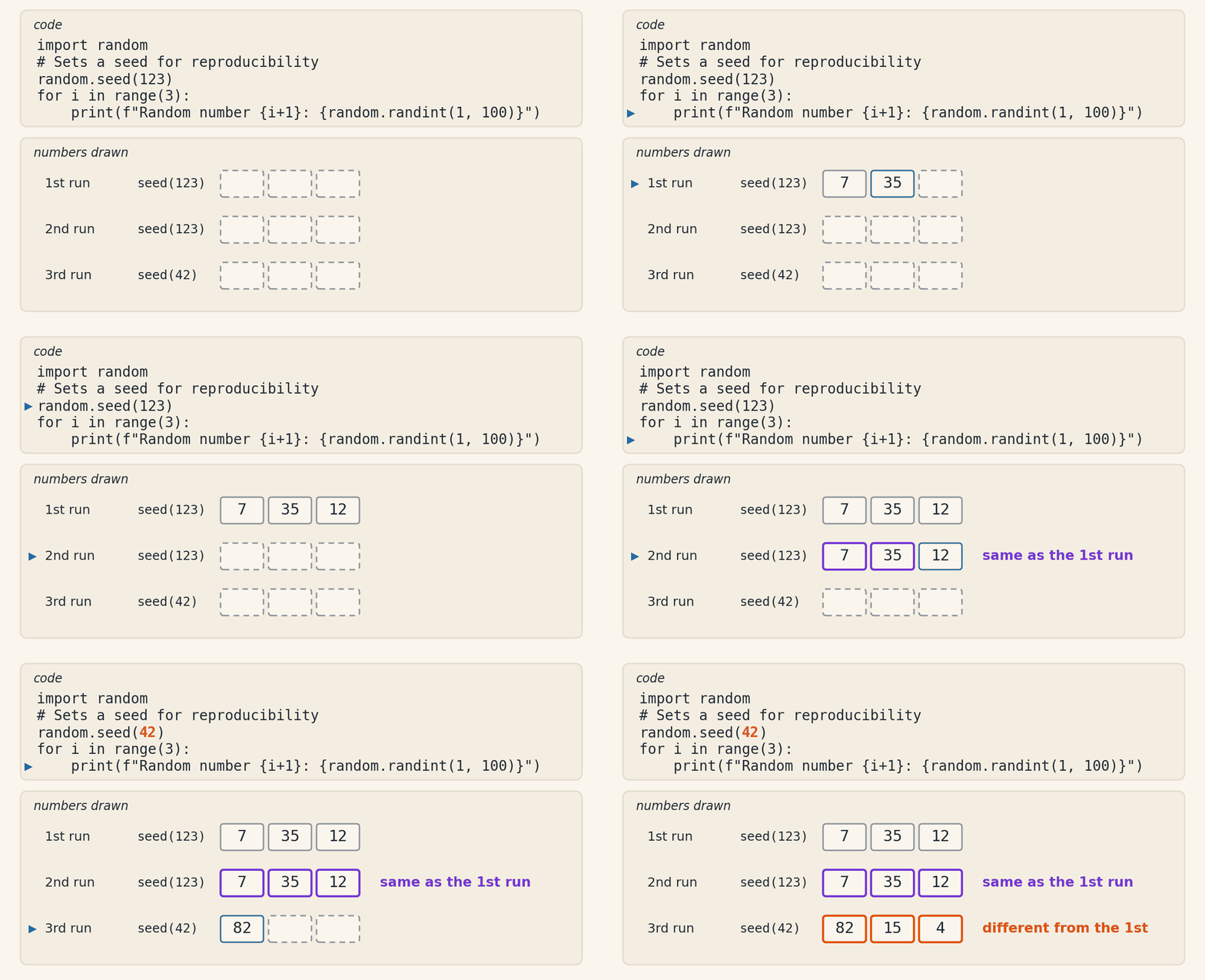
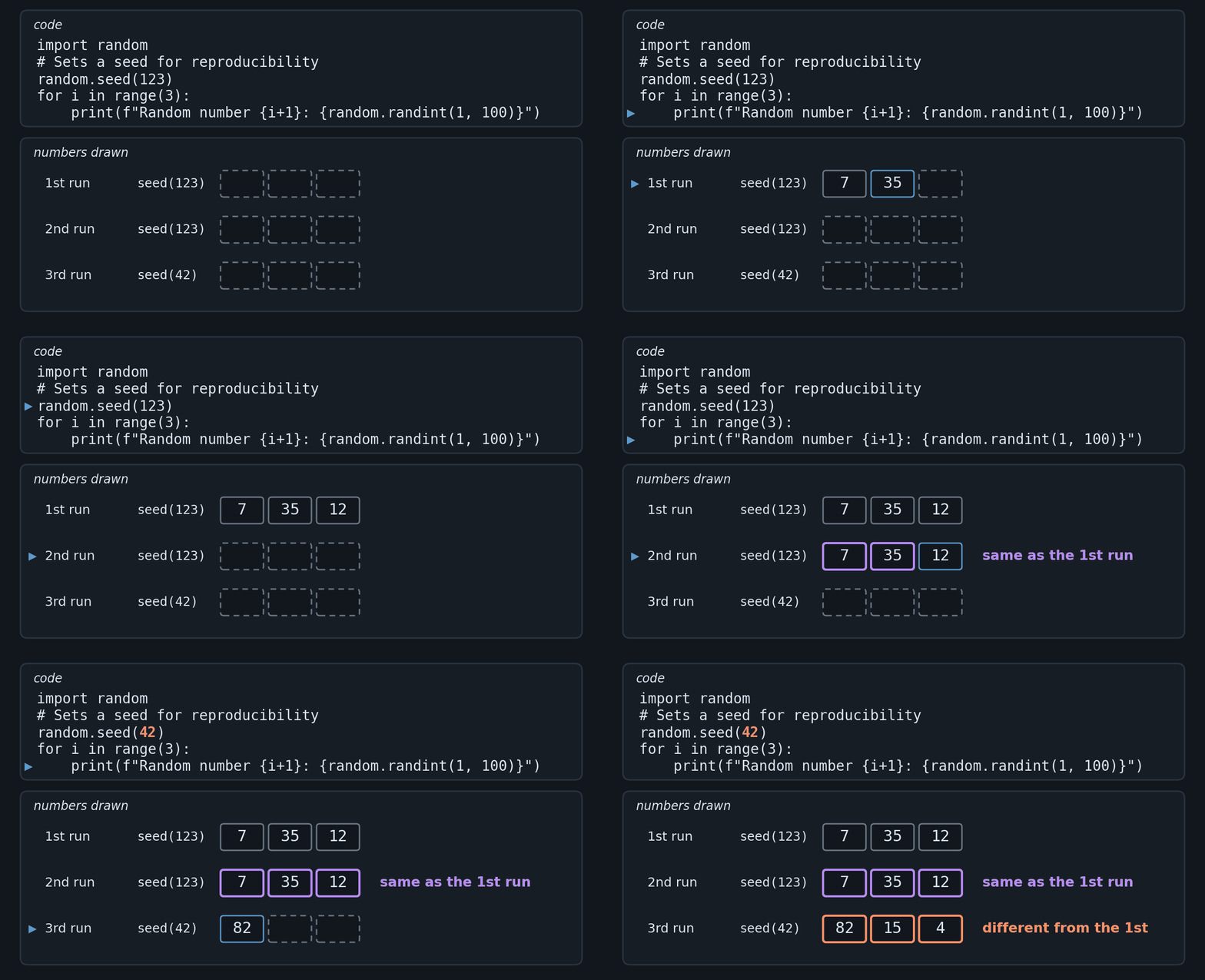
By setting a seed with random.seed(value), the generated number sequence will always be the same.
import random

# Sets a seed for reproducibility
random.seed(123)

for i in range(3):
    print(f"Random number {i+1}: {random.randint(1, 100)}")
Output:
Random number 1: 7
Random number 2: 35
Random number 3: 12
The animation below runs this program three times. In the first two the seed is 123, and the numbers drawn repeat, one by one. In the third the seed becomes 42, and the sequence changes. That is what pseudorandom means: the numbers look random, but they come from a calculation that, starting from the same seed, always produces the same sequence.
A seed also makes a draw verifiable. If the teacher announces the seed before the draw, any student can run the same program and check that the order of the presentations came from it, and not from a choice by the teacher:
import random

class_list = ['Ada', 'Alan', 'Grace', 'Guido', 'Linus']

# the seed announced before the draw
random.seed(2026)
random.shuffle(class_list)
print(f"Order of the presentations: {class_list}")
Output:
Order of the presentations: ['Alan', 'Linus', 'Guido', 'Grace', 'Ada']
With seed 2026, the order is always this one, on every run. Change the seed, and the order changes.
Note: Python, by default, already initializes the seed automatically based on system entropy sources, ensuring different random results on each execution. You only need to use
random.seed()when you wish to control the generation of random numbers (for example, in tests or reproducible simulations).
Warning - the random module is not for passwords
Anyone who knows the seed reproduces the whole random sequence, and that sequence can also be reconstructed from numbers already drawn. That is why random is fine for games, draws and simulations, but not for passwords, verification codes or access keys. For those cases, Python has the secrets module, which takes its randomness from the operating system and does not accept a seed.
Example: Simulating a Dice Game#
Let’s create a simple example with two players, who play 10 rounds. In each round, both roll a die at the same time: whoever rolls a 6 wins the round; if both roll a 6, the round is a tie; and, if neither rolls a 6, nobody wins.
import random

# Game simulation
player1_wins = 0
player2_wins = 0

for i in range(1, 11): # Simulate 10 rounds
    player1_result = random.randint(1, 6)
    player2_result = random.randint(1, 6)

    print(f"Round {i}: Player 1 rolled {player1_result}, Player 2 rolled {player2_result}")

    if player1_result == 6 and player2_result == 6:
        print("Tie in this round!")
    elif player1_result == 6:
        player1_wins += 1
        print("Player 1 won this round!")
    elif player2_result == 6:
        player2_wins += 1
        print("Player 2 won this round!")
    else:
        print("No player won this round.")
    print()

# Whoever won more rounds wins the game
if player1_wins > player2_wins:
    print("Player 1 won the game!")
elif player2_wins > player1_wins:
    print("Player 2 won the game!")
else:
    print("Tie in the total rounds!")

print(f"\nRounds won by Player 1: {player1_wins}")
print(f"Rounds won by Player 2: {player2_wins}")
Code output (example):
Round 1: Player 1 rolled 1, Player 2 rolled 5
No player won this round.

Round 2: Player 1 rolled 6, Player 2 rolled 2
Player 1 won this round!

Round 3: Player 1 rolled 3, Player 2 rolled 6
Player 2 won this round!

...

Player 1 won the game!

Rounds won by Player 1: 3
Rounds won by Player 2: 2
Example: The Sum of Two Dice#
Each face of a die has the same chance of coming up, but the sum of two dice does not. The program below rolls two dice 3600 times, counts how many times each sum came up and draws the count with asterisks. With the fixed seed, the output is always the same, including when you run the code on the page.
import random

random.seed(42)

# 13 zeros, in positions 0 to 12: position s stores how
# many times the sum s came up (0 and 1 go unused)
counts = []
for i in range(13):
    counts.append(0)

# roll two dice 3600 times and count each sum
for i in range(3600):
    total = random.randint(1, 6) + random.randint(1, 6)
    counts[total] += 1

# draw one bar for each sum, from 2 to 12
for total in range(2, 13):
    # '*' * n repeats the asterisk n times:
    # one asterisk for every 20 rolls
    bar = '*' * (counts[total] // 20)
    # the :2 reserves two places for the number,
    # lining up the 2 with the 12
    print(f"{total:2}: {bar} {counts[total]}")
Output:
 2: **** 96
 3: ********* 199
 4: ************* 275
 5: ******************* 394
 6: *********************** 475
 7: ****************************** 610
 8: ************************ 487
 9: ********************* 427
10: *************** 309
11: ********** 204
12: ****** 124
7 is the sum that comes up most, and 2 and 12 are the rarest. The reason is in the combinations: two dice have 36 possible results, and six of them add up to 7 (1 + 6, 2 + 5, 3 + 4, 4 + 3, 5 + 2 and 6 + 1), while only one adds up to 2 (1 + 1). In 3600 rolls, the expected count for 7 is 3600 × 6/36 = 600, and it came up 610 times. The more rolls, the closer the share of each sum gets to that calculation.
Example: Secret Santa Draw#
In a Secret Santa, each participant draws the name of another, and nobody may draw their own name. The program shuffles a copy of the participant list and checks each position: if someone got their own name, it shuffles again, until the draw is valid. The participants are five names from the history of computing: Ada Lovelace, Alan Turing, Grace Hopper, Guido van Rossum (the creator of Python) and Linus Torvalds.
import random

participants = ['Ada', 'Alan', 'Grace', 'Guido', 'Linus']

# shuffle scrambles the list itself.
# The copy keeps the original in order.
drawn = participants.copy()

attempts = 0
valid = False
# draw again until nobody draws their own name
while not valid:
    random.shuffle(drawn)
    attempts += 1
    valid = True
    # check each person against the name they drew
    for i in range(len(participants)):
        if participants[i] == drawn[i]:
            valid = False  # drew their own name

# show who drew whom
for i in range(len(participants)):
    print(f"{participants[i]} drew {drawn[i]}")
print(f"Valid draw on attempt {attempts}.")
Code output (example):
Ada drew Grace
Alan drew Guido
Grace drew Ada
Guido drew Linus
Linus drew Alan
Valid draw on attempt 3.
There is no seed here, because a real draw must not be predictable. With five people, only 44 of the 120 possible orders leave everyone with someone else’s name, about 37%. That is why the program needs, on average, almost three attempts (120 ÷ 44 ≈ 2.7).
With the random module, you can create simulations, games, and tests that rely on unpredictable behavior.
And, when you need to reproduce a specific result, simply set a seed with random.seed().
Exercises#
Before starting the exercises, let’s learn a little more about reading input data. This time about the map() function, which is used to apply a specific function to all elements of a sequence (like lists or tuples), returning an iterator with the results. It takes two arguments: the function to be applied and the input sequence.
For example, when we want to convert user input into floating-point numbers, we use map() together with the float() function:
grade1, grade2, grade3 = map(float, input().split())
print(grade1, grade2, grade3)
In this code, input() receives three grades separated by spaces. The .split() method divides the input into a list of strings. Then, map(float, ...) applies the float() function to each element of the list, converting the strings into floating-point numbers. Finally, the converted values are assigned to the variables grade1, grade2, and grade3. The print at the end shows the result: when you test the code, type 6 8 9.1 in the field that appears, and it prints 6.0 8.0 9.1, with the 6 and the 8 already converted to float.
Another example is when we want to convert user input into a list of floating-point numbers. We can do this as follows:
grades = list(map(float, input().split()))
print(grades)
In this case, input() receives several grades separated by spaces. The .split() method divides the input into a list of strings. Then, map(float, ...) applies the float() function to each element of the list, converting the strings into floating-point numbers. Finally, the list() function transforms the map object into a list of floating-point numbers, which is assigned to the grades variable. Typing 7 8.5 10 6, the print shows [7.0, 8.5, 10.0, 6.0].
Now, let’s move on to the Exercises.
Age Classification: Develop a program that receives multiple user ages as input, all separated by spaces. For each age, the program should print the corresponding category according to the following scale:
Category |
Age Range |
|---|---|
Minor |
Under 13 years |
Teenager |
13 to 17 years |
Adult |
18 to 59 years |
Senior |
60 years or older |
# Test
Input: 12 15 20 16 21 60 22 14 23 65
Output:
Minor
Teenager
Adult
Teenager
Adult
Senior
Adult
Teenager
Adult
Senior
Palindrome Check: Write a program that receives a list of words and checks if each word is a palindrome. A palindrome is a word that remains the same when read backwards. The program should print “Yes” for palindromes and “No” for non-palindromes. Use
end=' 'in the print command so that the results are displayed on the same line, separated by spaces.
# Test
Input: arara python reviver código osso casa radar programa mussum piloto
Output: Yes No Yes No Yes No Yes No Yes No
Countdown: Write a countdown from 10 to 1, with a 1-second interval between each number. To do this, search for and use the
timemodule to pause the program’s execution for 1 second before printing each number.
Remember to import the time module and use the time.sleep(1) function to create the desired delay. You can find more information about the time module in the official Python documentation.
# Test
Input: No input
Output: 10, 9, 8, 7, 6, 5, 4, 3, 2, 1
Performance Analysis of a Class with up to 100 Students: Analyze the performance of a class with up to 100 students in a programming language course. Your program should receive as input a list of up to 100 numbers between 0 and 10, representing the final grades of each student.
For each grade in the list, the program must:
Add the grade to a total sum (for later calculation of the class average).
Check if the grade is greater than or equal to 5. If it is, increment the passed students counter.
If the grade is less than 5, increment the failed students counter.
After processing all grades, the program should calculate and print the following information: Number of Passed Students, Number of Failed Students, and Class Average.
Note: Consider using this syntax to store grades in a list: list(map(float, input().split(',')))
# Test 1
Input: 1.3, 2.8, 8.1, 5.6, 8.1, 6.9, 9.7, 0.7, 0.7, 1.1, 10.0, 1.7, 8.5, 3.3, 2.4, 6.9, 2.5, 0.3, 8.8, 3.1, 8.1, 9.2, 1.4, 4.6, 4.6, 0.6, 10.0, 1.4, 4.3, 7.9, 3.9, 2.4, 5.4, 5.6, 4.4, 3.5, 0.5, 7.4, 2.7, 2.1, 3.5, 6.3, 3.6, 0.0, 7.7, 0.8, 7.7, 9.7, 1.6, 0.3, 6.5, 4.2, 1.2, 4.3, 4.5, 8.9, 5.8, 7.5, 9.7, 8.2, 1.5, 9.2, 6.1, 9.7, 6.7, 0.5, 7.1, 3.4, 7.8, 8.1, 4.5, 4.1, 5.8, 3.4, 0.3, 10.0, 7.7, 0.2, 9.9, 2.3, 7.8, 5.6, 3.6, 1.3, 9.5, 1.2, 6.4, 3.2, 9.1, 8.6, 6.2, 7.9, 4.9, 7.3, 1.2, 5.1, 9.2, 7.6, 0.3, 7.4
Output:
Number of Passed Students: 50
Number of Failed Students: 50
Class Average: 5.06

# Test 2
Input: 7.0, 8.5, 9.0, 4.5, 6.0, 3.0, 2.5, 8.0, 9.5, 5.0
Output:
Number of Passed Students: 7
Number of Failed Students: 3
Class Average: 6.30

# Test 3
Input: 10.0, 10.0, 10.0, 10.0, 10.0, 10.0, 10.0, 10.0, 10.0, 10.0
Output:
Number of Passed Students: 10
Number of Failed Students: 0
Class Average: 10.00

# Test 4
Input: 0.0, 0.0, 0.0, 0.0, 0.0, 0.0, 0.0, 0.0, 0.0, 0.0
Output:
Number of Passed Students: 0
Number of Failed Students: 10
Class Average: 0.00
Factorial Calculation: Write a program that receives a list of integers, and following some criteria, calculates and prints the factorial of each one of them. The factorial of a number is the product of all integers from 1 up to the number itself.
Here are the steps and criteria for implementing your program:
Receive and store a list of integers.
Check if each number is valid (that is, greater than or equal to zero and less than 15).
Calculate the factorial of each number using a
fororwhileloop.Display the factorial result for each number. If it’s not possible to calculate the factorial (for example, for invalid numbers), print an
X.Show the quantity of numbers for which the factorial could not be calculated.
# Test 1
Input: 7, 6, -1, 14, 1, 12, 0, 18, 15, 12, 5, 9, 10, 0, 12, 17, 2, 15, 12, 2, 16, 19, 5, 4, 10
Output: 5040, 720, X, 87178291200, 1, 479001600, 1, X, X, 479001600, 120, 362880, 3628800, 1, 479001600, X, 2, X, 479001600, 2, X, X, 120, 24, 3628800
Quantity of invalid numbers: 7

# Test 2
Input: 3, 9, 12, 15, 12, 0, 8, 15, 12, 5, 9, 10, 0, 12, 17, 2, 15, 12, 2, 16, 19, 5, 4, 10, 3, 13
Output: 6, 362880, 479001600, X, 479001600, 1, 40320, X, 479001600, 120, 362880, 3628800, 1, 479001600, X, 2, X, 479001600, 2, X, X, 120, 24, 3628800, 6, 6227020800
Quantity of invalid numbers: 6
Remember to handle special cases. Zero has a factorial of 1, and a negative number has no factorial.
6. Guessing Game (Player vs Computer): The objective is to develop an interactive number guessing game in which the player competes against the computer. The game must follow these rules:
At the beginning of the game, the program must generate a secret random number between 1 and 100. This will be the number that both the player and the computer will try to guess.
Both the player and the computer have a limited number of attempts to guess the number. For example, it can be limited to 20 attempts.
In each round, the player and the computer make a guess. The program must then provide a hint for both, indicating whether the secret number is greater or smaller than the guesses.
If the player or the computer guesses the number correctly, the program should congratulate them and report the number of attempts it took to guess the number. If both guess the number in the same round, the game ends in a tie.
If the player and the computer run out of attempts without guessing the number, the program must inform that the game is over and reveal the secret number.
7. Asterisk Pattern Exercise: Write a Python program that prints a triangle of asterisks. The program must receive as input the number of rows of the triangle and the type of triangle to be printed (type1 or type2). Then, the program should print the asterisk triangle with the specified number of rows and in the chosen format.
Type 1: Each row starts with an asterisk and increases the number of asterisks as we go down.
Type 2: The maximum number of asterisks appears on the first row, and as we move downwards, this number decreases.
# Test 1
Input: type1, 3
Output:
*
**
***

# Test 2
Input: type1, 5
Output:
*
**
***
****
*****

# Test 3
Input: type2, 4
Output:
****
***
**
*
8. Identification of Prime Numbers in a List: Develop a program that identifies all prime numbers present in a list provided in the input. A prime number is a number greater than 1 that has no positive divisors other than 1 and itself. Follow the instructions below:
Read a list of integers.
For each number in the list, check if it is a prime number.
If the number is prime, add it to a new list.
After checking all numbers in the original list, display the new list containing only the prime numbers.
# Test 1
Input: -23, 15, -7, 49, -35, 21, -2, 30, -14, 8, -50, 44, -29, 17, -3, 34, -9, 25, -40, 12, 5, -28, 37, -16, 10, -4, 42, -33, 18, -6, 27, -13, 39, -22, 11, -1, 31, -19, 20, -36, 14, -8, 26, -45, 9, -24, 32, -10, 23, -5
Output: 17, 5, 37, 11, 31, 23

# Test 2
Input: -18, 33, -12, 27, -6, 42, -30, 21, -3, 39, -24, 15, -9, 36, -15, 12, -1, 45, -27, 18, -7, 30, -21, 9, -33, 24, -13, 6, -42, 36, -19, 3, -39, 30, -10, 0, 48, -25, 16, -4, 41, -28, 22, -5, 38
Output: 3, 41
9. 5-Number Lottery: Develop a program that simulates a lottery where 5 distinct numbers between 1 and 50 are drawn. The program must randomly generate 5-number games until a game matches exactly the drawn combination. The goal is to determine how many games are needed until there is a winner. Follow the instructions below:
Receive as input an integer corresponding to the seed for pseudorandom number generation.
Generate a winning combination of 5 unique numbers between 1 and 50 using
random.sample.Convert the winning combination into a set to make comparison easier.
Create a loop that simulates games of 5 unique numbers between 1 and 50, also using
random.sample.After each game, convert the generated number combination into a set and check if it matches the winning combination.
Count the number of games played until a game matches the winning combination exactly.
Display the total number of games needed to find a winner.
# Test 1
Input: 1
Output: Number of games needed: 24836

# Test 2
Input: 2
Output: Number of games needed: 622164

# Test 3
Input: 11
Output: Number of games needed: 807045
10. The “Old” Fibonacci: The Fibonacci sequence is an infinite series of integers where each number is the sum of the two preceding ones. It starts with the numbers 1 and 1:
1, 1, 2, 3, 5, 8, 13, 21, 34, 55, …
To calculate the next number in the sequence, we add the two previous numbers. For example:
The third number is 1 + 1 = 2.
The fourth number is 1 + 2 = 3.
The fifth number is 2 + 3 = 5.
And so on.
See the illustrative image below:

Now, let’s create a program that generates the Fibonacci sequence up to the n-th term. The user will provide the value of n.
We initialize the variables
lastandsecond_to_lastwith the values 1, as the first two terms of the sequence are 1.We use a loop (like a
fororwhile) to calculate the next terms, saving the values in a list.In each iteration, we add
lastandsecond_to_lastto obtain the next term.We update the variables
lastandsecond_to_lastto the correct values.We repeat the process until we reach the n-th term.
Finally, all numbers in the sequence, stored in a list, should be printed.
# Test 1
Input: 10
Output: 1, 1, 2, 3, 5, 8, 13, 21, 34, 55

# Test 2
Input: 19
Output: 1, 1, 2, 3, 5, 8, 13, 21, 34, 55, 89, 144, 233, 377, 610, 987, 1597, 2584, 4181

# Test 3
Input: 23
Output: 1, 1, 2, 3, 5, 8, 13, 21, 34, 55, 89, 144, 233, 377, 610, 987, 1597, 2584, 4181, 6765, 10946, 17711, 28657
11. Random Password Generator
You have been hired to develop a simple system that generates test passwords for users. Each password must contain uppercase letters, lowercase letters, and numbers. To make it easier to create multiple passwords, the system must generate a set of passwords automatically.
Important: the seed must be set with
random.seed(42)before any calls to functions likerandom.choices()orrandom.shuffle(). This ensures that all students generate exactly the same passwords. For the same reason, these passwords are predictable: they are for practice, not for real use (see the warning about thesecretsmodule in the Random Numbers section).
Requirements:
Each password must contain:
3 uppercase letters
3 lowercase letters
3 digits
The password must have 9 characters in total, arranged in random order.
Use a loop to generate the desired quantity (
qty) of passwords.Use the
randommodule and set the seed withrandom.seed(42)before generating any password.
Tips:
import stringcan be usefulUse
string.ascii_uppercase,string.ascii_lowercase, andstring.digitsto access letters and numbers.Use
random.choices(..., k=3)to draw 3 characters from a list.Finally, use
random.shuffle(list)to shuffle the order of the characters in the password.
# Test 1
Input: 3
Output: rfH4t80AQ wl74S1SKh Gl0I9J2bd

# Test 2
Input: 5
Output: rfH4t80AQ wl74S1SKh Gl0I9J2bd W6l37evJW ft8R8YHi0

# Test 3
Input: 8
Output: rfH4t80AQ wl74S1SKh Gl0I9J2bd W6l37evJW ft8R8YHi0 5LKgg8Xo2 pDrE45kW2 19gC5LLyw
12. Prime Numbers Battle
Two players have entered a mathematical battle! Each will receive 15 random numbers between 1 and 1000. The goal is simple: whoever has the most prime numbers wins the game.
To ensure that the tests can be reproduced identically, the program must receive two seeds of random numbers — one for each player.
Requirements
Receive two integers as input: they will be used as seeds (
random.seed()) — one for each player.After setting the seed, draw 15 numbers between 1 and 1000 for each player, with
random.randint(1, 1000).Check which of these numbers are prime.
Display:
The 15 numbers drawn for each player
How many prime numbers each player received
Declare the winner based on who had the most primes: “Winner: Player 1” or “Winner: Player 2”. In case of a tie, report: “Winner: Tie”
# Test 1
Input: 123 456
Output:
PLAYER 1
[54, 275, 90, 788, 418, 273, 111, 859, 923, 896, 40, 389, 550, 576, 341]
Number of Primes: 2

PLAYER 2
[767, 461, 990, 478, 446, 400, 814, 911, 664, 42, 633, 749, 843, 921, 809]
Number of Primes: 3

Winner: Player 2

# Test 2
Input: 111 222
Output:
PLAYER 1
[848, 972, 218, 944, 966, 324, 506, 199, 408, 427, 632, 832, 174, 645, 199]
Number of Primes: 2

PLAYER 2
[798, 111, 241, 291, 314, 33, 30, 494, 229, 456, 758, 738, 452, 464, 77]
Number of Primes: 2

Winner: Tie

# Test 3
Input: 42 99
Output:
PLAYER 1
[655, 115, 26, 760, 282, 251, 229, 143, 755, 105, 693, 759, 914, 559, 90]
Number of Primes: 2

PLAYER 2
[414, 390, 205, 614, 184, 236, 255, 137, 779, 89, 258, 747, 393, 544, 701]
Number of Primes: 3

Winner: Player 2