

Chapter 5: Functions and Modularization#

Defining Functions#
A function is a named block of code that performs a task and can be called as many times as needed. Instead of repeating the same lines at several points in a program, you write the task once, inside the function, and call the function wherever the task is needed. This makes the program shorter, easier to read and easier to fix: an error in the task is corrected in one place only. Splitting a program into functions, each with one task, is what is called modularization.
To define a function, we use the reserved word def. The basic structure of a function includes:
Keyword
def: Indicates the start of a function definition.Function name: Should be descriptive and follow Python naming conventions, as described in PEP 8. Use lowercase letters with words separated by underscores (snake_case convention).
Parentheses
()containing the parameters (if any) separated by commas.Colon
:to end the header line.Indented code block that makes up the body of the function.
(Optional)
returnto return a value from the function. If omitted, the function returnsNoneby default.
Simple example of a function to calculate and return the sum of two numbers.
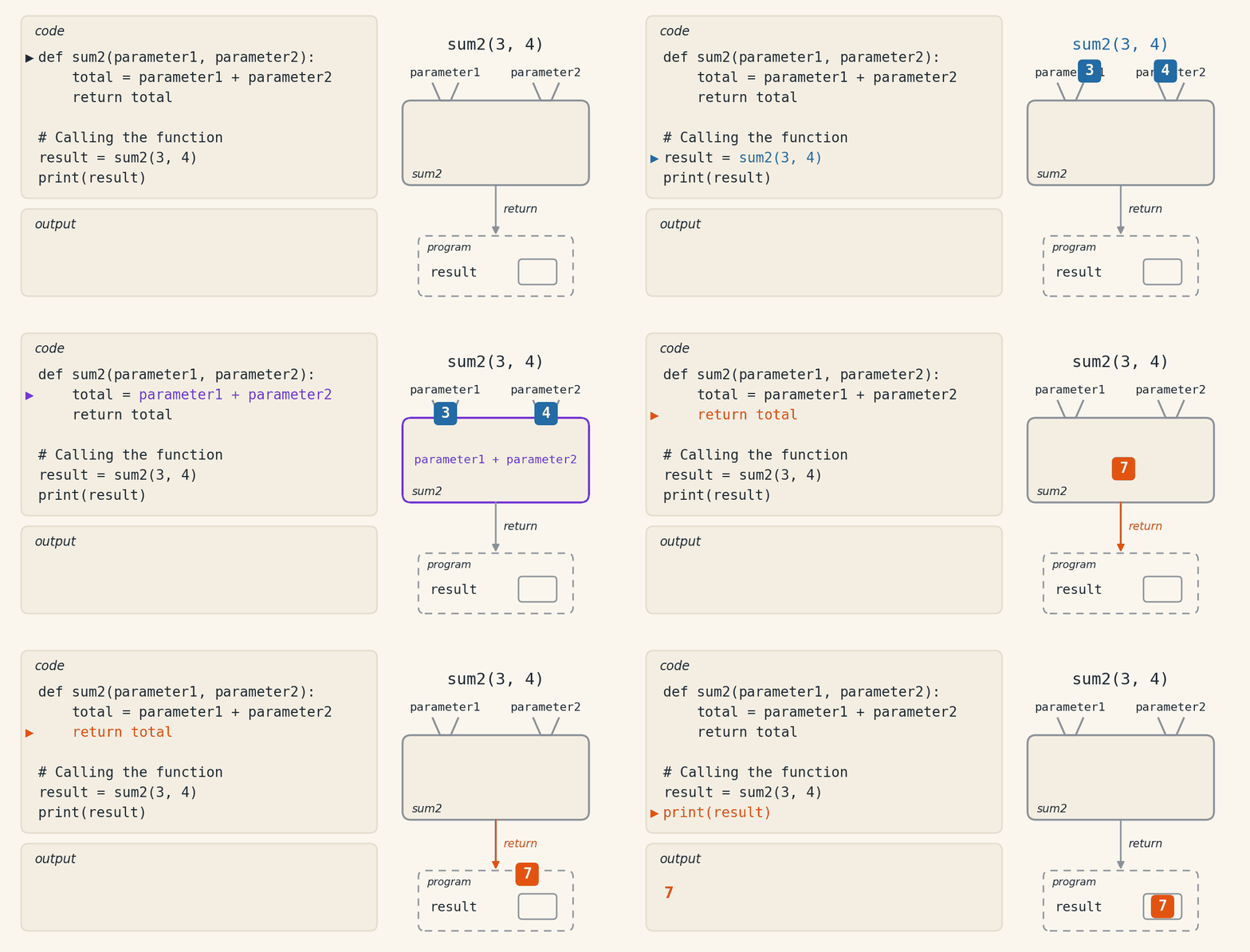
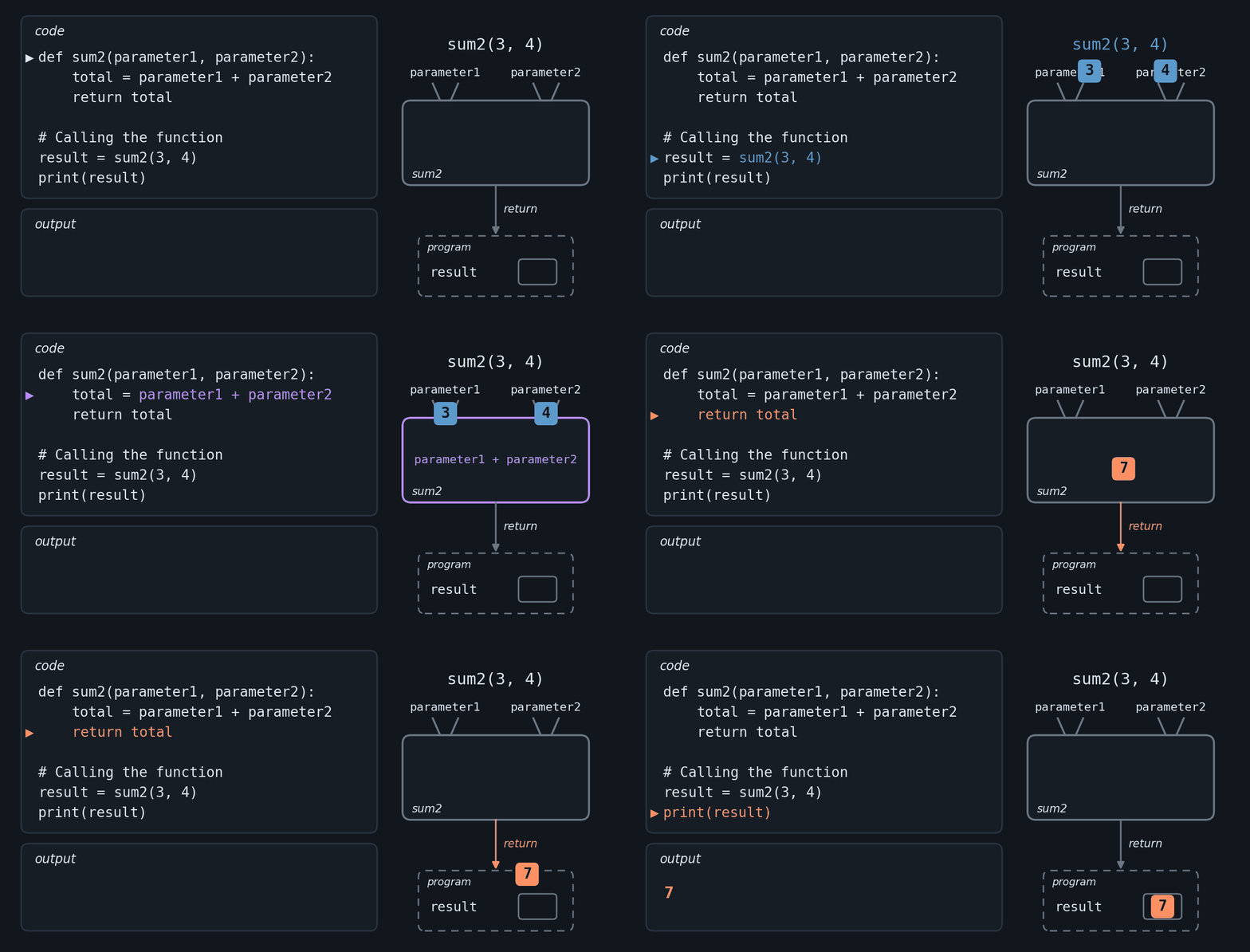
The animation below shows the path of the data in this example. The values 3 and 4 enter the function through the parameters, the calculation happens inside it, and return sends the 7 back to the program. What is active lights up in the code and in the drawing at the same time, and the color indicates the phase: blue on the way in, purple inside the function and orange on the way out.
The same code, to run on the page:
def sum2(parameter1, parameter2):
    total = parameter1 + parameter2
    return total

# Calling the function
result = sum2(3, 4)
print(result)
Code Output:
7
Notice the order in which this code runs. The def only creates the function sum2: no line of its body runs at that moment. The body runs when the function is called, on the line result = sum2(3, 4), and it runs again on every new call.
The names in parentheses in the definition, parameter1 and parameter2, are the parameters: variables of the function that receive values on each call. The values written in the call, 3 and 4, are the arguments. They are passed in the order they appear: the first argument goes to the first parameter and the second to the second. Inside the function, then, parameter1 is 3 and parameter2 is 4.
Docstrings and Type Hints#
Two practices make a function easier to understand and to use: docstrings and type hints.
Docstrings are documentation strings written right below the
defline. They say what the function does, what each parameter receives and what it returns, and they show up when you callhelp()on the function.Type hints indicate the expected type of each parameter and of the return value. They help whoever reads the code and the tools that check types.
Docstring and type hints example:
def sum_numbers(a: float, b: float) -> float:
    """
    Calculates the sum of two numbers.

    Args:
        a (float): First number.
        b (float): Second number.

    Returns:
        float: The sum of 'a' and 'b'.
    """
    return a + b
In this example,
aandbshould befloat, andsum_numbersreturns afloat. Callinghelp(sum_numbers)shows the docstring.Python, however, does not check or convert these types at run time:
sum_numbers(2, 3)returns5, anint, and evensum_numbers("Py", "thon")runs and returns'Python'. The annotations are for the people who read the code and for tools such as mypy, which check the types without running the program.
Functions without Return (Procedures)#
A function without return, also called a procedure, performs an action, such as showing something on the screen, and gives back no value (it returns None, implicitly).
Example:
def print_header(title: str) -> None:
    """
    Prints a formatted header with borders.

    Args:
        title: Text to be displayed in the center of the header.
    """
    width = len(title) + 6
    print("=" * width)
    print(f"|  {title}  |")
    print("=" * width)

# Calling the function
print_header("MONTHLY REPORT")
Code Output:
====================
|  MONTHLY REPORT  |
====================
Notice how the -> None type hint makes it explicit that this function exists for its side effect (printing to the screen), not to return a value, which is typical of a procedure.
Functions with Return#
A function with a return gives a value back to whoever called it, which can store it in a variable or use it in a calculation. Next, an example without a default value and one with a default value.
Example without Default Value:
def sum_numbers(a: float, b: float) -> float:
    """
    Calculates the sum of two numbers.

    Args:
        a: First number to be added.
        b: Second number to be added.

    Returns:
        The sum of the values 'a' and 'b'.
    """
    return a + b

# Calling the function with arguments
result = sum_numbers(3.5, 5.0)
print(f"Result: {result}")
Code Output:
Result: 8.5
Example with Default Value:
def sumP(a: float, b: float = 0.0) -> float:
    """
    Calculates the sum of two numbers.

    Args:
        a: First number to be added.
        b: Second number to be added, default is 0.0.

    Returns:
        The sum of the values 'a' and 'b'.
    """
    return a + b

# Calling the function with different arguments
result1 = sumP(3.5, 5.0)  # Two arguments
result2 = sumP(3.5)       # Using the default value of b
print(f"Results: {result1}, {result2}")
Code Output:
Results: 8.5, 3.5
In the second example, b has the default value 0.0. A parameter with a default value is optional in the call: when the argument is left out, as in sumP(3.5), the parameter takes the value written in the definition.
return ends the function#
When a return runs, the function ends right there and gives back the value; the lines below it do not run. This makes it possible to write a decision as a sequence of tests, each with its own return:
def status(grade: float) -> str:
    if grade >= 7:
        return "passed"
    if grade >= 5:
        return "make-up exam"
    return "failed"

print(status(8.5))
print(status(6.0))
print(status(3.0))
Code Output:
passed
make-up exam
failed
With the grade 8.5, the first return already ends the function, and the second test is never evaluated. The last return is reached only when none of the previous tests succeeded, so there is no need for elif or else. The same holds inside a loop: a return inside a for ends the loop and the function at once.
print is not return#
A common confusion at the start is to think that a function that prints a value also returns it. They are different things: print shows the value on the screen, and the program does not keep it; return hands the value to whoever called the function, which can store it in a variable or use it in a calculation.
def double_prints(x: int) -> None:
    print(x * 2)

def double_returns(x: int) -> int:
    return x * 2

a = double_prints(5)
b = double_returns(5)
print(a)
print(b)
Code Output:
10
None
10
The first call prints 10 right away, but returns nothing: a receives None, the value every function without return gives back. The second prints nothing; the 10 goes to b and only shows up on the screen when the program prints b. That is why only the second one can continue a calculation: double_returns(5) + 1 is 11, while double_prints(5) + 1 prints 10 and stops with an error (TypeError), because None cannot be added to 1. If the value will be used later, the function should use return.
Positional and Keyword Arguments#
In a call, arguments can be passed in two ways: positional and keyword.
Positional arguments: go to the parameters in the order they appear.
Example:
def display_info(name: str, age: int) -> None:
    print(f"Name: {name}, Age: {age}")

# Calling the function with positional arguments
display_info("Alice", 30)
Code Output:
Name: Alice, Age: 30
Keyword arguments: carry the name of the parameter, in the form
name=value, so the order does not matter.Example:
def display_info(name: str, age: int) -> None:
    print(f"Name: {name}, Age: {age}")

# Calling the function with keyword arguments
display_info(age=30, name="Alice")
Code Output:
Name: Alice, Age: 30
The two forms can be mixed, as long as the positional arguments come first: display_info("Alice", age=30) works, and display_info(name="Alice", 30) is a syntax error.
Scope: local and global variables#
A variable created inside a function is local: it exists only while the function runs and can only be used inside it. Parameters are local variables too. A variable created outside any function is global.
def compute_average(grade1: float, grade2: float) -> float:
    average = (grade1 + grade2) / 2
    return average

result = compute_average(8.0, 6.0)
print(result)
Code Output:
7.0
The variable average exists only during the call; when the function ends, only its value comes out, through return. A print(average) outside the function would stop the program with a NameError, because outside it that name does not exist. To use the average outside the function, use the returned value, as result does.
A global variable, on the other hand, can be read inside the function:
rate = 0.25

def price_with_rate(price: float) -> float:
    return price * (1 + rate)

print(price_with_rate(50.0))
Code Output:
62.5
Assigning a value to a name inside the function, however, creates a new local variable, even if a global with the same name exists, and the global does not change. Python has the global keyword to change a global variable from inside a function, but the clearer way is for the function to return the value with return and let the program decide what to do with it.
Functions with Multiple Return Values#
A function can return more than one value in a single call, separating them with commas in the return.
Example: Returning Two Values
In the example below, sum_diff_values returns the sum and the difference of two numbers.
def sum_diff_values(a: float, b: float) -> tuple[float, float]:
    """
    Calculates the sum and difference of two numbers.

    Args:
        a: First number.
        b: Second number.

    Returns:
        A tuple containing the sum and difference of the numbers.
    """
    sum_result = a + b
    diff_result = a - b
    return sum_result, diff_result

# Calling the function
sum_values, diff_values = sum_diff_values(10, 5)
print(f"The sum is: {sum_values}")
print(f"The difference is: {diff_values}")
Code Output:
The sum is: 15
The difference is: 5
The results come out as 15 and 5, with no decimal part: the arguments 10 and 5 are integers, and the float annotation does not convert them.
The values come back together in a tuple, and the call can “unpack” them into separate variables, as in sum_values, diff_values = sum_diff_values(10, 5).
Example: Returning Values of Different Types
Next, the analyze_list function returns the sum of the elements in a list and a boolean value indicating whether all numbers are positive.
def analyze_list(numbers: list[int]) -> tuple[int, bool]:
    """
    Analyzes a list of integers.

    Args:
        numbers: List of integers.

    Returns:
        - The sum of the elements.
        - A boolean value indicating if all numbers are positive.
    """
    total_sum = sum(numbers)

    # Checking if all numbers are positive without using all
    all_positive = True
    for num in numbers:
        if num <= 0:
            all_positive = False
            break

    return total_sum, all_positive

# Calling the function
sum_res, positive_res = analyze_list([3, -1, 5, 7, 2])
print(f"Sum of elements: {sum_res}")
print(f"Are all elements positive? {positive_res}")
Code Output:
Sum of elements: 16
Are all elements positive? False
The function returns the sum of the elements and checks if all are positive, returning False if any is not.
Functions that Receive Other Functions as Arguments#
In Python, a function can be passed as an argument to another, like any other value.
Example: Passing Functions as Arguments
The example below shows a function that applies an operation, defined by another function, to each element of a list.
def apply_operation(operation, my_list: list[int]) -> list[int]:
    """
    Applies an operation to each element of a list.

    Args:
        operation: Function that defines the operation to be applied.
        my_list: List of elements.

    Returns:
        A new list with the results of the applied operation.
    """
    return [operation(element) for element in my_list]

# Functions for mathematical operations
def square(x: int) -> int:
    return x * x

def cube(x: int) -> int:
    return x * x * x

# Applying the square function to a list
numbers = [1, 2, 3, 4, 5]
square_result = apply_operation(square, numbers)
print(f"The square of each number in the list is: {square_result}")

# Applying the cube function to a list
cube_result = apply_operation(cube, numbers)
print(f"The cube of each number in the list is: {cube_result}")
Code Output:
The square of each number in the list is: [1, 4, 9, 16, 25]
The cube of each number in the list is: [1, 8, 27, 64, 125]
The
apply_operationfunction receives:A function (
operation) that defines the transformation logic.A list (
my_list) whose elements will be processed.
We use a list comprehension to apply the operation to each element of the list.
The
squareandcubefunctions are examples of operations that can be passed toapply_operation.
That way, apply_operation works for any operation that takes a number and returns another.
Anonymous Functions (Lambda)#
An anonymous function, or lambda, is a short function, without a name, written on a single line: the lambda keyword, the parameters, a colon (:) and the expression it returns.
The basic syntax of a lambda function is:
lambda parameters: expression
Example with one parameter#
print((lambda x: x * 2)(3))
Code Output:
6
In this example, a lambda function that doubles a number is defined and immediately called with the value 3. The function calculates 3 * 2 and returns 6, which print displays on the screen.
Example with two parameters#
add_nums = lambda x, y: x + y
print(f"The sum of 5 and 7 is: {add_nums(5, 7)}")
Code Output:
The sum of 5 and 7 is: 12
Here, the lambda receives two parameters, x and y, and returns their sum. Assigned to the variable add_nums, it is called like a regular function. The PEP 8 style guide recommends def when the function will get a name; the example does it this way only to show the syntax.
Example with lists and map()#
numbers = [1, 2, 3, 4, 5]
squares = list(map(lambda x: x ** 2, numbers))
print(f"The squares of the numbers {numbers} are: {squares}")
Code Output:
The squares of the numbers [1, 2, 3, 4, 5] are: [1, 4, 9, 16, 25]
The map() function applies the lambda lambda x: x ** 2 to each element of numbers and returns a map object, which list() turns into a list.
Example with multiple returns#
square_and_cube = lambda x: (x ** 2, x ** 3)
result = square_and_cube(5)
print(f"The square and cube of 5 are: {result}")
Code Output:
The square and cube of 5 are: (25, 125)
The lambda returns two values in a tuple: the square and the cube of x. With the argument 5, it returns (25, 125).
Lambdas are for short functions, a single expression, used once, usually as an argument to another function, such as map() and filter(). reduce(), which also takes a function, is not built-in: it lives in the functools module and needs from functools import reduce. For anything bigger than one expression, def is more readable.
Recursive Functions#
Recursion is a technique in which a function calls itself to solve a smaller version of the same problem. With each new call, the problem is reduced to a simpler case, until it reaches a situation whose answer is known directly. This stopping point is called the base case. Without it, the function would keep calling itself indefinitely and the program would crash with a stack overflow.
Every recursive function therefore combines two parts:
Base case: condition that ends the recursion without making a new call.
Recursive case: call to the function itself with a smaller input.
It works well for problems that contain smaller versions of themselves, such as factorial, Fibonacci, tree traversals and list processing, and it usually gives shorter code than the version with a loop.
Example: Sum of Numbers from 1 to N#
The sum of numbers from 1 to a number n can be calculated recursively:
def sum_recursive(n: int) -> int:
    """
    Sums the positive integers from 1 to n.

    Args:
        n: Upper bound of the sum.

    Returns:
        The sum 1 + 2 + ... + n. For n <= 0, returns 0.
    """
    if n <= 0:                       # Protection: avoids infinite recursion for non-positive values
        return 0
    if n == 1:                       # Base case
        return 1
    return n + sum_recursive(n - 1)  # Recursive case

# Testing the function
print(sum_recursive(5))
Code Output:
15
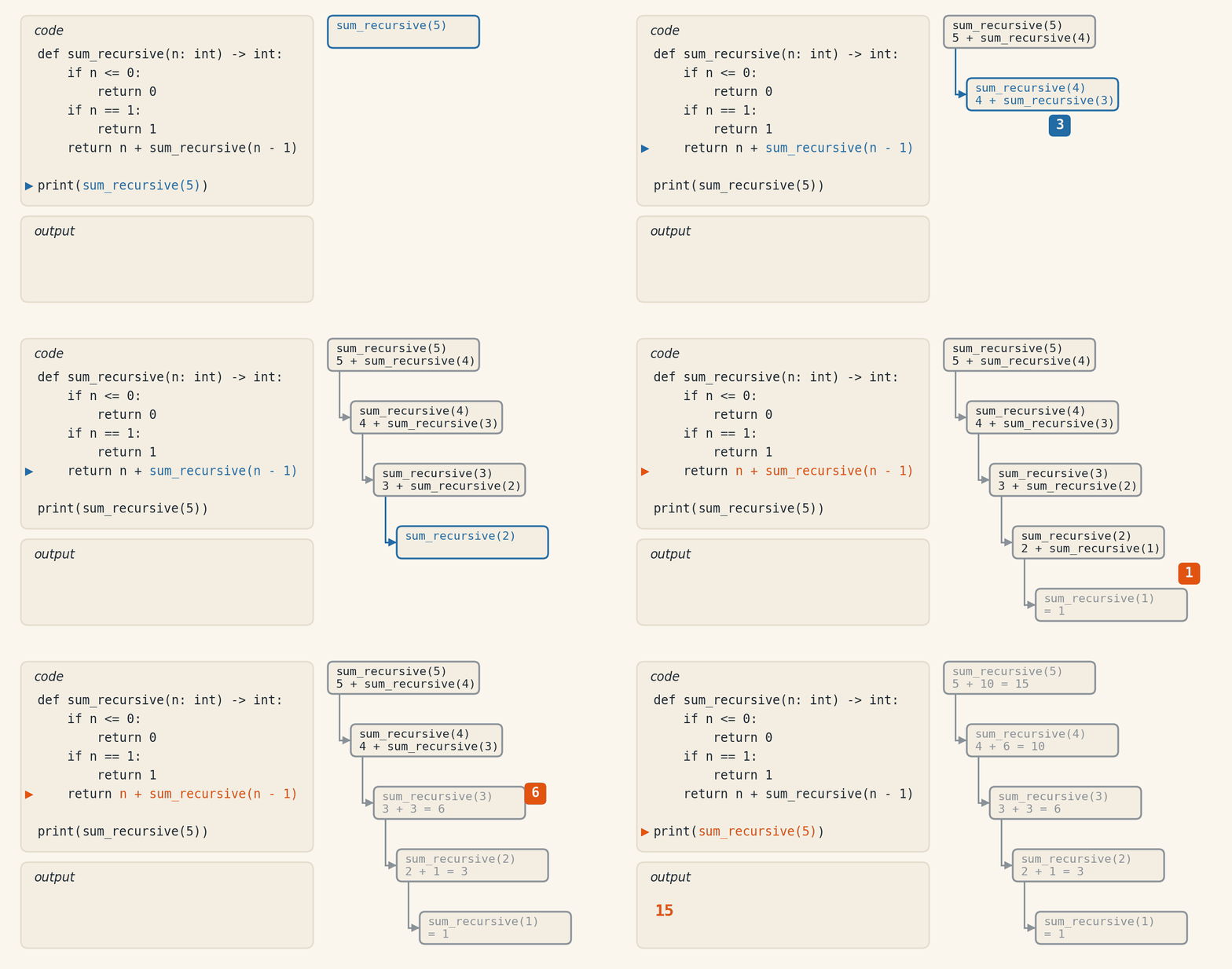
The function sum_recursive(5) calls sum_recursive(4), which calls sum_recursive(3), and so on, until it reaches sum_recursive(1), which returns 1. The values are added back along the call chain.
Recursive Representation
The function’s execution can be visualized as a call stack. In the animation below, each call is a step that waits for the answer of the step below it. On the way down, in blue, sum_recursive(5) calls sum_recursive(4), and so on, until sum_recursive(1). That is the base case, in purple, which answers 1 without making a new call. On the way back, in orange, each answer climbs one step and is added there: 1, 3, 6, 10 and 15. A step that has already answered fades, and the stack empties.
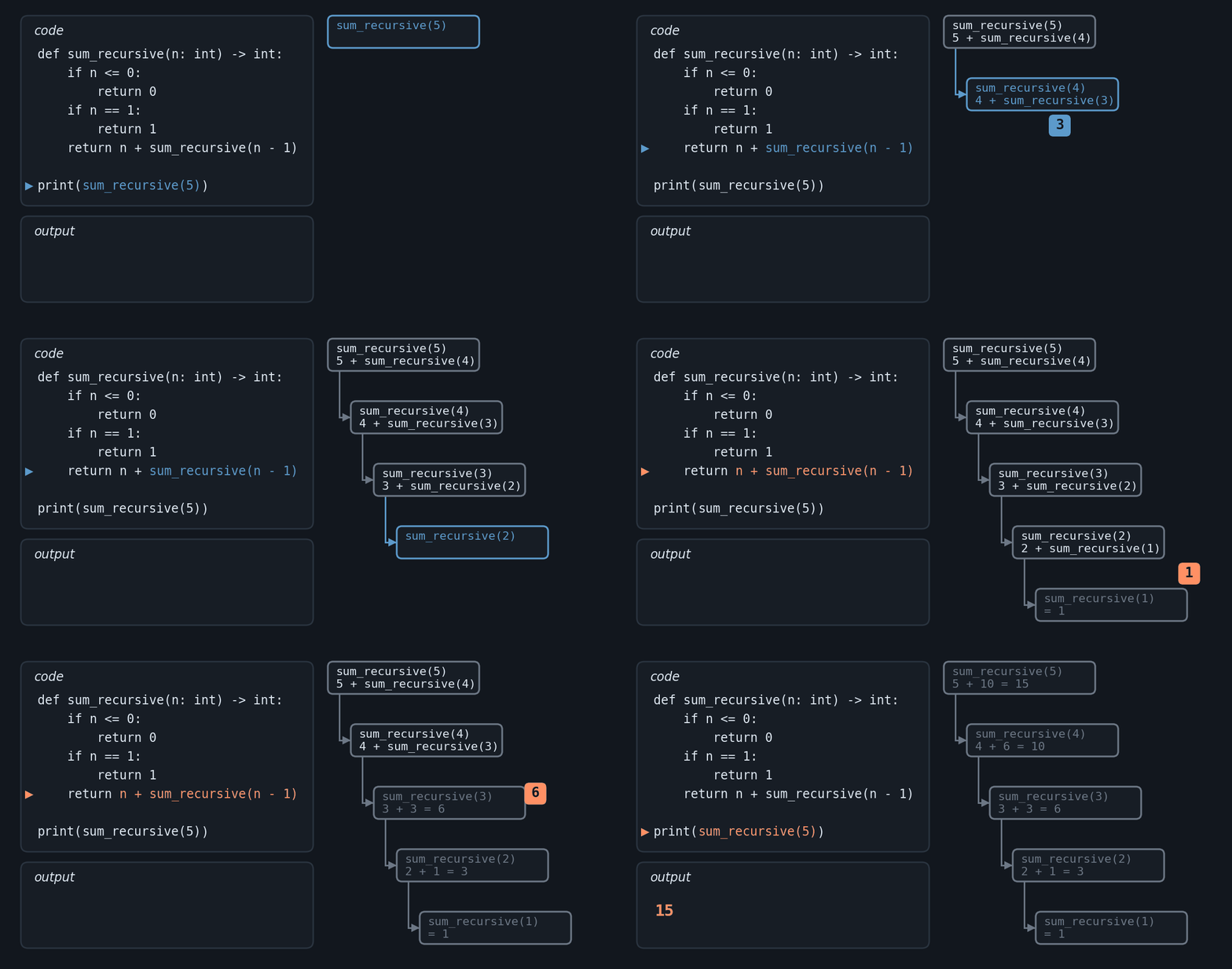
Accumulated resolution on the way back:
sum_recursive(1) = 1
sum_recursive(2) = 2 + sum_recursive(1) = 2 + 1 = 3
sum_recursive(3) = 3 + sum_recursive(2) = 3 + 3 = 6
sum_recursive(4) = 4 + sum_recursive(3) = 4 + 6 = 10
sum_recursive(5) = 5 + sum_recursive(4) = 5 + 10 = 15
Warning - Recursion depth limit
Each recursive call consumes a slot on the Python execution stack. The interpreter limits this stack to about 1000 calls by default. For small inputs like sum_recursive(5), this is not a problem, but calling sum_recursive(2000) raises RecursionError. For very large problems, prefer an equivalent iterative version.
Example: Sum of Numbers in a Range#
To calculate the sum of numbers between a and b:
def sum_range(a: int, b: int) -> int:
    """
    Sums the integers in the range [a, b], inclusive on both ends.

    Args:
        a: Lower bound of the range.
        b: Upper bound of the range.

    Returns:
        The sum a + (a+1) + ... + b. Returns 0 if a > b.
    """
    if a > b:                          # Protection: invalid range
        return 0
    if a == b:                         # Base case: we reached the upper bound
        return a
    return a + sum_range(a + 1, b)     # Recursive case

# Testing the function
print(sum_range(3, 7))
Code Output:
25
On each call, a goes up by 1. The recursion stops when a reaches b, the base case, which returns a itself.
Example: Factorial of a Number#
The factorial of a number n, denoted n!, is the product of all positive integers from 1 to n. It counts, for example, in how many different orders 5 distinct books can be arranged on a shelf: there are 5 options for the first book, 4 for the second, 3 for the third, and so on, and 5! = 5 × 4 × 3 × 2 × 1 = 120. After choosing the first book, the same problem remains with one book fewer, and that is what recursion takes advantage of: 5! = 5 × 4!.
def factorial(n: int) -> int:
    """
    Calculates the factorial of n (n!).

    Args:
        n: Non-negative integer.

    Returns:
        The product 1 × 2 × ... × n. By convention, 0! = 1.
        Returns 0 for negative inputs (invalid value).
    """
    if n < 0:                        # Protection: factorial is not defined for negative numbers
        return 0
    if n == 0 or n == 1:             # Base case
        return 1
    return n * factorial(n - 1)      # Recursive case

# How many ways are there to arrange 5 distinct books on a shelf?
print(factorial(5))
Code Output:
120
The function calls itself with n - 1 until n is 0 or 1, returning 1. In our example, factorial(5) computes 5 × factorial(4) = 5 × 24 = 120, meaning there are 120 distinct ways to arrange the 5 books on the shelf.
Note - Why 0! equals 1
By mathematical convention, the factorial of 0 is 1 (not 0). This definition keeps the recurrence n! = n × (n-1)! consistent for n = 1, since 1! = 1 × 0! = 1 × 1 = 1. It also appears naturally in combinatorial formulas, such as the number of ways to arrange zero objects, which is exactly one way (the empty arrangement).
Example: Sum of Elements in a List#
The sum of elements in a list can be done recursively:
def sum_list(my_list: list[int]) -> int:
    """
    Sums all elements of an integer list recursively.

    Args:
        my_list: List of integers.

    Returns:
        The sum of the elements. For an empty list, returns 0.
    """
    if len(my_list) == 0:                        # Base case: empty list
        return 0
    return my_list[0] + sum_list(my_list[1:])    # Recursive case

# Testing the function
example_list = [1, 2, 3, 4, 5]
print(f"The sum of numbers in the list is: {sum_list(example_list)}")
Code Output:
The sum of numbers in the list is: 15
The function takes the first element of the list and calls itself with the rest. The process continues until the list is empty.
Tip - Cost of slicing in recursion
The expression my_list[1:] creates a new list on every recursive call. For a list of size n, this results in n partial copies throughout the recursion, totaling O(n²) in memory and time. For large lists, prefer passing an index as an additional argument and walking the list by position, rather than slicing.
Advantages and Disadvantages of Recursion#
Advantages |
Disadvantages |
|---|---|
Shorter and more expressive code, close to the mathematical definition of the problem. |
Each call consumes memory on the execution stack (parameters, local variables, and return address). |
Ideal for problems with naturally recursive structure: factorial, Fibonacci, tree traversals, and linked-list processing. |
Python limits call depth to about 1000 by default ( |
Avoids auxiliary variables and loops when the solution is defined in a self-referential way. |
Without a well-defined base case, a stack overflow occurs from calls that never end. |
For large inputs, where the number of calls approaches the stack depth limit, an iterative version of the same algorithm is usually safer. Compare the recursive factorial already presented with its equivalent iterative version:
def factorial_iterative(n: int) -> int:
    """Iterative version of the factorial, without recursion."""
    if n < 0:
        return 0
    result = 1
    for i in range(2, n + 1):
        result *= i
    return result

print(factorial_iterative(5))
Code Output:
120
The iterative version uses only one variable (result) and a loop, without stacking calls. For small inputs, the two versions are interchangeable. For large values (for example, n = 10000), the recursive version raises RecursionError, while the iterative version completes normally.
Other Built-in Functions#
The previous chapters already used several built-in functions, which come ready in Python, without import: print(), input(), int(), float(), str(), len() and range(). The table shows others that have not appeared yet.
Function |
What it does |
|---|---|
|
Returns the largest value in a sequence. |
|
Returns the smallest value in a sequence. |
|
Adds up the elements of a sequence of numbers. |
|
Returns a sorted list. |
|
Returns |
|
Yields (index, value) pairs while going through a sequence. |
|
Joins the elements of several sequences into tuples. |
|
Returns an integer computed from the object. For strings, it changes on every run of the program. |
|
Shows the documentation of an object. |
|
Lists the attributes and methods of an object. |
|
Opens a file and returns a file object. |
|
Computes an expression written in a string. |
|
Runs Python code written in a string. |
Warning - Risks of eval and exec
eval() and exec() execute Python code contained in a string. This is dangerous when the string comes from an external source (user input, file, network request), because it allows arbitrary code execution. For example, eval(input()) lets anyone run any command inside your program.
For simple text-to-number conversions, use int(), float(), or bool(). To safely evaluate Python literals (lists, dictionaries, tuples, numbers), use ast.literal_eval() from the ast module. Avoid eval and exec in real code, except in very specific cases where you fully control the input.
Note - the math module
Functions such as math.sqrt() and math.factorial() are not built-in: they live in the math module, which must be imported with import math.
Example:
import math
root = math.sqrt(16)
print(root)
Code Output:
4.0
Official documentation
For the full list of built-in functions and details about each one, see the official Python documentation.
Organizing a Program into Functions#
So far, each example showed a function on its own. In a real program, they work together: each one does part of the task, and the main program just calls them in the right order. That is what the opening of the chapter called modularization.
The program below takes two grades, computes the average and shows the student’s status, all in a single block:
grade1 = 8.0
grade2 = 6.0
average = (grade1 + grade2) / 2
if average >= 7:
    status = "passed"
elif average >= 5:
    status = "make-up exam"
else:
    status = "failed"
print(f"Average: {average:.1f} ({status})")
Code Output:
Average: 7.0 (passed)
The same program, organized into functions:
def compute_average(grade1: float, grade2: float) -> float:
    average = (grade1 + grade2) / 2
    return average

def status(grade: float) -> str:
    if grade >= 7:
        return "passed"
    if grade >= 5:
        return "make-up exam"
    return "failed"

def show_result(average: float) -> None:
    print(f"Average: {average:.1f} ({status(average)})")

def main() -> None:
    average = compute_average(8.0, 6.0)
    show_result(average)

main()
Code Output:
Average: 7.0 (passed)
Both versions print the same thing. The second is longer, but each function has a single task and a name that says which one, and main() reads like a summary of the program: compute the average and show the result. To change the passing rule, you only touch status; to change the output format, only show_result. And compute_average and status are the same ones from the scope and return sections: a function written once is reused in another program.
Calling the main function main is a convention, not a Python rule. Chapter 8 takes the next step: keeping functions in separate files, the modules, and using them with import.
Exercises#
Minimum and Maximum of Three Numbers
Develop a program that determines the smallest and largest number among three values provided by the user. The program must use functions to perform the necessary operations. Follow the instructions:
Create a function called
read_numbers()that asks the user to enter three numbers and returns these values.Implement a function called
find_min_max(a, b, c)that receives three numbers as parameters and returns a tuple containing the minimum and maximum value, in that order.In the main program, use the created functions to:
Obtain the three numbers from the user.
Calculate the minimum and maximum value.
Display the results.
Example of use in the main program:
num1, num2, num3 = read_numbers()
minimum, maximum = find_min_max(num1, num2, num3)
print(f"The smallest number is: {minimum}")
print(f"The largest number is: {maximum}")
Make sure the program properly handles different types of input, including integers and decimals.
# Test 1
Input: 10, 5, 8
Output:
The smallest number is: 5
The largest number is: 10

# Test 2
Input: 3.14, 1.71, 1.41
Output:
The smallest number is: 1.41
The largest number is: 3.14

# Test 3
Input: -5, 0, -10
Output:
The smallest number is: -10
The largest number is: 0

# Test 4
Input: 1, 3.14, 2
Output:
The smallest number is: 1
The largest number is: 3.14
BMI Calculation Using Functions
Develop a Python program to calculate a person’s Body Mass Index (BMI), using functions to organize and modularize the code.
The program should include the following functions:
A function to read user data (weight in kg and height in meters).
A function to calculate BMI using the formula: BMI = weight / (height * height).
A function to classify BMI according to standard ranges.
The BMI classification should follow the table below:
BMI (kg/m²) |
Classification |
|---|---|
< 18.5 |
Underweight |
18.5 - 24.9 |
Normal weight |
25.0 - 29.9 |
Overweight |
30.0 - 34.9 |
Obesity grade 1 |
35.0 - 39.9 |
Obesity grade 2 |
≥ 40.0 |
Obesity grade 3 |
In the main program, call the functions in the appropriate order to:
Get user data.
Calculate BMI.
Determine the classification.
For example:
weight, height = read_data()
bmi = calculate_bmi(weight, height)
classification = classify_bmi(bmi)
print(f"Your BMI is {bmi:.2f} - Classification: {classification}")
Be sure to handle potential user input errors, such as negative or zero values for weight and height. The program should be robust and capable of handling different input scenarios.
# Test 1
Input: 90.5, 1.85
Output: Your BMI is 26.44 - Classification: Overweight

# Test 2
Input: 65.0, 1.75
Output: Your BMI is 21.22 - Classification: Normal weight

# Test 3
Input: 45.0, 1.60
Output: Your BMI is 17.58 - Classification: Underweight

# Test 4
Input: 120.0, 1.70
Output: Your BMI is 41.52 - Classification: Obesity grade 3
Geometric Shape Area Calculator
Create a program that works as an area calculator for different geometric shapes, including triangle, circle, and rectangle. The program should provide an easy-to-use menu for the user to select the desired shape and then enter the necessary dimensions to calculate the area.
Create a main function called calculate_area() that represents a menu abstraction for the user with the following options:
Option 1: Calculate the area of a triangle (base and height)
Option 2: Calculate the area of a circle (radius)
Option 3: Calculate the area of a rectangle (length and width)
Option 4: Exit the program
Individually create a function for calculating the areas of each geometric shape:
triangle_area(base, height)circle_area(radius)rectangle_area(length, width)
Test examples:
# Test 1
Input:
1
5
10
Output: The area of the triangle is: 25.00

# Test 2
Input:
2
3
Output: The area of the circle is: 28.27

# Test 3
Input:
3
4
6
Output: The area of the rectangle is: 24.00

# Test 4
Input: 4
Output: Program terminated.
Observations:
Use the
mathlibrary to get π (pi) in circle calculations.Round all results to two decimal places.
4. Bonus System for Olympic Athletes
The National Olympic Committee has decided to create a bonus system for athletes who won medals in the Olympics. The system works as follows:
Each athlete receives a base bonus according to the medal:
Gold: R$ 50,000
Silver: R$ 30,000
Bronze: R$ 10,000
In addition, there are additional bonuses based on specific criteria:
World record broken: +R$ 100,000
Country’s first medal in the sport: +R$ 50,000
Create a function called calculate_bonus that receives the following parameters:
medals: a list of strings representing the medals won (“gold”, “silver”, or “bronze”)world_record: A String, Yes or No, indicating if the athlete broke a world recordfirst_medal_country: A String, Yes or No, indicating if it is the country’s first medal in the sport
The function must return the total value of the athlete’s bonus.
# Test 1
Input: Gold, Yes, No
Output: 150000

# Test 2
Input: Silver, Bronze, No, Yes
Output: 90000

# Test 3
Input: Bronze, Bronze, Bronze, No, No
Output: 30000

# Test 4
Input: Gold, Silver, Bronze, No, Yes
Output: 140000
5. Calculating the Roots of Quadratic Equations
In this exercise, you will have the opportunity to apply mathematical concepts to solve the Bhaskara problem, writing code to calculate the roots of a quadratic equation.
Given a quadratic equation in the form \(Ax^2 + Bx + C = 0\), write a program that reads three floating-point values and calculates the roots of the equation using the Bhaskara Formula. If it is not possible to calculate the roots, show the message “Impossible to calculate”, in case there is a division by zero or a square root of a negative number.
\( R1 = \\frac{-B + \\sqrt{B^2 - 4AC}}{2A} \)
\( R2 = \\frac{-B - \\sqrt{B^2 - 4AC}}{2A} \)
Observations:
If \(A\) is equal to zero, it is not possible to calculate the roots.
If the discriminant \(\\Delta = B^2 - 4AC \) is negative, it is not possible to calculate the roots.
The roots of the equation must have 2 digits after the decimal point.
Write one function for reading the data, another to check if it is possible to calculate the roots, and a third to calculate and return the roots.
# Test 1
Input: 10.0, 19.1, 5.2
Output:
R1 = -0.33
R2 = -1.58

# Test 2
Input: 0.0, 20.0, 5.0
Output: Impossible to calculate

# Test 3
Input: 1.0, -3.0, 2.0
Output:
R1 = 2.00
R2 = 1.00

# Test 4
Input: 1.0, 2.0, 5.0
Output: Impossible to calculate
6. Counting: Even, Odd, Positive and Negative
Write a function called count_even_odd that receives a list of numbers as an argument and returns two variables: the count of even numbers and the count of odd numbers in the list.
Write another function called count_positive_negative that receives the same list of numbers as an argument and returns two variables: the count of positive numbers and the count of negative numbers in the list.
The main program should read a list of integers from the input, pass this list to the functions above. Then, the program should print the counts of even, odd, positive, and negative numbers, each on a separate line.
# Test 1
Input: 1, 2, 3, 4, 5, 6, 7, 8, 9, 10, 11, 12, 13, 14, 15, 16, 17, 18, 19, 20, 21, 22, 23, 24, 25, -1, -2, -3, -4, -5, -6, -7, -8, -9, -10, -11, -12, -13, -14, -15, -16, -17, -18, -19, -20, -21, -22, -23, -24, -25
Output:
Quantity of even numbers: 24
Quantity of odd numbers: 26
Quantity of positive numbers: 25
Quantity of negative numbers: 25

# Test 2
Input: 30, -31, 32, -33, 34, -35, 36, -37, 38, -39, 40, -41, 42, -43, 44, -45, 46, -47, 48, -49, 50, -51, 52, -53, 54, -55, 56, -57, 58, -59, 60, -61, 62, -63, 64, -65, 66, -67, 68, -69, 70, -71, 72, -73, 74, -75
Output:
Quantity of even numbers: 23
Quantity of odd numbers: 23
Quantity of positive numbers: 23
Quantity of negative numbers: 23
7. Recursive Sum of a List
Write a recursive function called recursive_sum that receives a list of integers as input and returns the sum of all elements in the list.
For example, if the input list is [1, 2, 3, 4, 5], the function should return 15 (which is the sum of all numbers in the list).
Observations:
The
recursive_sumfunction must have a base condition, which is when the list is empty.The function must call itself with a smaller version of the list, until it reaches the base condition.
The function must perform the sum of the list elements recursively.
Test your function with the following inputs:
# Test 1
input = 1, 2, 3, 4, 5, 50, 60, 70, 80, 90, 0, 1
output = 366

# Test 2
input = 10, 20, 30, 40, 50, 1, 2, 3, 4, 5, 6, 7, -15, -20
output = 143
8. Fibonacci Sequence Calculation
Imagine you have a list of numbers. The goal is to calculate the n-th number of the Fibonacci sequence for each number in that list and print the total sum of these numbers.
The Fibonacci sequence is like a spiral staircase, where each number is the sum of the two previous ones. It starts with 0 and 1, and continues infinitely: 0, 1, 1, 2, 3, 5, 8, 13, 21…
To do this, you will need to create two recursive functions:
The Fibonacci function: This function will be the heart of the operation. It will receive a number as input and, using recursion, calculate the corresponding number in the Fibonacci sequence.
The Recursive Sum function: This function will receive the list of results from the Fibonacci function and, again using recursion, sum all the elements of that list.
In the end, you will print on the screen the total sum of all the numbers of the Fibonacci sequence calculated for each number in the input list.
Remember: recursion is like a mirror that reflects itself. The function calls itself to solve smaller problems until it reaches a stopping point, called the “base condition”. It’s like going down a staircase: you take one step at a time until you reach the ground.
# Test 1
Input: 1, 2, 3, 4, 5, 6, 7, 8, 9, 10, 11, 12, 13, 14, 15
Output: 1596

# Test 2
Input: 10, 11, 9, 15, 17, 23, 13, 27, 12, 11, 22
Output: 245637
9. Recursive Power Calculation
Write a recursive function called calculate_power that receives two numbers as input: the base (base) and the exponent (exponent). The function must calculate and return the result of the base raised to the exponent, without using the math.pow() function or any other advanced mathematical function, only elementary mathematical operations.
For example, if the base is 2 and the exponent is 3, the function should return 8 (which is the result of 2 raised to 3).
Notes:
The
calculate_powerfunction must have a base case, which is when the exponent is equal to 0.The function must call itself with a smaller version of the exponent until reaching the base case.
The function must compute the power recursively, using only basic mathematical operations (multiplication, division, addition, and subtraction).
Test your function with the following inputs:
# Test 1
Input: 2, 3
Output: 2^3 = 8

# Test 2
Input: 4, 5
Output: 4^5 = 1024

# Test 3
Input: 6, 4
Output: 6^4 = 1296

# Test 4
Input: 34, 0
Output: 34^0 = 1
Remember to implement the calculate_power function recursively, using only basic mathematical operations.
10. Tower of Hanoi: A Classic Recursive Challenge in Computing and Mathematics
The Tower of Hanoi is a classical and intriguing problem in the fields of computing and mathematics. It involves moving disks strategically between three pegs, following a specific set of rules. The challenge looks simple at first glance, but its complexity grows exponentially as the number of disks increases.
The Problem: Imagine three pegs, labeled A, B, and C. At the start of the game, all the disks — which vary in size — are stacked on peg A in decreasing order of size, with the largest disk at the bottom and the smallest at the top. The goal is to transfer all the disks from peg A to peg C.
The Rules:
You can only move one disk at a time.
Each move involves taking the top disk from one stack and placing it on top of another stack.
Never place a larger disk on top of a smaller one. The disks must be stacked in size order.
Peg B is auxiliary. You can use it as an intermediate peg to help with the disk movements.
Visualizing the Game:
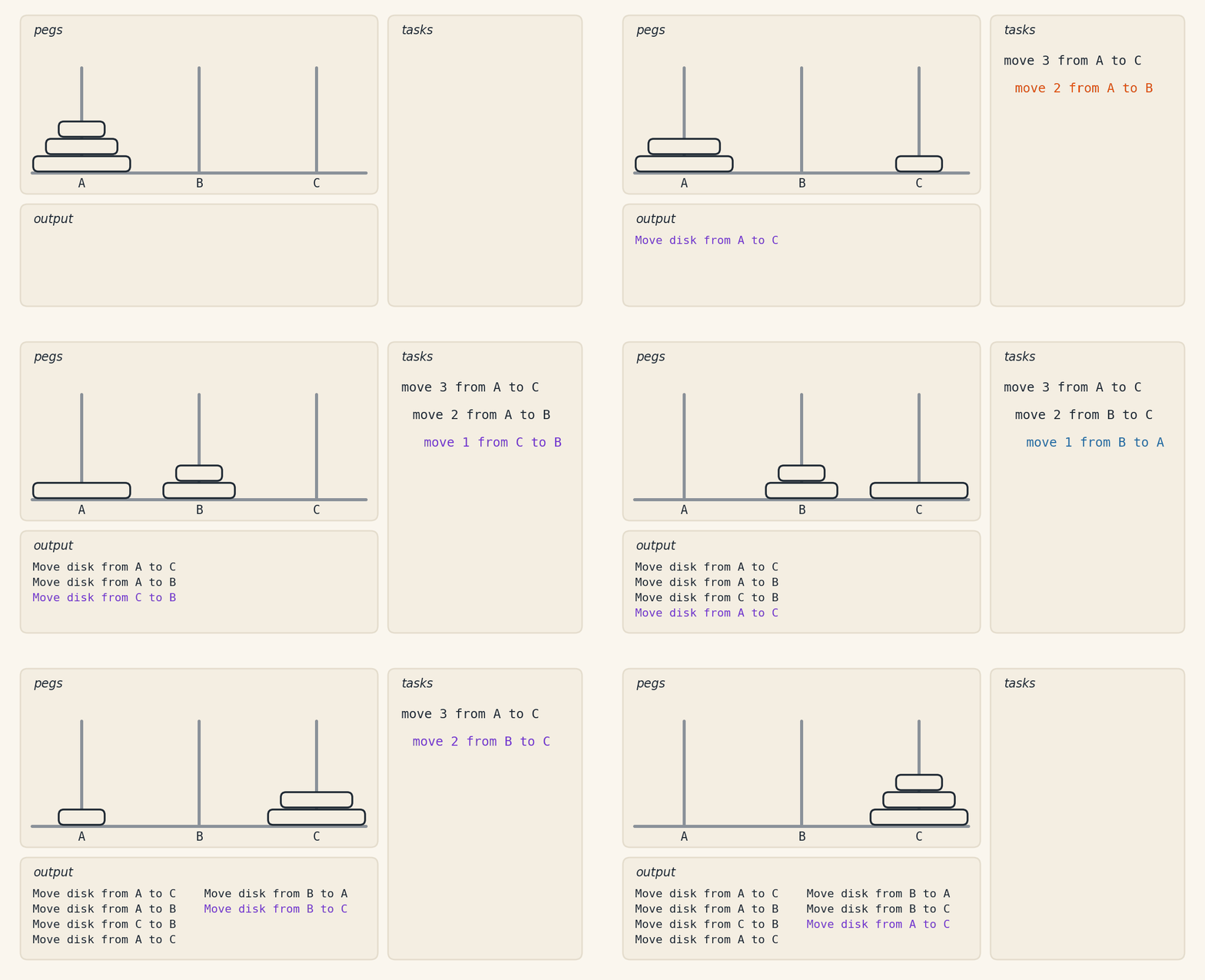
The animation below solves the game with three disks, in the seven moves of Test 1. On the right, the recursion appears as a stack of tasks: a new task comes in blue, the one that moves a disk turns purple and, when the task below it finishes, the one above resumes in orange.
Your Task:
Implement a recursive function called tower_of_hanoi that solves this problem. The function must take as input the number of disks (n) and the names of the source, auxiliary, and destination pegs. It should run and print the moves required to transfer all the disks from the source peg to the destination peg.
Function Prototype:
def tower_of_hanoi(n, source, auxiliary, destination):
    # Implementation here
Hints and Notes:
The function must have a base case for when there is only one disk.
Use recursion to break the problem into smaller subproblems.
Print each move using the format: “Move disk from [source] to [destination]”.
The recursive solution should:
Move n-1 disks to the auxiliary peg
Move the largest disk to the destination peg
Move the n-1 disks from the auxiliary peg to the destination peg
Tests:
# Test 1
Input: 3, A, B, C
Output:
Move disk from A to C
Move disk from A to B
Move disk from C to B
Move disk from A to C
Move disk from B to A
Move disk from B to C
Move disk from A to C

# Test 2
Input: 4, A, B, C
Output:
Move disk from A to B
Move disk from A to C
Move disk from B to C
Move disk from A to B
Move disk from C to A
Move disk from C to B
Move disk from A to B
Move disk from A to C
Move disk from B to C
Move disk from B to A
Move disk from C to A
Move disk from B to C
Move disk from A to B
Move disk from A to C
Move disk from B to C
Exercises (Extra)#
1. Performance Analyzer: Plan Your Studies!
This exercise helps you analyze your academic performance and plan your studies efficiently. Based on the grades obtained in 7 subjects, the system computes essential metrics such as averages, standard deviations, and the grade required to reach the passing target (5.0). It also builds a study priority ranking based on consistency, instability, and difficulty of reaching the average.
The subjects are analyzed in the following order, each with 3 units:
Programming Language
Linear Algebra
Modeling the Physical World I
Reading and Writing Practices II
General Chemistry
Differential and Integral Calculus I
Environment and Urban Development
Data Input:
For each subject, you provide 6 grades:
3 assessments from the 1st unit.
3 assessments from the 2nd unit.
The system computes the grade required in the 3rd unit to reach the 5.0 target.
Total: 42 grades for 7 subjects.
Important Calculations:
The system computes the following metrics:
Unit Average:
\( \text{Unit Average} = \frac{\text{sum of the 3 grades}}{3} \)
Grade required in the 3rd unit to reach the 5.0 target:
\( \text{Required Grade} = 3 \times \text{Target (5.0)} - (\text{1st Unit Average} + \text{2nd Unit Average}) \)
Subject Consistency: Measures how stable performance was between the first two units. The smaller the percentage difference between the averages, the higher the consistency.
\( \text{Consistency} = 1 - \frac{|\text{2nd Unit Average} - \text{1st Unit Average}|}{\text{1st Unit Average}} \)
Consistency near 1: stable performance across units.
Consistency near 0: significant variation between units.
Subject Instability: Measures the variation in grade dispersion between the first two units.
\( \text{Instability} = \frac{\text{Standard Deviation of the 2nd Unit}}{\text{Standard Deviation of the 1st Unit}} \)
Instability = 1: same dispersion across units.
Instability > 1: the second unit was more dispersed.
Instability < 1: the first unit was more dispersed.
Study Priority Ranking: Determines which subjects need the most attention. \( \text{Priority} = \text{Weight}_1 \times (1 - \text{Consistency}) + \text{Weight}_2 \times \text{Instability} + \text{Weight}_3 \times \text{Required Grade} \)
Default weights:
Consistency: \( \text{Weight}_1 = 2.0 \)
Instability: \( \text{Weight}_2 = 1.5 \)
Required Grade: \( \text{Weight}_3 = 1.0 \)
Task:
Implement the main function analyze_performance to compute all the metrics above and produce the results for each subject.
Note: To build the priority ranking, you can use sorting helpers available in the language, such as sorted in Python, to make the implementation easier.
Prototype
def analyze_performance(
    grades: list[float],
    compute_average,
    compute_std_deviation,
    compute_required_grade,
    evaluate_consistency,
    build_priority_ranking
) -> None:
    """
    Analyze academic performance based on subject grades.

    Parameters:
        grades (list[float]): List with subject grades (42 values).
        compute_average (function): Function to compute the average.
        compute_std_deviation (function): Function to compute the standard deviation.
        compute_required_grade (function): Function to compute the required grade.
        evaluate_consistency (function): Function to evaluate consistency.
        build_priority_ranking (function): Function to build the priority ranking.
    """
    pass
Test:
# Test 1
Input:
6.0, 7.0, 8.0, 5.0, 6.5, 6.0,
4.0, 5.5, 6.0, 4.5, 5.0, 4.0,
7.0, 8.0, 7.5, 6.0, 7.0, 6.5,
6.0, 6.5, 7.0, 6.0, 6.0, 5.5,
5.0, 5.5, 5.0, 4.5, 4.0, 4.0,
6.0, 7.0, 6.5, 5.5, 6.0, 5.0,
7.0, 6.5, 6.0, 6.5, 6.0, 5.5

Output:
Study priority ranking:
1. General Chemistry:
   - Consistency: 0.81
   - Instability: 1.00
   - Required grade in the 3rd unit: 5.67
   - Priority: 7.55
2. Linear Algebra:
   - Consistency: 0.87
   - Instability: 0.48
   - Required grade in the 3rd unit: 5.33
   - Priority: 6.31
3. Differential and Integral Calculus I:
   - Consistency: 0.85
   - Instability: 1.00
   - Required grade in the 3rd unit: 3.00
   - Priority: 4.81
4. Environment and Urban Development:
   - Consistency: 0.92
   - Instability: 1.00
   - Required grade in the 3rd unit: 2.50
   - Priority: 4.15
5. Reading and Writing Practices II:
   - Consistency: 0.90
   - Instability: 0.58
   - Required grade in the 3rd unit: 2.67
   - Priority: 3.74
6. Programming Language:
   - Consistency: 0.83
   - Instability: 0.76
   - Required grade in the 3rd unit: 2.17
   - Priority: 3.65
7. Modeling the Physical World I:
   - Consistency: 0.87
   - Instability: 1.00
   - Required grade in the 3rd unit: 1.00
   - Priority: 2.77